GraphQL | Query (original) (raw)
Last Updated : 22 Mar, 2024
We will use GraphQL API for demonstration. GraphQL is an open-source data query and manipulation language for APIs and a runtime for fulfilling queries with existing data. It's neither an architectural pattern nor a web service. GraphQL was developed internally by Facebook in 2012 before being publicly released in 2015.
**Terms: Let's start by defining basic terms. For reference, consider the following sample operation.
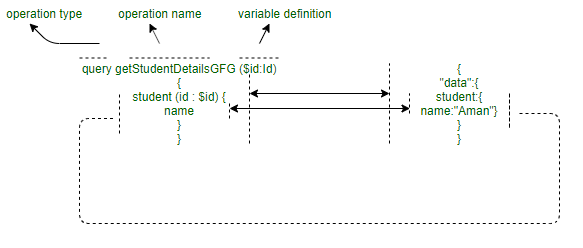
**GraphQL Operations: As a basic definition, anything that hits the server is called a 'query'. But formally, there are three types of **Operations, and **Query is just one of them and the other two are **Mutations and **Subscriptions. A string is written in the GraphQL language that defines one or more operations and fragments. We will use the ready-made example of Pokemon schema in this article you can also create your own schema.
****GraphQL Query:**A GraphQL query is used to **read or fetch values. It is given to the GraphQL server for execution and a result is returned.
**Fields: A unit of data that will be returned as part of a query response is known as a Fields, even if they are nested. The query structure and the result of that query's structure will be the same as you can see in the below diagram. **Query:
{
pokemon(name:"pikachu") {
name
id
types
}
}
**Output:

- **Arguments: Arguments can be passed to field in a query to get the desired response by the client so that only the essential data is fetched and that eventually reduces the over fetching of data. Multiple arguments can also be passed to increase the chance or precision of the data that is fetched.
**Defining a field with an argument:
field (argument name: argument type): returntype
Argument name is used to give the instruction about the required data which needs to be fetched whereas argument type specifies the kind of data that can be passed as the argument.
Arguments also help to **resolve a query on the server-side in a specific way. It is a **key:value pair supplied with a field. It can be a literal or a variable as well in the fields example we already used arguments on pokemon by providing specific name. **Query:
{
pokemon(id:"UG9rZW1vbjowMDE") {
name
types
}
}
**Output:

- **Aliases: In case two individual queries on the same fields are to be done, we can use 'aliases' to distinguish both the queries. These aliases are added like prefixes to the query. For example, if we want to retrieve two pokemon and name them as ****'firstPokemon'** and ****'secondPPokemon'**. **Query:
query retrievePokemon{
firstPokemon: pokemon(name:"Pikachu") {
id
types
}
secondPokemon: pokemon(name:"Charizard") {
id
types
}
}
**Output:
- **Fragments: GraphQL provides the power to make a sub-type of query fields that can be used again and again using an identifier attached to it. It is known as a **fragment and is supplied as ****...fragmentName**. Getting multiple objects, each with possibly different fields **Syntax:
fragment basicInfoOfPokemon on Pokemon {
name
id
}
query retrievePokemon {
firstPokemon: pokemon(name: "pikachu") {
...basicInfoOfPokemon
types
weight{
minimum
maximum
}
classification
}
}
**Output:
- **Operation Name: Till now we are using shorthand syntax, we can also omit query keyword and name. In this example, we add a query keyword as an operation type and **Electrictype as operation name. **Syntax:
query Electrictype {
pokemon(name: "pikachu") {
name
weight {
minimum
maximum
}
}
}
**Output:
- **Directives: The 'directives' influence the results that come back. The common one is ****'skip'** and ****'include'** combined with an 'if'. ****@skip:** If you want to ****'skip'** a particular field on a particular 'if' condition, you can use. **Syntax:
fieldName @skip (if: booleanCondition) {
name
}
The @skip acts like a default inclusion of
The field, unless the 'if' is valid.
Output:
 **@include** If you want to 'include' a particular field on a particular 'if' condition, you can use. **Syntax:
fieldName @include (if: booleanCondition) {
name
}
The @include acts like a default exclusion of
The field, unless the 'if' is valid.
**Output:
