Lists and NonNull in GraphQL Schema (original) (raw)
Last Updated : 28 Apr, 2025
GraphQL is a powerful **open-source **Query Language for APIs. In 2012 it was first developed by a team of developers in Facebook and then it was later made public to the general people by making it open-source. Now it is being maintained by the GraphQL community.
GraphQL is most commonly known for its **single endpoint query which allows the user to define a single endpoint to fetch all the information needed. The benefit of using single endpoint queries is that they help the user in **reducing fetching too much data or less amount of data than required.
Lists and Non-Null
Lists and Non-Null are two important **data types in GraphQL that are used to define **GraphQL Schema. They are useful in defining the structure and constraints of data returned by GraphQL queries. Lists make the query fetching easier by helping the user to fetch the sequence of values required. Non-null constraints on a field help the users **prevent errors in the code while fetching the data.
**Prerequisites:
Below are the prerequisites that we need to install before executing the GraphQL query on our laptop or desktop.
- Nodejs
- Npm
- VsCode IDE
Lists in GraphQL Schema
- Lists are used to represent an array or **collection of values.
- Lists are represented by enclosing the data type of the field name by using ****' [ ] ' square** brackets.
- Lists can hold different data types as required. It can consist of scalar types like **String, **Int, **Float, or Boolean, or it can contain another list.
- Lists in GraphQL can be of two types. They are **nullable lists and **non-nullable lists.
1. Nullable Lists
- A Nullable list can contain either no values or many values.
- Nullable lists accepts null values also.
- Nullable lists are represented by using square brackets ' [ ] ' .
**Syntax :
type Query{
listName : [ dataType ], //Nullable List
}
2. Non-Nullable Lists
- A Non-nullable list must contain at least one value.
- Non-nullable lists does not accept null values.
- Non-nullable lists are represented by using exclamation mark ' ! ' after the square brackets ' [ ] ' .
**Syntax :
type Query{
listName : [ dataType] ! //Non-nullable List
}
Example for Lists
In the below example, create a GraphQL schema to define a list of users.
**Step 1: Define the Schema
Let's create a schema and save the file as schema.graphql.
type Query {
users: [User]! #Non-Null List - User
}
type User {
userID: ID! #Non-Null field - userID
userName: String
userEmail: String
}
**Step 2: Implement Resolvers
Let's set up the server, save the file as server.js and we will implement resolvers for the users list.
JavaScript ``
const express = require('express'); const { graphqlHTTP } = require('express-graphql'); const { buildSchema } = require('graphql'); const fs = require('fs'); const path = require('path');
const schema = buildSchema(fs.readFileSync(path.join(__dirname, 'schema.graphql'), 'utf8'));
const users = [ { userID: '1001', userName: 'User1', userEmail: 'user1@gmail.com' }, { userID: '1002', userName: 'User2', userEmail: 'user2@gmail.com' }, ];
const root = { users: () => users, };
const app = express();
app.use( '/graphql', graphqlHTTP({ schema: schema, rootValue: root, graphiql: true, }) );
const PORT = process.env.PORT || 4000;
app.listen(PORT, () => {
console.log(GraphQL server is running on http://localhost:${PORT}/graphql);
});
``
**Step 3: Test Your List in GraphiQL
Run your GraphQL server.
node server.js
**Output:

**Step 4: Execute the Below Query in the GraphiQL Interface
{
users {
userID
userName
userEmail
}
}
**Output:
We will receive a response with the list of users

List of users
Passing Null Values
If we pass null value for users list like the below code we will get an error like "Cannot return null for non-nullable field Query.users"
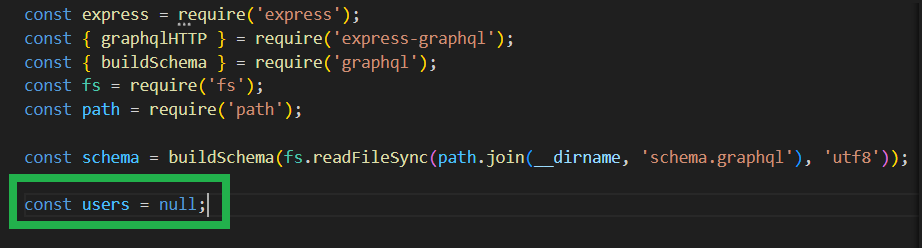
Pass users list as null
**Output:

Error when users list is passed as null
When a non-null field userID is not passed we will get an error like "Cannot return null for non-nullable field User.userID."

UserID is not passed
**Output:
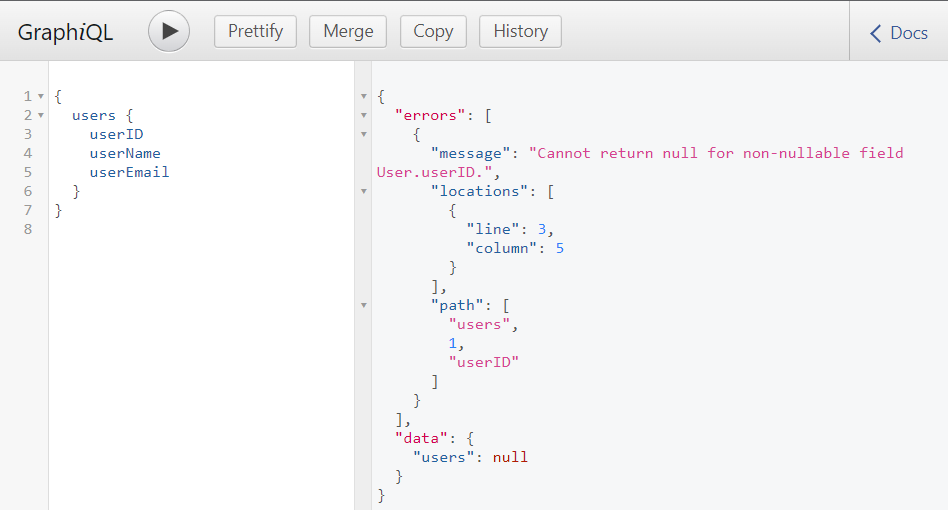
Error when non-null field userID is not passed
Non-Null in GraphQL Schema
- Non-null plays a crucial role in defining the structure of the data and ensuring that certain fields always have a value.
- Non-Null in GraphQL Schema can be used with other datatypes other than lists.
- Non-Null type can be applied on scalar types like String, Int, Float, and Boolean.
- Non-Null type helps us to add constraint for field names.
- By default a field can contain null values or return null value.
- A field is declared as Non-Null by using ' ! ' symbol.
- If a field is declared as Non-Null then it does not allow to either contain null value or return null value.
Why do We Need Non-Null?
The use of non-null fields in GraphQL is essential for a few reasons:
- Non-null fields ensure that the required data is always present, maintaining data integrity. In short, Non-null field ensures that necessary information is always there.
- Users can rely on non-null fields, knowing that these fields will always contain a value. This simplifies client-side logic and error handling.
- Non-null fields make your API more predictable. Users can trust that certain information will be available, streamlining the development process.
**Syntax:
fieldName : dataType! //Non-null Field
Example for Non-Null Field
In this example, we will create a GraphQL schema to define a list of persons with name of the person as null.
**Step 1: **Define a Non-Null Field in Your Schema
Let's create a schema and save the file as schema.graphql.
type Query {
person: [Person]
}
type Person {
name: String! # Non-Null field
age: Int
}
In this example, name is a non-null field. This implies that every person must have name when the query is executed.
**Step 2: **Implement Resolvers
Let's set up the server, save the file as server.js and we will implement resolvers for the name field.
JavaScript ``
const express = require('express'); const { graphqlHTTP } = require('express-graphql'); const { buildSchema } = require('graphql'); const fs = require('fs'); const path = require('path');
const schema = buildSchema(fs.readFileSync(path.join(__dirname, 'schema.graphql'), 'utf8'));
const person = [ { name: 'Person1', age:22 }, { name: null, age:25 }, //name is a non-null field but passed as null ];
const root = { person: () => person, };
const app = express();
app.use( '/graphql', graphqlHTTP({ schema: schema, rootValue: root, graphiql: true, }) );
const PORT = process.env.PORT || 4000;
app.listen(PORT, () => {
console.log(GraphQL server is running on http://localhost:${PORT}/graphql);
});
``
**Step 3: Test Your List in GraphiQL
Run your GraphQL server.
node server.js

**Step 4: Execute the Below Query in the GraphiQL Interface
query {
person {
name
age
}
}
**Output:
So we will receive a response with the list of persons with the below error because we have passed the name of the person as null.
Here person name is a non-null field so it will not allow null value.
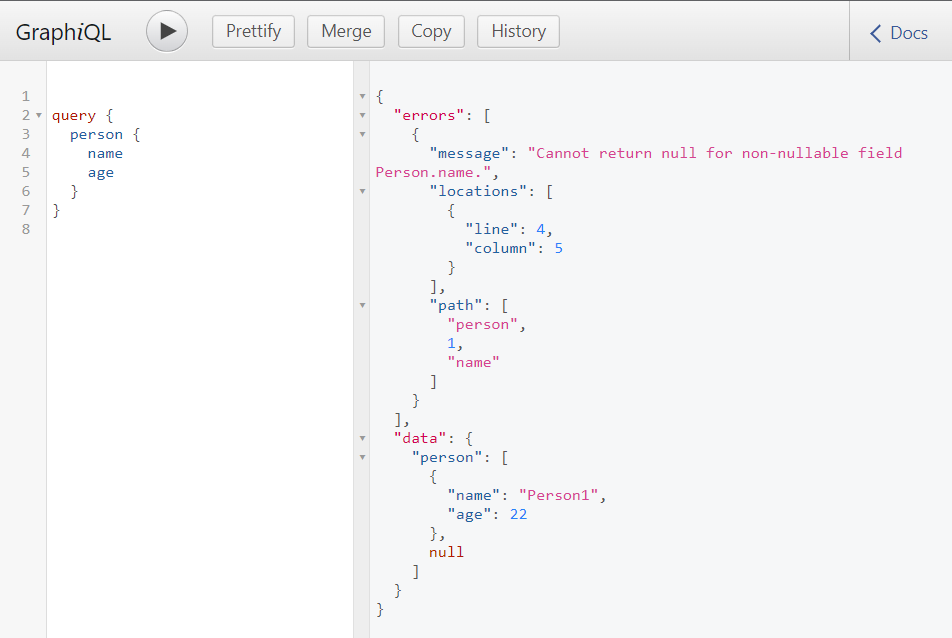
Error due to null passed in Non-null field
Handling the Non-Null Errors
- To handle the non-null field and prevent the error faced in previous example we will modify server.js and pass the non-null fields with non-null values.
- Replace the person with non-null value in name field as the below code in server.js JavaScript `
const person = [ { name: 'Person1', age:22 }, { name: 'Person2', age:25 }, ];
`
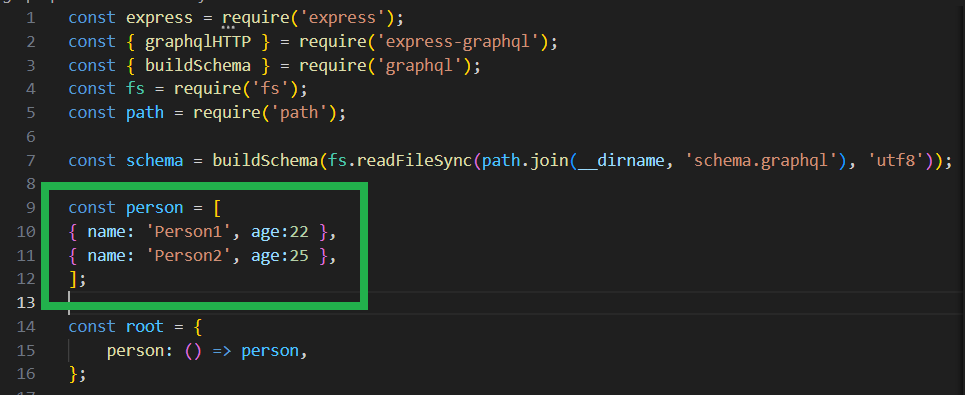
Name of the person with non-null value
**Output:
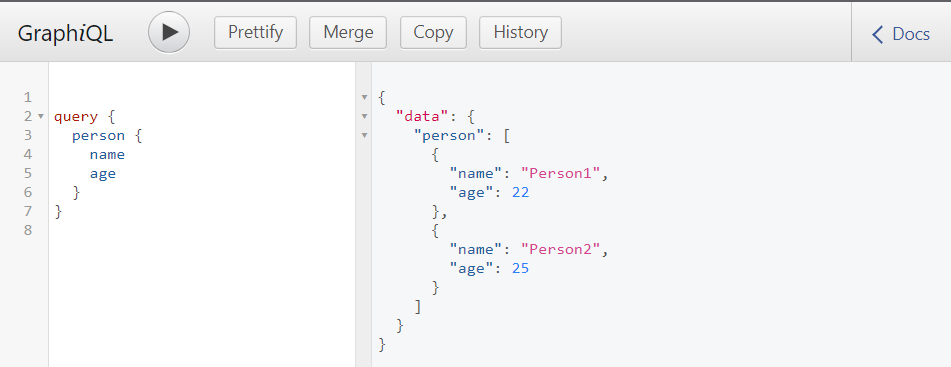
Output of Person without error
Conclusion
Lists and non-null constraints are crucial elements in GraphQL schema definition. Lists represent arrays or collections of values, and they can be either nullable or non-nullable. Non-null constraints ensure that certain fields always have a value, contributing to data integrity and making the API more predictable for users.