How To Validate Input Field In The HTML Form? (original) (raw)
Last Updated : 1 Dec, 2025
Input fields are essential components of HTML forms, enabling users to provide data for processing. Ensuring proper validation of these input fields enhances user experience and prevents errors or malicious inputs.
Project Overview
We will create simple Validating Input Fields in HTML Forms.
- A simple HTML form with various input fields to collect user data.
- First Name and Last Name: Text input fields with required validation and minimum character length.
- Email Address: Input field for email with built-in validation for proper email format.
- Password: Secure input field with a minimum character limit.
- Phone Number: Input field with a specific pattern for phone number format validation
- A simple "Submit" button to send the data once the form is filled and validated.
Project Preview
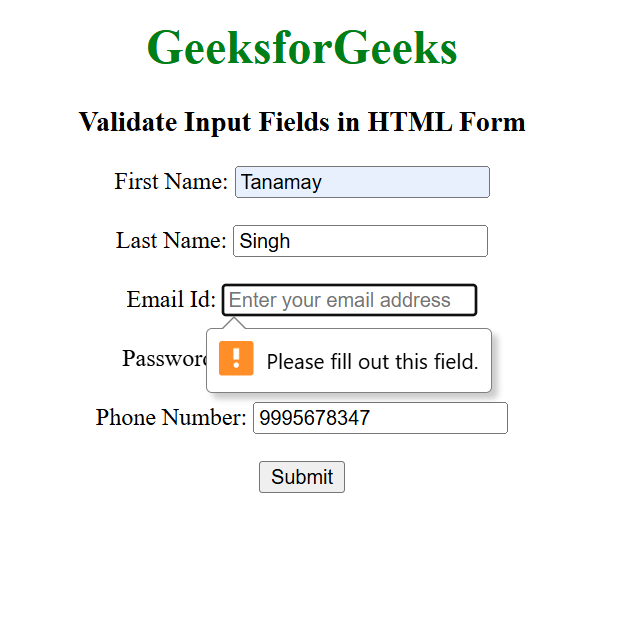
Validate Input Field In The HTML Form
Validating Input Fields HTML
HTML `
GeeksforGeeks
Validate Input Fields in HTML Form
First Name:Last Name:
Email Id:
Password:
Phone Number:
`
- **HTML Structure: The form uses a centered layout with headings to display "GeeksforGeeks" and a subtitle. It includes a form with labeled input fields for user data collection.
- **First Name, Last Name: Text fields with required and minimum length validation.
- **Email: Validates the email format using type="email".
- **Password: Requires a minimum of 8 characters.
- **Phone Number: Validates format 123-456-7890 using a regex pattern.
- **Submit Button: A single Submit button is included to send the form data upon successful validation.
- **Built-in Validation: Uses attributes like required, minlength, and pattern for real-time browser validation, ensuring user inputs are correct.
- **User Experience Enhancements: Includes placeholders for guidance and tooltips (title) to explain input formats, making the form intuitive and user-friendly.
HTML Form Validation Attributes
| Attributes | Uses |
|---|---|
| Required | It ensures the user fills out a field before the form is submitted. |
| Maxlength | Sets a maximum number of characters that can be entered. |
| Minlength | Sets a minimum number of characters required. |
| Pattern | Specifies a regular expression that the input value must match |
| Type | Determines the type of input and enforces specific validation rules. |
| Min and Max | Set minimum and maximum values for numeric or date inputs. |
| Title | Provides a tooltip with guidance on input requirements when the input does not match the pattern |
| Multiple | Allows multiple entries for certain types of inputs like email or file. |
| Placeholder | Displays a hint or example text inside the input field. |
| Disabled | It disables the input, making it uneditable and excluding it from form submission. |
| Autocomplete | Controls whether the browser should automatically fill in values based on previous inputs. |
| Autofocus | Automatically focuses on a specific input field when the page loads. |
| Readonly | Makes the input field uneditable but includes it in the form submission |
| Novalidate | Disables native HTML form validation. |