HTML Introduction (original) (raw)
Last Updated : 08 Nov, 2025
HTML (HyperText Markup Language) is the standard language for creating and structuring web pages using tags and elements. It defines how content like text, images, and links appear in a browser.
- It is a markup language, not a programming language.
- This means it annotates text to define how it is structured and displayed by web browsers.
- It is a static language, meaning it does not inherently provide interactive features but can be combined with CSS for styling and JavaScript for interactivity. HTML `
Welcome to My Webpage
This is my first paragraph of text!
`
HTML Elements and HTML Tag
HTML Elements and HTML Tags are related but distinct. An HTML element is the complete structure, including the opening tag, content (if any), and the closing tag (if applicable).
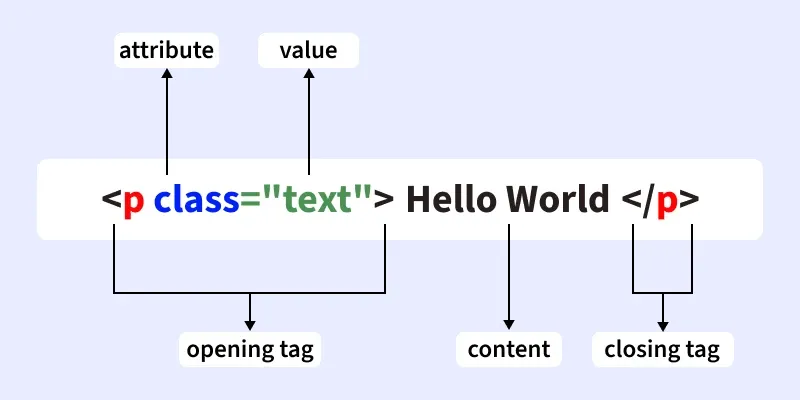
On the other hand, A tag is the actual keyword or name enclosed in angle brackets (< >) that tells the browser what kind of content to expect.
How HTML Works: Understanding Step-by-Step
In this topic, we’ll learn how a simple HTML file is written, saved, opened in a browser, rendered, and finally displayed on the screen along with how CSS and JavaScript enhance it.
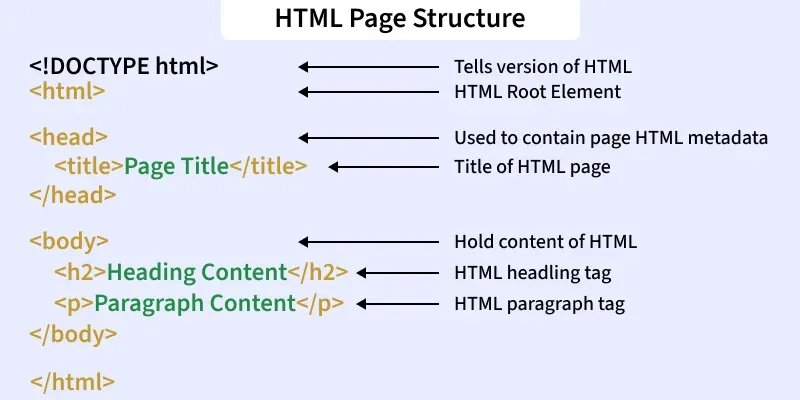
[Slide 1]: HTML Page Structure
- HTML gives the basic structure of a webpage.
- Every HTML page starts with to define the version.
- The tag is the root element containing all other tags.
- The section includes information like the page title.
- The section contains the visible content shown in the browser.
[Slide 2]: Saving the File
- After writing your code, save it with the
.htmlextension. - This makes it recognizable as a web file.
- The saved file can be opened in any browser.
[Slide 3]: Opening in a Browser
- Open the HTML file in browsers like Chrome or Firefox.
- The browser reads and interprets the HTML code.
- Converts code into a visual webpage.
[Slide 4]: Rendering the Page
- Browser processes each HTML tag.
- Displays elements like text, headings, and images properly.
- Converts raw code into structured content.
[Slide 5]: Displaying Content
- Final web page appears on the screen.
- Shows all content written in the HTML file.
- Any errors in HTML affect how it displays.
Let this slide show how the code from Slide 1 looks when run in the browser:

Output of Slide1 Image
Interaction of HTML, CSS, and JavaScript
HTML, CSS, and JavaScript work together to create modern web pages. Each plays a unique role - HTML gives structure, CSS adds style, and JavaScript brings interactivity.
- HTML structures the webpage and defines content elements.
- CSS enhances visual appearance like colors, fonts, and layout.
- JavaScript adds interactivity and dynamic features.
- Together, they make web pages functional, attractive, and user-friendly.
How They Work Together
Take a look at the image below to understand how HTML, CSS, and JavaScript work together to build and enhance a webpage.
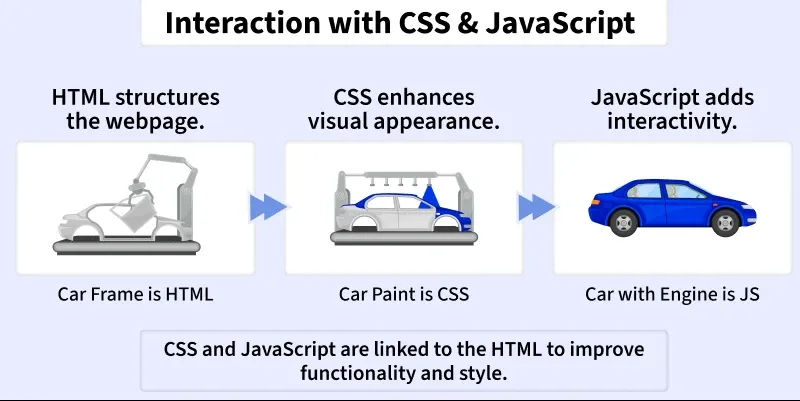
- HTML acts as the car’s frame, forming the foundation.
- CSS is like the car’s paint, giving it style and design.
- JavaScript is the engine, adding motion and behaviour.
- When combined, they create a complete, interactive website.
Let’s understand the concept of HTML, CSS, and JavaScript through the example given below.
HTML `
HTML, CSS and JS ExampleWelcome to My Webpage
This structure is built using HTML, styled with CSS, and made interactive with JS.
Click MeCSS
body { text-align: center; background-color: #eef; }
h2 { color: darkblue; }
button { padding: 10px 20px; background-color: blue; color: white; border: none; cursor: pointer; }
JavaScript
function showMessage() {
  alert("This is JavaScript adding interactivity!");
}
`
HTML Attributes
Attributes provide additional information about an element. They are placed inside the opening tag and are written as name="value". Common attributes include class, id, href, and src.
- Attributes are written inside the opening tag of an element.
- They are written as name="value" pairs.
- Most HTML elements can have one or more attributes.
- Attributes help in customizing how elements behave or display in a browser.
- Attribute values are usually enclosed in double quotes (
").
**Example:
href is an attribute of the tag that defines the URL of the link.
To learn more about it follow the article - HTML Attributes
Also Check:
Introduction to HTML | Complete HTML tutorial