Introduction to Markdown (original) (raw)
Last Updated : 16 Aug, 2022
If you have ever worked with git platforms like GitHub, BitBucket or Submitted any question or answers to an online forum, chances are you pretty much have unknowingly used Markdown.
Markdown is a lightweight markup language. Created by John Gruber in 2004, Markdown is now one of the world’s most popular markup languages. And given below is a detailed explanation of its advantages and on using it.
The extension for a Markdown file is .md or .markdown. To compile a markdown file you need an application capable of processing markdown files like Microsoft Word, Dillinger, etc. These applications use a Markdown processor or parser which converts a markdown file to printable HTML code.
Advantages Of Markdown:
- It's not made just for programmers, because you can write E-Books with it using leanpub.
- Convertible to formats like PDF, HTML, docs etc.
- You can format your mail using markdown with MarkdownHere.
- It is heavily used to write formatted pages across various platforms like StackOverflow, Github and many more.
- Markdown Files can be converted to webpages using tools like Github Pages, blot.im and smallvictori.es.
It would be really helpful if you know the basics of Web Formatting, but no need to worry if you don't, we will cover everything from Amateur to Professional. Markdown helps in creating all basic elements that you see on a web page like texts, lists, external links, images and many more.
To start writing Markdown code there are plenty of tools available online. As you know the best way of learning something is by doing it. You can start executing code as shown below in any online Markdown editor like Dillinger.
Given below is a syntax which will be useful to learn and later as a cheat sheet for writing Markdown codes.
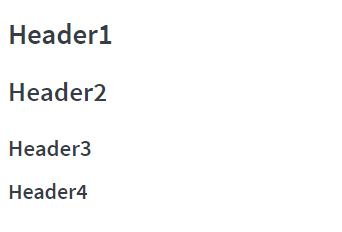
- Headers
Syntax:
Header1
Header2
Header3
Header4
....
Output:
- Formatting
Syntax:
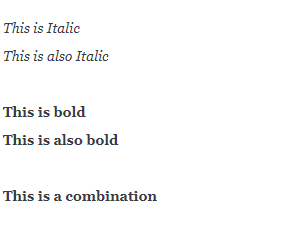
This is Italic This is also Italic
This is bold This is also bold
This is a combination
Output:
- Lists
Syntax:
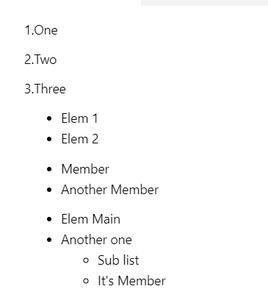
1.One 2.Two 3.Three
- Elem 1
- Elem 2
- Member
- Another Member
- Elem Main
- Another one
- Sub list
- It's Member
Output:
- Images & Links
Syntax:
IMAGE :
LINK :Output:

- Code & Quotes
Syntax:
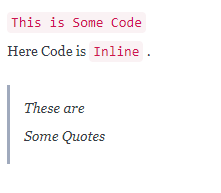
This is Some Code
Here Code is Inline .
These are Some Quotes
Output:
This Article is a cheat sheet you can use for Markdown,
For a detailed tutorial on Markdown syntax see daringfireball.net