How to Download and Install iCloud on Windows? (original) (raw)
Last Updated : 23 Jul, 2025
iCloud is the most premium and scalable cloud storage service provided by Apple Inc. It has more than 800 million users currently all over the world, out of which most of them use Apple devices like MacBook, iPhone etc. It stores user data like documents, images, and contacts on Apple's encrypted servers. With a strong focus on privacy, Apple ensures the safety of passwords and sensitive information.
In this article, we look at how to install iCloud on Windows devices and will discuss some useful questions that you should know.
How to Install iCloud on Windows?
Follow the below steps to install iCloud on Windows:
**Step 1: Visit the official website of iCloud using any web browser like Google Chrome, Microsoft Edge, etc.

**Step 2: Press the ****"GET"** button on the website to start the download of the iCloud Application.
.png)
**Step 3: It will then automatically re-direct you to the Windows Store App and the download will start in the background.
**Step 4: After the download is finished, the iCloud app will be installed within 2-3 minutes. It will then show up on the all programs list of the Start menu.

**Step 5: Click on the iCloud app to open it. Now, the iCloud application is installed on your Windows device. Now, you will see an iCloud icon in the taskbar near the notification actions tab bar. Click on the **iCloud icon in the taskbar to open a small popup window requesting you to log into your Apple account.
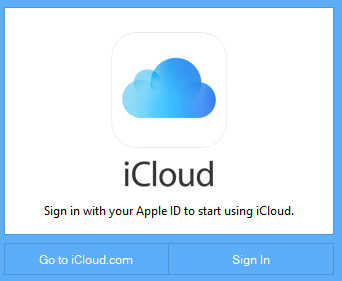
**Step 6: Then click on the **Sign in button in the small popup window that appeared. It will take you to bigger windows to sign in to your Apple ID using your Windows device.
iCloud requires the credentials of your Apple ID to store your data which requires your unique Apple ID and and your password. After signing in the iCloud, now you can easily store all the data of yours into the cloud servers of Apple using the iCloud on your Windows device.

Congratulations!! At this point, you have successfully installed iCloud on your Windows device.