How to Install Zip and Unzip in Linux? (original) (raw)
Last Updated : 6 Oct, 2021
Zip is a command-line compression utility for files and directories. File and folder compression allows for quicker and more reliable file and folder transfer, storage, and email. Unzip, on the other hand, is a program that allows you to decompress files and directories.
- zip is used to compress the files to reduce file size and also used as a file package utility. zip is available in many operating systems like Unix, Linux, windows, etc.
- If you have limited bandwidth between two servers and want to transfer the files faster, then zip the files and transfer.
- The zip program puts one or more compressed files into a single zip archive, along with information about the files (name, path, date, time of last modification, protection, and check information to verify file integrity). An entire directory structure can be packed into a zip archive with a single command.
- The zip program puts one or more compressed files into a single zip archive, along with information about the files (name, path, date, time of last modification, protection, and check information to verify file integrity). An entire directory structure can be packed into a zip archive with a single command.
- Compression ratios of 2:1 to 3:1 are common for text files. zip has one compression method (deflation) and can also store files without compression. zip automatically chooses the better of the two for each file to be compressed.
- The program is useful for packaging a set of files for distribution; for archiving files; and for saving disk space by temporarily compressing unused files or directories.
Installing Zip:
You can install Zip by running the below command:
$ sudo apt-get install zip
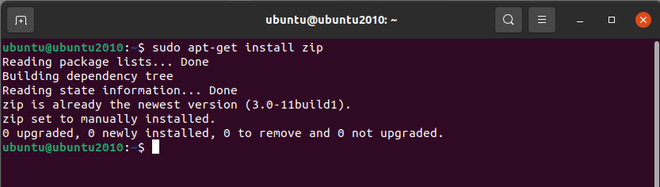
Installing Zip
After installation, use the command to verify that the zip was installed correctly or not.
$ zip

Verify Zip installed properly
Installing Unzip:
Similarly, you can install Unzip by running the below command:
$ sudo apt install unzip

Installing Unzip
After installation, use the command to verify the unzip was installed correctly or not.
$ unzip

Verify Unzip installed properly
The zip and unzip utilities are already pre-installed in newer Linux distros like Ubuntu 20.04 and CentOS 8, so you're good to go.