Designing Twitter A System Design Interview Question (original) (raw)
Last Updated : 31 Oct, 2025
Designing Twitter (or Facebook feed or Facebook search..) is a quite common question that interviewers ask candidates. A lot of candidates get afraid of this round more than the coding round because they don't get an idea of what topics and tradeoffs they should cover within this limited timeframe.
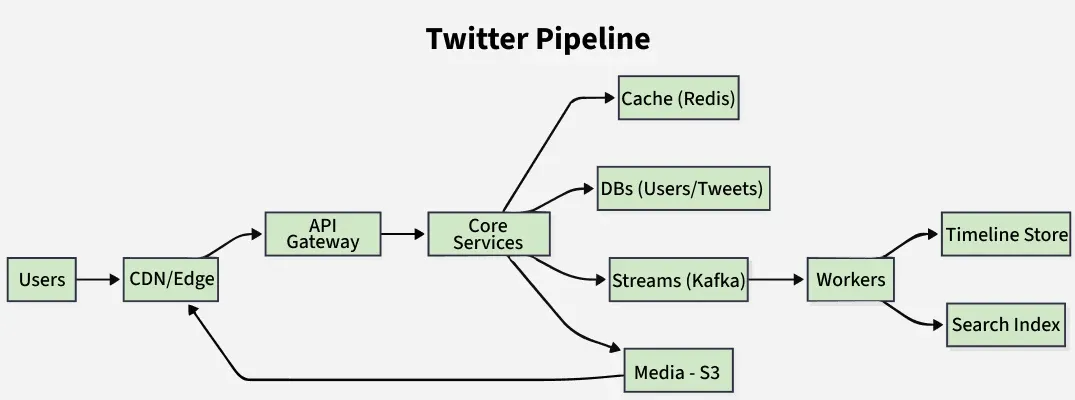
1. How Would You Design Twitter?
Don't jump into the technical details immediately when you are asked this question in your interviews. Do not run in one direction, it will just create confusion between you and the interviewer. Most of the candidates make mistakes here and immediately they start listing out some bunch of tools or frameworks like MongoDB, Bootstrap, MapReduce, etc.
You can put yourself in a situation where you're working on real-life projects. Firstly, define the problem and clarify the problem statement.
2. Requirements for Twitter System Design
2.1 Functional Requirements:
- Should be able to post new tweets (can be text, image, video etc).
- Should be able to follow other users.
- Should have a newsfeed feature consisting of tweets from the people the user is following.
- Home timeline (“following” feed) and user profile timeline.
- Likes, retweets/reposts, replies/threads.
- Search tweets/users/hashtags.
- Notifications (mentions, likes, follows, retweets).
- Trends (top hashtags/topics by region).
2.2 Non Functional Requirements:
- High availability for read‑heavy surfaces (home, profiles, search): p99 < 300–500 ms.
- Write availability for tweet/engagement: p99 < 150–250 ms end‑to‑end.
- Durability: no lost acknowledged tweets.
- Scalability: horizontal scale across regions.
- Consistency: timeline eventually consistent (< few seconds), strong for identity/handles.
- Cost: leverage CDN for media, caching for hot keys, tiered storage for cold data.
2.3 Explicit Non‑Goals (MVP)
- Direct Messages, Audio Spaces, Ads, Recommendations beyond basic ranking (note as future work).
3. Capacity Estimation for Twitter System Design
To estimate the system's capacity, we need to analyze the expected daily click rate.
3.1 Traffic Estimation:
Let us assume we have 1 billion total users with 200 million daily active users (DAU), and on average each user tweets 5 times a day. This give us 1 billion tweets per day.
200 million * 5 tweets = 1 billion/day
Tweets can also contains media such as images, or videos. We can assume that 10 percent of tweets are media files shared by users, which gives us additional 100 million files we would need to store.
10 percent * 1 billion = 100 million/day
For our System Request per Second (RPS) will be:
1 billion requests per day translate into 12K requests per second.
1 billion / (24 hrs * 3600 seconds) = 12K requests/second
Throughput
- **Tweet writes: 1B/day ≈ 11,574/s (round **12k TPS).
- **Home timeline reads: 6B/day ≈ 69,444/s (**~70k RPS base; spikes 5–10×).
- **Engagement writes (likes/retweets/replies): assume 3× tweets → **~36k TPS.
3.2 Storage Estimation:
Lets assume each message on average is 100 bytes, we will require about 100 GB of database storage every day.
1 billion * 100 bytes = 100 GB/day
10 percent of our daily messages (100 million) are media files per our requirements. Let's assume each file is 50KB on average, we will require 5 TB of storage everyday.
100 million * 50 KB = 5TB/day
For 10 years require 19 PB of storage.
(5TB + 0.1 TB ) * 365 days * 10 years = 19 PB
- **Media: 15% × 1B × 300 KB avg ≈ **45 TB/day origin ingest; CDN offloads egress.
- **Search index (inverted index + term dict + postings): ~1–2× text size → **~1–3 TB/day.
3.3 Bandwidth Estimation
As our system is handling 5.1 TB of ingress everyday, we will require a minimum bandwidth of around 60 MB per second.
5.1 TB / (24 hrs * 3600 seconds) = 60 MB/second
3.4 Identity & ID Generation
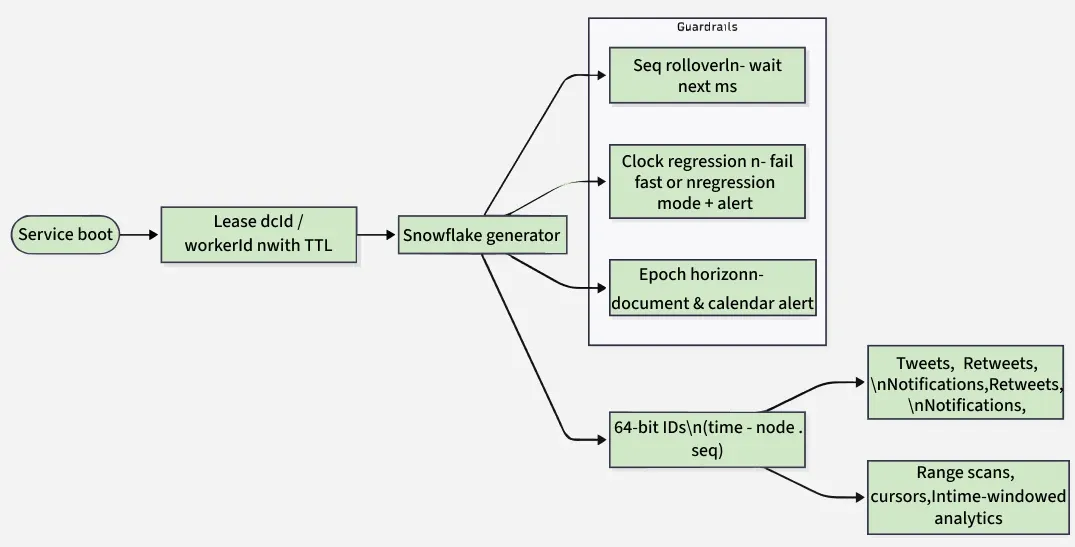
1. Snowflake-style 64-bit IDs (k-sortable, time-ordered)
A 64-bit integer that encodes time + machine identity + per-millisecond sequence, so IDs are _roughly increasing by time and unique without round-trips to a DB.
- **41 bits — milliseconds since a chosen epoch (e.g., 2010-11-04).
Range ≈ 69 years from the epoch. - **10 bits — **node identity (often split as 5 bits datacenter + 5 bits worker).
Up to 1024 workers globally. - **12 bits — **sequence within the same millisecond.
Up to **4096 IDs/ms/worker (~4.1M/sec across 1000 workers).
2. Where Snowflake IDs are used
- **Tweet IDs, Retweet IDs, Notification IDs, Timeline Entry IDs → fast range scans by time, stable pagination cursors.
- **Shard routing: For high write locality you’ll usually shard tweets by authorId hash, not by tweetId. Use tweetId for lookups and secondary indexes.
- **Search & analytics: The time component helps build time-windowed indexes and stream processors (late data detection).
3. Assigning worker IDs (10-bit space)
- Static mapping on service boot via a small control plane (e.g., “ID Authority” service) that leases a
(datacenterId, workerId)pair with TTL; renew on heartbeat. - Protect against double assignment (e.g., VM reimage): lease IDs, don’t hardcode; on lease loss, stop issuing IDs.
4. Failure & edge cases to plan for
- **Sequence rollover within 1 ms: wait next ms (most common), or route a portion of traffic to a shadow generator.
- **Clock regression: refuse to generate (fail fast) vs. “regression sequence” mode; always page oncall it’s a production smell.
- **Exhaustion horizon: 41-bit time runs ~69 years from your epoch; document the epoch and set a calendar alert long in advance.
5. User IDs vs. Tweet IDs
- You can also issue userId via Snowflake (good to avoid DB sequences).
- Keep handle and userId separate:
handleis mutable (rename),userIdis immutable. - A dedicated “handles” table maps
handle → userIdwith a strict unique constraint; a secondary mappinguserId → currentHandlehelps joins and backfills.
4. Use Case Design for Twitter System Design
In the above Diagram,
- User will click on Twitter Page they will get the main page inside main page, there will be Home Page, Search Page, Notification Page.
- Inside Home Page there will be new Tweet page as well as Post Image or Videos.
- In new Tweet there we will be like, dislike, comments as well as follow / unfollow button.
- Guest User will have only access to view any tweet.
- Registered use can view and post tweets. Can follow and unfollow other users.
- Registered User will able to create new tweets.
5. Low Level Design for Twitter System Design
A low-level design of Twitter dives into the details of individual components and functionalities. Here's a breakdown of some key aspects:

5.1 Data storage:
- User accounts: Store user data like username, email, password (hashed), profile picture, bio, etc. in a relational database like MySQL.
- Tweets: Store tweets in a separate table within the same database, including tweet content, author ID, timestamp, hashtags, mentions, retweets, replies, etc.
- Follow relationships: Use a separate table to map followers and followees, allowing efficient retrieval of user feeds.
- Additional data: Store media assets like images or videos in a dedicated storage system like S3 and reference them in the tweet table.
5.2 Core functionalities:
- Posting a Tweet:
User submits content -> validated (length, media, etc.) ->stored with hashtags/mentions -> followers & mentions notified. - **Timeline Generation:
Fetch followed users/hashtags -> retrieve & rank tweets (relevance, recency, engagement) -> cache in Redis for speed. - **Search:
Process keywords/hashtags ->analyze tweet content & metadata -> return ranked results. - **Follow/Unfollow:
Update relationships -> adjust timelines -> send notifications.
5.3 Additional considerations:
.webp)
- Caching: Use caching mechanisms like Redis to reduce database load for frequently accessed data like user timelines and trending topics.
- Load balancing: Distribute workload across multiple servers to handle high traffic and ensure scalability.
- Database replication: Ensure data redundancy and fault tolerance with database replication techniques.
- Messaging queues: Leverage asynchronous messaging queues for processing tasks like sending notifications or background indexing.
- API design: Develop well-defined APIs for internal communication between different components within the system.
6. High Level Design for Twitter System Design
We will discuss about high level design for twitter,

6.1 Architecture:
For twitter we are using microservices architecture since it will make it easier to horizontally scale and decouple our services. Each service will have ownership of its own data model. We will divide our system into some cores services.
6.2 User Services
This service handles user related concern such as authentication and user information. Login Page, Sign Up page, Profile Page and Home page will be handle into User services.
6.3 Newsfeed Service:
This service will handle the generation and publishing of user newsfeed. We will discuss about newsfeed in more details. When it comes to the newsfeed, it seems easy enough to implement, but there are a lot of things that can make or break this features. So, let's divide our problem into two parts:
6.3.1 Generation:
Let's assume we want to generate the feed for user A, we will perform the following steps:
- Retrieve the ID's of all the users and the enitities( hashtags, topics, etc.)
- Fetch the relevant algorithm to rank the tweets on paramaters such as relevance, time management, etc.
- Use a ranking algorithm to rank the tweets based on parameters such as relevance, time, engagement, etc.
- Return the ranked tweets data to the client in a paginated manner.
Feed geneartion is an intensive process and can take quite a lot of time, especially for users following a lot of people. To imporve the performance, the feed can be pre-generated and stored in the cache, then we can have a mechanism to periodically update the feed and apply or ranking algorithm to the new tweets.
6.3.2 Publishing
Publishing is the step where the feed data us pushed according to each specify user. This can be a quite heavy operation, as a user may have million of friend or followers. To deal with this, we have three different approcahes:
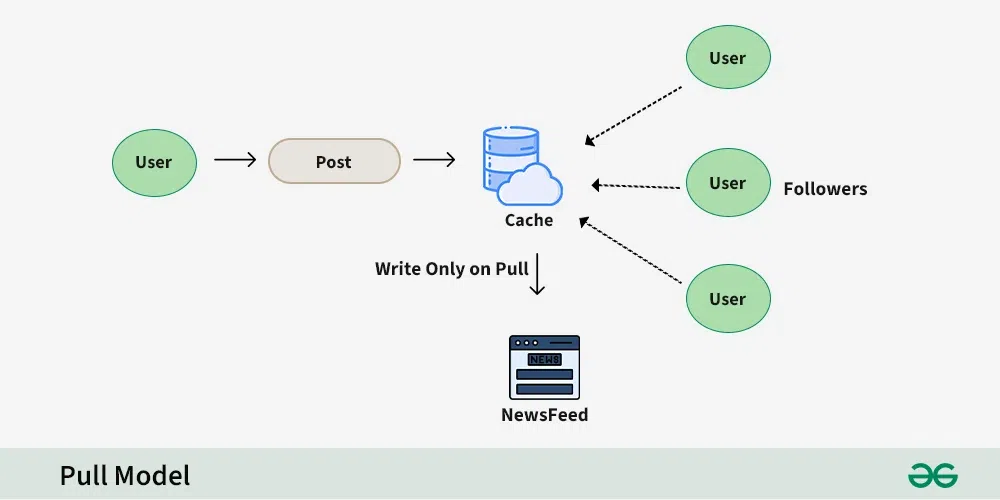
- Pull Model (Fan-out on Load):
Feeds are generated only when a user requests them, reducing database writes.
Drawback: Recent tweets appear only on reload, increasing read operations.
- **Push Model (Fan-out on Write):
Tweets are immediately pushed to all followers’ feeds, reducing read-time computation.
Drawback: Increases write operations on the database.
.webp)
- Hybrid Model:
Combines push and pull strategies—users with few followers use push, while high-follower users (e.g., celebrities) use pull, balancing read and write operations.
6.4 Tweet service:
The tweet service handle tweet-related use case such as posting a tweet, favorites, etc.
6.5 Retweets :
Retweets are one of our extended requirements. To implement this feature, we can simply create a new tweet with the user id of the user retweeting the original tweet and then modify the type enum and content property of the new tweet to link it with the original tweet.
6.6 Search Service:
This service is responsible for handling search related functionality. In search service we get the Top post, latest post etc. These things we get because of ranking.
6.7 Media Service:
This service will handle the media(images, videos, files etc.) uploads.
6.8 Analytics Service:
This service will be use for metrics and analytics use cases.
6.9 Ranking Algorithm:
We will need a ranking algorithm to rank each tweet according to its relevance to each specific user.
Example: Facebook used to utilize an EdgeRank algorithm. Here, the rank of each feed item is described by:
Rank = Affinity * Weight * Decay
Where,
Affinity: is the "closeness" of the user to the creator of the edge. If a user frequently likes, comments, or messages the edge creator, then the value of affinity will be higher, resulting in a higher rank for the post.Weight: is the value assigned according to each edge. A comment can have a higher weightage than likes, and thus a post with more comments is more likely to get a higher rank.Decay: is the measure of the creation of the edge. The older the edge, the lesser will be the value of decay and eventually the rank.
Now a days, algorithms are much more complex and ranking is done using machine learning models which can take thousands of factors into consideration.
6.10 Search Service
- Sometimes traditional DBMS are not performant enough, we need something which allows us to store, search, and analyze huge volumes of data quickly and in near real-time and give results within milliseconds. Elasticsearch can help us with this use case.
- Elasticsearch is a distributed, free and open search and analytics engine for all types of data, including textual, numerical, geospatial, structured, and unstructured. It is built on top of Apache Lucene.
6.11 How do we identify trending topics?
- Trending functionality will be based on top of the search functionality.
- We can cache the most frequently searched queries, hashtags, and topics in the last
Nseconds and update them everyMseconds using some sort of batch job mechanism. - Our ranking algorithm can also be applied to the trending topics to give them more weight and personalize them for the user.
6.12 Notifications Service:
- Push notifications are an integral part of any social media platform.
- We can use a message queue or a message broker such as Apache Kafka with the notification service to dispatch requests to Firebase Cloud Messaging (FCM) or Apple Push Notification Service (APNS) which will handle the delivery of the push notifications to user devices.
6.13 Architecture Overview
[Mobile/Web]
│ HTTPS / HTTP2 + TLS
▼
[API Gateway / Edge] ──> [Auth] ──> [Rate Limiter] ──> [Service Mesh]
│ │
│ ├── Tweet Service (write path)
│ ├── Engagement Service (likes/retweets/replies)
│ ├── Social Graph Service (follow edges)
│ ├── Timeline Service (home/profile)
│ ├── Search Service (query/index)
│ ├── Media Service (upload/origin)
│ ├── Notification Service (push/email)
│ └── User Service (profiles, identity)
│
├─► CDN (images/video, thumbnails)
└─► WebSocket/SSE fanout (live updates)
Core Data Plane:
- - Caches (Redis/Memcache clusters) in front of stores
- - Event Bus (Kafka/NATS) for write logs & fanout
- - OLTP Stores (e.g., Manhattan/Cassandra/Postgres shards)
- - Search Index (Lucene/Elasticsearch-like “Earlybird” tiers)
- - Object Storage (S3/GCS + lifecycle + Glacier/Archive)
- - Stream Processing (Heron/Flink/Spark Streaming) for ranking features, trends, counters
- - Batch (Spark/Presto) for analytics/training
6.14 Write Path (Tweet/Create)
- Client sends POST /tweets (text + mediaRefs).
- Auth & rate-limit checked; Snowflake ID allocated.
- Persist tweet to Write-Ahead Log (event bus) and primary store (ack on quorum).
- Publish events:
TweetCreated{tweetId, authorId, entities}to Kafka. - Async consumers:
- Fan-out to home timelines (push model for normal users).
- Index into search.
- Counters/metrics (trends, author stats).
- Notifications to mentions/replies.
- Return 200 + tweet payload quickly (target < 150 ms at p99 in DC).
6.15 Home Timeline (Read Path & Fan-out Strategy)
**a. Approaches
- **Fan-out on write (push): On
TweetCreated, insert into each follower’s TimelineEntry list.
Pros: fast reads; Cons: heavy writes; hot spots on celebs. - **Fan-out on read (pull): Read follows, fetch latest N from each, merge-sort + rank.
Pros: fewer writes; Cons: slow reads, heavy fan-in. - **Hybrid: Push for users below threshold (e.g., < 100k followers); for celebrities, compute on read and cache.
**b. Read Flow
- Client calls GET /timeline/home?cursor=….
- Check cache (Redis): materialized page for user. On miss, fetch TimelineEntries (pinned lists) and rank.
- Join with tweet bodies (batch
mget), filter blocks/mutes, apply visibility. - Return paginated results +
nextCursor(opaque).
**c. Ranking (MVP → ML)
- **MVP heuristic: recency + engagement (likes/retweets/replies) + affinity(you↔author) + diversity (no floods).
- **Online features: freshness minutes, author interactions, user activity, text/hashtag signals.
- **ML path: train on clicks/likes dwell-time; online feature store fed by streams; A/B experiments with guardrails.
**d. Caching
- Per-user home timeline pages (e.g., 100–200 entries/page) TTL ~ minutes; invalidation on new tweets from follows.
- Hot tweet bodies cached by
tweetIdwith short TTL + write-through on update.
**6.16 Search & Trends
**a. Indexing
- Stream processor tokenizes text/entities; build inverted index (term → postings list of tweetIds with positions).
- Tiered index: realtime (seconds) + archive segments; rolling merges.
- Geo/language fields for filtering.
**b. Query
- GET /search?q=…&type=tweets|users&sort=top|latest&lang=…&geo=…
- Parse → rewrite (spelling, synonyms, hashtags) → candidate fetch → rank (BM25/ML) → safety filters (blocks/mutes/NSFW).
**c. Trends
- Rolling counters per region/language; exponential decay window; exclude spam/bot patterns; output top-K per bucket every few minutes.
- Likes/retweets recorded as append-only events; maintain denormalized counters with CRDTs or transactional increments per shard + periodic reconcile.
- Replies form a conversation graph; store
inReplyToId, compute thread views lazily with capped depth and pagination. - Follows are directed edges; partitions by followerId ("who I follow") and by followeeId ("my followers") with secondary views for fan-out.
- Suggestion: maintain mutuals cache for UI and abuse heuristics.
**6.19 Media Pipeline
- Upload via signed URL to object store; virus scan; transcode variants (image sizes, video bitrates); write metadata rows.
- Serve via CDN with cache-control; origin shield to protect storage; hash-based keys for dedupe.
**6.20 Notifications
- Subscribe to events (
LikeCreated,FollowCreated,Mentioned,ReplyCreated). - Fanout through notification preference rules; enqueue to APNs/FCM/Email/SMS.
- Per-user inbox store for in-app notifications; read markers and collapse logic.
7. Data Model Design for Twitter System Design
This is the general Dara model which reflects our requirements.

Database Design for Twitter
In the diagram, we have following table:
7.1 Users:
In this table contain a user's information such name, email, DOB, and other details where ID will be autofield and it will be unique.
Users
{
ID: Autofield,
Name: Varchar,
Email: Varchar,
DOB: Date,
Created At: Date
}
- Fields:
userId(Snowflake int64),handle(unique),name,email(unique),bio,avatarUrl,bannerUrl,createdAt,updatedAt,settings(JSON: language, privacy, dmPrefs…),statusFlags(bitmask: suspended, protected, deactivated, suspectedBot), counters{followersCount, followingCount, tweetsCount, likesCount}(denormalized, eventually consistent). - Typical queries: by
userId(profile fetch), byhandle(login/lookup). - Consistency: strong for
handle,email; eventual for counters.
7.2 Tweets:
As the name suggests, this table will store tweets and their properties such as type (text, image, video, etc.) content etc. UserID will also store.
Tweets
{
id: uuid,
UserID: uuid,
type: enum,
content: varchar,
createdAt: timestamp
}
- Fields:
tweetId(Snowflake),authorId,text(<= 280–4000 chars configurable),createdAt,inReplyToId?,quoteOfId?,conversationId(root of thread),mediaRefs[](array ofmediaId),entities{hashtags[], mentions[], urls[]},visibility(public/protected),language,geo?(point +placeId),flags(deleted, edited),editGroupId?(for edit history), **counters{likeCount, retweetCount, replyCount, viewCount}. - Typical queries: author’s timeline (authorId recent), by
tweetId, conversation fetch byconversationId. - Consistency: write‑ack on quorum; **read‑your‑writes via session stickiness; counters eventually consistent with periodic reconcile.
7.3 Favorites:
This table maps tweets with users for the favorite tweets functionality in our application.
Favorites
{ id: uuid,
UserID: uuid,
TweetID: uuid,
CreatedAt: timestamp
7.4 Followers:
This table maps the followers and followess (one who is followed) as users can folloe each other. The relation will be N:M relationship.
Followers
{
id: uuid,
followerID: uuid,
followeeID: uuid,
}
7.5 Feeds:
This table stores feed properties with the corresponding userID.
Feeds
{
id: uuid,
userID,
UpdatedAt: Timestamp
}
7.6 Feeds_Tweets:
This table maps tweets and feed. There relation will be (N:M relationship).
feeds_tweets{
id: uuid,
tweetID: uuid,
feedID: uuid
}
7.7 What Kind of Database is used in Twitter?
- While our data model quite relational, we don't necessarily need to store everything in a single database, as this can limit our scalability and quickly become a bottleneck.
- We will split the data between different services each having ownership over a particular table. The we can use a realtional database such as PostgreSQL or a distributed NoSQL database such as Apache Cassandra PostgreSQL for our usecase.
7.8 Core Entities (Logical Model – Production)
- User(userId, handle, name, email, bio, createdAt, settings, statusFlags)
- Tweet(tweetId, authorId, text, createdAt, inReplyToId?, quoteOfId?, mediaRefs[], entities{hashtags[], mentions[]}, visibility, language, geo?)
- FollowEdge(followerId, followeeId, createdAt, state)
- Like(userId, tweetId, createdAt)
- Retweet(userId, srcTweetId, createdAt, retweetId)
- TimelineEntry(userId, tweetId, rankScore, insertedAt, source) – materialized home timeline
- Notification(userId, type, actorId, subjectId, createdAt, state)
- TrendCounter(bucket, hashtag/topic, region, count)
- AbuseSignals(subjectType, subjectId, signalType, score, bucket)
**7.9 Indexing & Sharding Keys (Practical)
- Tweets partitioned by authorId hash (write locality); secondary indexes: by tweetId, by createdAt.
- Social graph edges partitioned by followerId (for read: “who I follow”) and by followeeId (for fanout).
- TimelineEntry partitioned by userId.
- Search is separate inverted index (text + entities).
**7.10 Storage Choices (Operational)
- OLTP: wide-column (Cassandra-like) for tweets/timelines/edges or a Twitter-style multi-tenant store;
- Relational store for identity & strong-consistency domains (handles, email, auth).
- Object storage for media; CDN for egress; thumbnails/variants stored & cached.
8. API Design for Twitter System Design
A basic API design for our services:
8.1 Post a Tweets:
This API will allow the user to post a tweet on the platform.
{
userID: UUID,
content: string,
mediaURL?: string
}
- User ID (
UUID): ID of the user. - Content (
string): Contents of the tweet. - Media URL (
string) : URL of the attached media (optional) . - Result (
boolean) : Represents whether the operation was successful or not.
8.2 Follow or unfollow a user
This API will allow the user to follow or unfollow another user.
Follow `
{ followerID: UUID, followeeID: UUID }
Unfollow
{ followerID: UUID, followeeID: UUID }
`
Parameters
- Follower ID (UUID): ID of the current user.
- Followee ID (UUID): ID of the user we want to follow or unfollow.
- Media URL (string): URL of the attached media (optional).
- Result (boolean) : Represents whether the operation was successful or not.
8.3 Get NewsFeed
This API will return all the tweets to be shown within a given newsfeed.
getNewsfeed `
{ userID: UUID }
`
Parameters
- User ID (UUID): ID of the user.
- Tweets (Tweet[]): All the tweets to be shown within a given newsfeed.
9. Microservices Used for Twitter System Design
9.1 Data Partitioning
To scale out our databases we will need to partition our data. Horizontal partitioning (aka Sharding) can be a good first step. We can use partitions schemes such as:
- Hash-Based Partitioning
- List-Based Partitioning
- Range Based Partitioning
- Composite Partitioning
The above approaches can still cause uneven data and load distribution, we can solve this using Consistent hashing.
9.2 Mutual friends
- For mutual friends, we can build a social graph for every user. Each node in the graph will represent a user and a directional edge will represent followers and followees.
- After that, we can traverse the followers of a user to find and suggest a mutual friend. This would require a graph database such as Neo4j and ArangoDB.
- This is a pretty simple algorithm, to improve our suggestion accuracy, we will need to incorporate a recommendation model which uses machine learning as part of our algorithm.
9.3 Metrics and Analytics
- Recording analytics and metrics is one of our extended requirements.
- As we will be using Apache Kafka to publish all sorts of events, we can process these events and run analytics on the data using Apache Spark which is an open-source unified analytics engine for large-scale data processing.
9.4 Caching
- In a social media application, we have to be careful about using cache as our users expect the latest data. So, to prevent usage spikes from our resources we can cache the top 20% of the tweets.
- To further improve efficiency we can add pagination to our system APIs. This decision will be helpful for users with limited network bandwidth as they won't have to retrieve old messages unless requested.
9.5 Media access and storage
- As we know, most of our storage space will be used for storing media files such as images, videos, or other files. Our media service will be handling both access and storage of the user media files.
- But where can we store files at scale? Well, object storage is what we're looking for. Object stores break data files up into pieces called objects.
- It then stores those objects in a single repository, which can be spread out across multiple networked systems. We can also use distributed file storage such as HDFS or GlusterFS.
9.6 Content Delivery Network (CDN)
- Content Delivery Network (CDN) increases content availability and redundancy while reducing bandwidth costs.
- Generally, static files such as images, and videos are served from CDN. We can use services like Amazon CloudFront or Cloudflare CDN for this use case.
10. Scalability for Twitter System Design
Let us identify and resolve Scalability such as single points of failure in our design:
- "What if one of our services crashes?"
- "How will we distribute our traffic between our components?"
- "How can we reduce the load on our database?"
- "How to improve the availability of our cache?"
- "How can we make our notification system more robust?"
- "How can we reduce media storage costs"?
To make our system more resilient we can do the following:
- Running multiple instances of each of our services.
- Introducing load balancers between clients, servers, databases, and cache servers.
- Using multiple read replicas for our databases.
- Multiple instances and replicas for our distributed cache.
- Exactly once delivery and message ordering is challenging in a distributed system, we can use a dedicated message broker such as Apache Kafka or NATS to make our notification system more robust.
- We can add media processing and compression capabilities to the media service to compress large files which will save a lot of storage space and reduce cost.
**11. Caching Strategy
- **Frontline: CDN for media & static assets; HTTP cache headers.
- **Data: Redis/Memcache for tweet bodies, user profiles, timeline pages; use write-through for counters; read-through with TTL + jitter; negative-cache 404s briefly.
- **Key invalidation: on tweet edit/delete, on follow changes, on engagement thresholds.
**12. Partitioning & Hot Keys
- Use per-author queues to smooth spikes; backpressure and QoS.
**13. Consistency Model
- **Strong: identity (handles/emails), payments.
- **Eventual: home timeline materialization, counts, trends.
- **Read-your-writes: route user to home region; session stickiness or client-side merge to show newly sent tweet immediately.
**14. Reliability, SRE & Observability
- **SLIs/SLOs: availability, latency (p50/p95/p99), error rate, freshness (indexing delay), delivery success.
- **Dashboards per surface; RED/USE metrics.
- **Tracing with end-to-end IDs; sampling for hot paths.
- Circuit breakers and bulkheads per service.
- **Chaos testing: kill brokers, drop partitions; verify graceful degradation (e.g., fallback to latest unranked timeline).
- **Disaster Recovery: multi-region; RPO minutes for timelines (rebuildable), RPO≈0 for tweet log; RTO < 1 hour via runbooks.
**15. Security, Privacy & Abuse
- OAuth2/OIDC, short-lived tokens. TLS-only. At-rest encryption (KMS).
- **Rate limiting per IP/user/app; dynamic shields during events.
- **Abuse/Spam: ML signals (account age, device fingerprints, graph patterns), risk scoring on write; shadow-ban/quarantine queues; user reporting workflows.
- **Privacy: blocks/mutes filtering in all reads; Right-to-Erasure: tombstones + GC in OLTP, deindex in search, purge from caches/CDN; data retention policy by region (GDPR/CCPA).
- **Content safety: media hashing (perceptual), NSFW classifiers; age gates.
**16. Cost Controls
- Push more through CDN (thumbs/variants, far-future TTL).
- Storage tiers & compaction; compress text; column families for hot/cold fields.
- Compute autoscaling on QPS/backlog; spot/preemptible for batch.
- Defer heavy recompute (e.g., rank refresh) for low-value cohorts.
**17. Failure Modes & Mitigations (Interview-Gold)
- **Hot celebrity tweet: push for normal users, pull for celebrity; cap fanout concurrency, enqueue per-follower buckets; protect caches from thundering herds with request collapse.
- **Search indexing lag: serve latest via realtime tier; degrade to “latest only” if top tier fails.
- **Cache outage: hit stores with read fences + partial pagination; reduce page size; disable ranked sort.
- **Kafka partition loss: dual-write to mirror; consumer offsets backed by transactional store.
18. E2E Sequence (Tweet → Follower Home)
XML `
Client → API → TweetSvc: validate, allocate id TweetSvc → Store: write quorum OK TweetSvc → Bus: publish TweetCreated FanoutWorker (consumes):
- fetch followers
- for non-celebs: append TimelineEntry(userId,tweetId,rankSeed)
- for celebs: mark home-shard as needs-merge SearchIndexer: tokenize, add to realtime index NotificationSvc: build mention/author notifications Client GET /timeline/home → TimelineSvc:
- read cached page or build page
- join tweets, run rank, filter blocks/mutes
- return page + cursor
`
19. Schema Sketches (illustrative)
XML `
Tweet{ tweetId PK, authorId, text, createdAt, replyToId?, quoteOfId?, media[], lang, visibility, entities{hashtags[],mentions[]} }
FollowEdge{ followerId, followeeId, createdAt, state, PRIMARY KEY(followerId, followeeId) }
TimelineEntry{ userId, tweetId, insertedAt, rankScore, source, PRIMARY KEY(userId, insertedAt DESC, tweetId) }
Like{ userId, tweetId, createdAt, PRIMARY KEY(userId, tweetId) }
Retweet{ userId, srcTweetId, retweetId, createdAt, PRIMARY KEY(userId, srcTweetId) }
Notification{ userId, notifId, type, actorId, subjectId, createdAt, state }
`
**20. Search Relevance Features (starter)
- Text: BM25 features, exact hashtag/mention boosts, URL domain quality.
- Social: author authority, user-author affinity, engagement freshness.
- Safety: language/NSFW, policy scores.
- Learning-to-rank: LambdaMART/XGBoost; online features from streams.