Annotations in Java (original) (raw)
Annotations in Java are a form of metadata that provide additional information about the program. They do not change the action of a compiled program but can be used by the compiler or runtime for processing.
Key Points
- Annotations start with ‘@’.
- Annotations do not change the action of a compiled program.
- Annotations help to associate metadata (information) to the program elements i.e. instance variables, constructors, methods, classes, etc.
- Annotations are not pure comments as they can change the way a program is treated by the compiler. See below code for example.
- Annotations basically are used to provide additional information, so could be an alternative to XML and Java marker interfaces.
Hierarchy of Annotations in Java
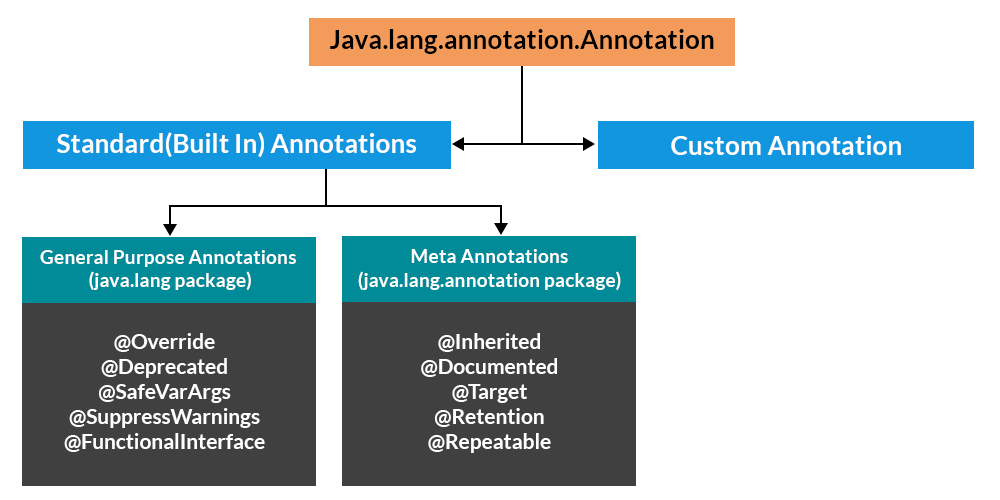
Categories of Annotations
There are broadly 5 categories of annotations as listed:
- Marker Annotations
- Single value Annotations
- Full Annotations
- Type Annotations
- Repeating Annotations
Let us discuss and we will be appending code wherever required if so.
**1. Marker Annotations
- Do not have any elements or values (just presence is enough).
- Used to signal the compiler or tools with metadata.
**Example
@TestAnnotation()
**2. Single value Annotations
- Contain only one element (can use shorthand notation).
- When specifying value, you don’t need to write the element name.
**Example
@TestAnnotation(“testing”);
**3. Full Annotations
- Contain multiple elements as key-value pairs.
- All values must be provided unless defaults are defined.
**Example
@TestAnnotation(owner=”Rahul”, value=”Class Geeks”)
**4. Type Annotations
- Introduced in Java 8 for annotating types (variables, generics, return types).
- Useful for stronger type checking and frameworks.
- Declared with @Target(ElementType.TYPE_USE)
**Example: Java Program to Demonstrate Type Annotation
Java `
import java.lang.annotation.ElementType; import java.lang.annotation.Target;
// Using target annotation to annotate a type @Target(ElementType.TYPE_USE)
// Declaring a simple type annotation @interface TypeAnnoDemo{}
// Main class public class GFG {
// Main driver method
public static void main(String[] args) {

    // Annotating the type of a string
    @TypeAnnoDemo String string = "I am annotated with a type annotation";
    System.out.println(string);
    abc();
}

// Annotating return type of a function
static @TypeAnnoDemo int abc() {

    System.out.println("This function's  return type is annotated");

    return 0;
}
}
`
Output
I am annotated with a type annotation This function's return type is annotated
**5. Repeating Annotations
- Allow the same annotation to be applied multiple times on a single element.
- Declared using @Repeatable with a container annotation.
- **Example: @Schedule(day="Monday") @Schedule(day="Tuesday").
**Example: Java Program to Demonstrate a Repeatable Annotation
Java `
import java.lang.annotation.Annotation; import java.lang.annotation.Repeatable; import java.lang.annotation.Retention; import java.lang.annotation.RetentionPolicy; import java.lang.reflect.Method;
// Make Words annotation repeatable @Retention(RetentionPolicy.RUNTIME) @Repeatable(MyRepeatedAnnos.class) @interface Words { String word() default "Hello"; int value() default 0; }
// Create container annotation @Retention(RetentionPolicy.RUNTIME) @interface MyRepeatedAnnos { Words[] value(); } public class Main {
// Repeat Words on newMethod
@Words(word = "First", value = 1)
@Words(word = "Second", value = 2)
public static void newMethod()
{
    Main obj = new Main();

    try {
        Class<?> c = obj.getClass();

        // Obtain the annotation for newMethod
        Method m = c.getMethod("newMethod");

        // Display the repeated annotation
        Annotation anno
            = m.getAnnotation(MyRepeatedAnnos.class);
        System.out.println(anno);
    }
    catch (NoSuchMethodException e) {
        System.out.println(e);
    }
}
public static void main(String[] args) { newMethod(); }
}
`
Output
@MyRepeatedAnnos({@Words(value=1, word="First"), @Words(value=2, word="Second")})
**Standard (Predefined) Annotations
Java provides seven built-in annotations.
From java.lang
**1. @Deprecated
- It is a marker annotation. It indicates that a declaration is obsolete and has been replaced by a newer form.
- The Javadoc @deprecated tag should be used when an element has been deprecated.
- @deprecated tag is for documentation and @Deprecated annotation is for runtime reflection.
- @deprecated tag has higher priority than @Deprecated annotation when both are together used.
**Example:
Java `
public class DeprecatedTest { @Deprecated public void Display() { System.out.println("Deprecatedtest display()"); }
public static void main(String args[])
{
    DeprecatedTest d1 = new DeprecatedTest();
    d1.Display();
}
}
`
Output
Deprecatedtest display()
**2. @Override
- It is a marker annotation that can be used only on methods.
- Ensures that a method actually overrides a method from its superclass.
- Helps catch errors when method signatures don’t match.
**Example: Java Program to Illustrate Override Annotation
Java `
class Base { public void Display() { System.out.println("Base display()"); }
 public static void main(String args[])
 {
     Base t1 = new Derived();
     t1.Display();
 }
}
// Class 2 // Extending above class class Derived extends Base { @Override public void Display() { System.out.println("Derived display()"); } }
`
**3. @SuppressWarnings
- Suppresses specific compiler warnings (e.g., unchecked, deprecation).
- Useful to make code cleaner without unnecessary warning messages.
**Example: Java Program to illustrate SuppressWarnings Annotation
Java `
class DeprecatedTest { @Deprecated public void Display() { System.out.println("Deprecatedtest display()"); } }
public class SuppressWarningTest { // If we comment below annotation, program generates // warning @SuppressWarnings({"checked", "deprecation"}) public static void main(String args[]) { DeprecatedTest d1 = new DeprecatedTest(); d1.Display(); } }
`
Output
Deprecatedtest display()
From java.lang.annotation
1. @Documented
- Marks annotations to be included in generated Javadoc.
- Improves API documentation clarity.
2. @Target
- Specifies where the annotation can be applied (class, method, field, etc.).
- Prevents misuse of annotations in wrong places.
**3. @Inherited
- Allows a subclass to inherit an annotation from its parent class.
- Useful in frameworks where annotations define behavior across hierarchies.
User-defined (Custom) Annotation
User-defined annotations can be used to annotate program elements, i.e. variables, constructors, methods, etc. These annotations can be applied just before the declaration of an element (constructor, method, classes, etc).
**Syntax
[Access Specifier] @interface
{
DataType () [default value];
}
Do keep these certain points as rules for custom annotations before implementing user-defined annotations.
- AnnotationName is an interface.
- The parameter should not be associated with method declarations and throws clause should not be used with method declaration.
- Parameters will not have a null value but can have a default value.
- default value is optional.
- The return type of method should be either primitive, enum, string, class name or array of primitive, enum, string or class name type.
**Example: Java Program to Demonstrate User-defined Annotations
Java `
package source;
import java.lang.annotation.Documented; import java.lang.annotation.Retention; import java.lang.annotation.RetentionPolicy;
// User-defined annotation @Documented @Retention(RetentionPolicy.RUNTIME) @ interface TestAnnotation { String Developer() default "Rahul"; String Expirydate(); } // will be retained at runtime
// Driver class that uses @TestAnnotation public class Test { @TestAnnotation(Developer="Rahul", Expirydate="01-10-2020") void fun1() { System.out.println("Test method 1"); }
@TestAnnotation(Developer="Anil", Expirydate="01-10-2021")
void fun2()
{
    System.out.println("Test method 2");
}

public static void main(String args[])
{
    System.out.println("Hello");
}
}
`