Arrays.sort() in Java (original) (raw)
Arrays.sort() is a built-in method in Java used to sort arrays in ascending order. It is part of the Arrays utility class in java.util package and supports sorting of primitive data types as well as objects. Internally, it uses optimized sorting algorithms to provide efficient performance.
- It sorts arrays in ascending order by default (for primitives and Comparable objects).
- For objects, you can customize sorting using Comparator.
- It uses Dual-Pivot QuickSort for primitives and TimSort for objects (optimized for performance).
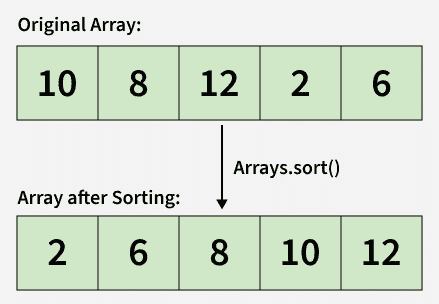
Arrays.sort
**Example: Sort integer and character arrays in ascending order
Java `
import java.util.Arrays;
class Geeks{
public static void main(String[] args) {

    // Array of primitive type
    int[] arr1 = {2, -1, 3, 4};

    // Character array
    char[] arr2 = {'b', 'a', 'c', 'b'};

    // Sorting arrays in ascending order
    Arrays.sort(arr1);
    Arrays.sort(arr2);

    // Print sorted arrays
    System.out.println(Arrays.toString(arr1));
    System.out.println(Arrays.toString(arr2));
}
}
`
Output
[-1, 2, 3, 4] [a, b, b, c]
**Explanation: The Arrays.sort() method in Java is used to arrange array elements in ascending order. It works with different data types like integers, characters, strings, and more, making sorting simple and efficient.
Syntax
To sort the whole array
Arrays.sort(arr);
To sort a subarray
Arrays.sort(arr, fromIndex, toIndex);
**Parameters:
- **arr: The array to be sorted.
- **from_Index: The index of the first element (inclusive) to be sorted.
- **to_Index: The index of the last element (exclusive) to be sorted.
- **Return Type: void (This method does not return anything).
**Note:
- Arrays.sort() does not remove duplicates; it only reorders elements.
- Primitive types cannot use custom comparators; sorting is in natural (ascending) order.
Example To Sort Subarray
We can sort a portion of an array by specifying start (inclusive) and end (exclusive) indices.
Java `
import java.util.Arrays;
public class Geeks{
public static void main(String[] args){

    int[] arr = {2, -1, 4, 3};

    // Sort elements from index 1 to 3
    Arrays.sort(arr, 1, 4);

    // Print array after sorting subarray
    System.out.println(Arrays.toString(arr));
}
}
`
**Explanation: Only the elements at indices 1, 2, and 3 are sorted; the element at index 0 remains unchanged.
Descending Order Sorting
To sort an array in descending order, we can use Arrays.sort() method with Collections.reverseOrder() as a comparator.
Java `
import java.util.Arrays; import java.util.Collections;
public class Geeks{ public static void main(String[] args) {
    // Array of primitive type
    Integer[] arr = {2, -1, 3, 4};
    Arrays.sort(arr, Collections.reverseOrder());
    System.out.println(Arrays.toString(arr));

    // String array
    String[] str = {"Hii", "Vishnu", "chauhan"};
    Arrays.sort(str, Collections.reverseOrder());
    System.out.println(Arrays.toString(str));
}
}
`
Output
[4, 3, 2, -1] [chauhan, Vishnu, Hii]
**Explanation:
- Works on object arrays only; primitive types (int) cannot use comparators.
- For Strings, sorts lexicographically from Z -> A.
Custom Sorting with Comparator
We can sort an array of objects by defining custom sorting logic with the help of using the Comparator interface.
Java `
import java.util.*;
// Custom class class Student{
int roll;
String name;
String address;

Student(int roll, String name, String address){

    this.roll = roll;
    this.name = name;
    this.address = address;
}

// Print student details
public String toString() {
    return roll + " " + name + " " + address;
}
}
// Comparator to sort by roll number class SortByRoll implements Comparator{
public int compare(Student s1, Student s2){

    return s1.roll - s2.roll;
}
}
class Geeks { public static void main(String[] args){
    Student[] students = {
        new Student(1, "Ram", "MP"),
        new Student(2, "Shyam", "UP"),
        new Student(3, "Hari", "Delhi")
    };

    // Sort using custom comparator
    Arrays.sort(students, new SortByRoll());

    // Print sorted students
    for (Student s : students)
        System.out.println(s);
}
}
`
Output
1 Ram MP 2 Shyam UP 3 Hari Delhi
**Explanation:
- Comparator allows custom sorting logic without modifying the class.
- Here, students are sorted by roll number.
Natural Sorting with Comparable Interface
In the below example, we sort an array of Student objects based on their name alphabetically.
Java `
import java.util.Arrays;
class Student implements Comparable{
int r;
String n;
String a;

// Constructor
public Student(int r, String n, String a){

    this.r = r;
    this.n = n;
    this.a = a;
}

// compareTo method to sort by name
public int compareTo(Student o){

    return this.n.compareTo(o.n);
}

// toString() method to print Student details
public String toString() {
    return this.r + " " + this.n + " " + this.a;
}
}
public class Geeks{
public static void main(String[] args){

    Student[] s = {
        new Student(1, "Ram", "UP"),
        new Student(2, "Shyam", "MP"),
        new Student(3, "Hari", "Bihar")
    };

    // Sorting students by name in alphabetical order
    Arrays.sort(s);

    for (Student student : s)
        System.out.println(student);
}
}
`
Output
3 Hari Bihar 1 Ram UP 2 Shyam MP
**Explanation:
- In this example, we use the Comparable interface to define a natural ordering for the Student objects.
- By implementing the method, we specify how two Student objects should be compared by enabling sorting based on the student's name.