Collection Interface in Java (original) (raw)
Last Updated : 27 Oct, 2025
The Collection interface is the root of the Java Collections Framework, defined in the java.util package. It represents a group of individual objects as a single unit and provides basic operations for working with them.
- **Dynamic in Nature: Collections can automatically grow or shrink in size, unlike arrays that have a fixed length.
- **Stores Homogeneous and Heterogeneous Objects: Can hold same-type or different-type elements based on implementation.
- **Easy to Use: Provides convenient methods such as add(), remove(), and clear() to manage elements effortlessly.
- **Efficient Traversal: Allows easy access and processing of elements using loops or iterators.
Collection Interface Declaration
public interface Collection extends Iterable
Here, E represents the type of elements stored in the collection.
Object Creation of Collection Interface
Collection fruits = new ArrayList<>();
In Java, we cannot create an object of an interface directly. Instead, we create an object of the ArrayList class that implements the interface and assign it to the interface reference.
Java `
import java.util.*;
public class GFG{
public static void main(String[] args){

    // Creating a Collection of String type using
    // ArrayList implementation
    Collection<String> fruits = new ArrayList<>();

    // Adding elements to the collection
    fruits.add("Apple");
    fruits.add("Banana");
    fruits.add("Mango");

    // Displaying the collection after removal
    System.out.println("After Removal: " + fruits);
}
}
`
Output
After Removal: [Apple, Banana, Mango]
Hierarchy of Collection Interface
The Collection interface is part of a hierarchy that extends Iterable, which means collections can be traversed.
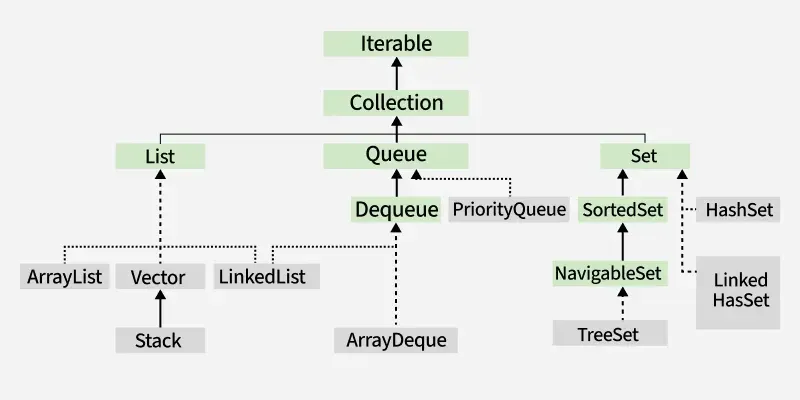
**Sub-Interfaces of Collection Interface
The subinterfaces of Collection, also called collection types, are:
1. List
- List represents an ordered collection that allows duplicates.
- Elements can be accessed by index.
- **Implementing Classes: ArrayList, LinkedList, Vector, Stack.
- **Declaration:
public interface List extends Collection
2. Set
- Set represents an unordered collection with no duplicate elements.
- **Implementing Classes: HashSet, TreeSet, LinkedHashSet, EnumSet, CopyOnWriteArraySet.
- **Declaration:
public interface Set extends Collection
**3. SortedSet
- SortedSet extends Set and maintains elements in a sorted order.
- Provides methods to handle range-based operations.
- **Implementing Class: TreeSet.
- **Declaration:
public interface SortedSet extends Set
4. NavigableSet
- NavigableSet extends SortedSet and provides navigation methods like lower(), floor(), ceiling(), and higher().
- **Implementing Class: TreeSet.
- **Declaration:
public interface NavigableSet extends SortedSet
**5. Queue
- Queue represents a collection following FIFO (First-In-First-Out) order.
- Implementing Classes: PriorityQueue, Deque, ArrayDeque, LinkedList
- **Declaration:
public interface Queue extends Collection
**5. Deque
- Deque extends Queue and allows elements to be added/removed from both ends.
- **Implementing Classes: ArrayDeque, LinkedList.
- **Declaration:
public interface Deque extends Queue
Operations on Collection Objects
The Collection interface provides several operations to manipulate data efficiently. Let’s see the most common operations using the ArrayList implementation class.
**1. Adding Elements
We can add elements using the add(E e) method for a single element or addAll(Collection c) to add multiple elements.
Java `
import java.util.*;
public class Geeks{
public static void main(String[] args){

    // Creating a collection using ArrayList implementation
    Collection<Integer> numbers = new ArrayList<>();

    // Adding individual elements
    numbers.add(10);
    numbers.add(20);
    numbers.add(30);

    // Adding another collection
    Collection<Integer> moreNumbers = new ArrayList<>();
    moreNumbers.add(40);
    moreNumbers.add(50);

    numbers.addAll(moreNumbers);

    System.out.println("After adding elements: " + numbers);
}
}
`
Output
After adding elements: [10, 20, 30, 40, 50]
**2. Removing Elements
Elements can be removed using remove(E e) or removeAll(Collection c) methods.
Java `
import java.util.*;
public class Geeks{
public static void main(String[] args){

    Collection<String> fruits = new ArrayList<>();
    fruits.add("Apple");
    fruits.add("Banana");
    fruits.add("Mango");
    fruits.add("Orange");

    System.out.println("Initial Collection: " + fruits);

    // Remove a specific element
    fruits.remove("Mango");
    System.out.println("After removing Mango: " + fruits);

    // Remove all elements present in another collection
    Collection<String> toRemove = new ArrayList<>();
    toRemove.add("Apple");
    toRemove.add("Banana");

    fruits.removeAll(toRemove);
    System.out.println("After removeAll(): " + fruits);
}
}
`
Output
Initial Collection: [Apple, Banana, Mango, Orange] After removing Mango: [Apple, Banana, Orange] After removeAll(): [Orange]
3. Accessing Elements
Although the Collection interface doesn’t provide index-based access, its sub-interface List (implemented by ArrayList) allows retrieving elements using the get(int index) method.
Java `
import java.util.*;
public class Geeks{
public static void main(String[] args){

    // Using List reference for index-based access
    List<String> colors = new ArrayList<>();
    colors.add("Red");
    colors.add("Green");
    colors.add("Blue");

    System.out.println("Colors List: " + colors);

    // Accessing elements by index
    String firstColor = colors.get(0);
    String lastColor = colors.get(colors.size() - 1);

    System.out.println("First Color: " + firstColor);
    System.out.println("Last Color: " + lastColor);
}
}
`
Output
Colors List: [Red, Green, Blue] First Color: Red Last Color: Blue
**4. Iterating over a Collection
To iterate over the elements of Collection we can use iterator() method.
Java `
import java.util.*;
public class Geeks { public static void main(String[] args) { Collection l = new LinkedList<>(); l.add("Geeks"); l.add("for"); l.add("Geeks");
    System.out.println("The list is: " + l);

    Iterator<String> it = l.iterator();
    System.out.print("Iterator values: ");
    while (it.hasNext()) {
        System.out.print(it.next() + " ");
    }
}
}
`
Output
The list is: [Geeks, for, Geeks] Iterator values: Geeks for Geeks
Methods of Collection Interface
| Method | Description |
|---|---|
| add(E e) | Adds an element to the collection (optional). |
| addAll(Collection<? extends E> c) | Adds all elements from another collection. |
| clear() | Removes all elements. |
| contains(Object o) | Checks if an element exists. |
| containsAll(Collection<?> c) | Checks if all elements exist. |
| remove(Object o) | Removes a single instance of the specified element. |
| removeAll(Collection<?> c) | Removes all elements present in another collection. |
| retainAll(Collection<?> c) | Retains only elements present in another collection. |
| removeIf(Predicate<? super E> filter) | Removes elements satisfying a predicate. |
| size() | Returns the number of elements. |
| isEmpty() | Checks if the collection is empty. |
| iterator() | Returns an iterator over the elements. |
| stream() | Returns a sequential stream. |
| parallelStream() | Returns a parallel stream. |
| toArray() | Converts the collection to an array. |
| equals(Object o) | Compares this collection with another object. |
| hashCode() | Returns hash code of the collection. |
| spliterator() | Returns a Spliterator for elements. |