Hashtable in Java (original) (raw)
The Hashtable class in Java is a legacy data structure that stores data in key-value pairs using a hash table. It is part of the Collections Framework and provides synchronized data access.
- Stores data as key-value pairs with no null keys or values allowed.
- Uses hashing (hashCode and equals) to store and retrieve elements efficiently.
- It is synchronized, making it thread-safe but slower than HashMap.
Syntax
public class Hashtable<K,V> extends Dictionary<K,V> implements Map<K,V>, Cloneable, Serializable
**Parameters:
- **K : the type of keys maintained by this map
- **V : the type of mapped values Java `
import java.util.Hashtable;
public class GFG { public static void main(String args[]) {
      // Create a Hashtable of String
      // keys and Integer values
    Hashtable<String, Integer> ht = new Hashtable<>();

    // Adding elements to the Hashtable
    ht.put("One", 1);
    ht.put("Two", 2);
    ht.put("Three", 3);

    // Displaying the Hashtable elements
    System.out.println("Hashtable Elements: " + ht);
}
}
`
Output
Hashtable Elements: {Two =2, Three =3, One =1}
In general, it's recommended to use the Map interface or one of its implementations (such as HashMap or ConcurrentHashMap) instead of the Hashtable class.
**Note: While the Hashtable class still exists in Java and can still be used, it's generally recommended to use the Map interface or one of its implementations instead.
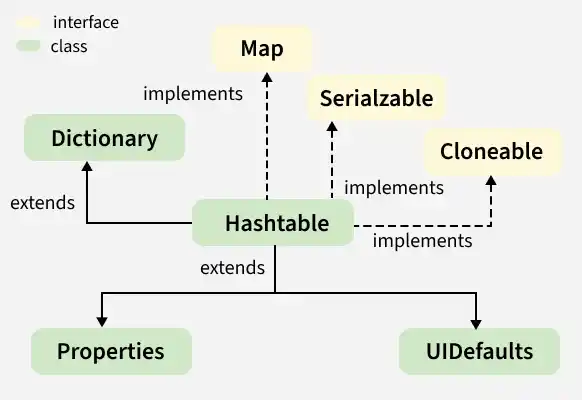
Hashtable implements Serializable, Cloneable, Map<K,V> interfaces and extends Dictionary<K,V>. The direct subclasses are Properties, UIDefaults.
Constructors
In order to create a Hashtable, we need to import it from **java.util.Hashtable. There are various ways in which we can create a Hashtable.
1. Hashtable()
This creates an empty hashtable with the default load factor of 0.75 and an initial capacity is 11.
Hashtable<K, V> ht = new Hashtable<K, V>();
Java `
// Using Hashtable() Constructor import java.io.; import java.util.;
class AddElementsToHashtable { public static void main(String args[]) { // No need to mention the // Generic type twice Hashtable<Integer, String> ht1 = new Hashtable<>();
    // Initialization of a Hashtable
    // using Generics
    Hashtable<Integer, String> ht2
        = new Hashtable<Integer, String>();

    // Inserting the Elements
    // using put() method
    ht1.put(1, "one");
    ht1.put(2, "two");
    ht1.put(3, "three");

    ht2.put(4, "four");
    ht2.put(5, "five");
    ht2.put(6, "six");

    // Print mappings to the console
    System.out.println("Mappings of ht1 : " + ht1);
    System.out.println("Mappings of ht2 : " + ht2);
}
}
`
Output
Mappings of ht1 : {3=three, 2=two, 1=one} Mappings of ht2 : {6=six, 5=five, 4=four}
**2. Hashtable(int initialCapacity)
This creates a hash table that has an initial size specified by initialCapacity and the default load factor is 0.75.
Hashtable<K, V> ht = new Hashtable<K, V>(int initialCapacity);
Java `
// Using Hashtable(int initialCapacity) import java.io.; import java.util.;
class GFG { public static void main(String args[]) { // No need to mention the // Generic type twice Hashtable<Integer, String> ht1 = new Hashtable<>(4);
    // Initialization of a Hashtable
    // using Generics
    Hashtable<Integer, String> ht2
      = new Hashtable<Integer, String>(2);

    // Inserting the Elements
    // using put() method
    ht1.put(1, "one");
    ht1.put(2, "two");
    ht1.put(3, "three");

    ht2.put(4, "four");
    ht2.put(5, "five");
    ht2.put(6, "six");

    // Print mappings to the console
    System.out.println("Mappings of ht1 : " + ht1);
    System.out.println("Mappings of ht2 : " + ht2);
}
}
`
Output
Mappings of ht1 : {3=three, 2=two, 1=one} Mappings of ht2 : {4=four, 6=six, 5=five}
3. Hashtable(int size, float fillRatio)
This version creates a hash table that has an initial size specified by size and fill ratio specified by fillRatio. fill ratio: Basically, it determines how full a hash table can be before it is resized upward and its Value lies between 0.0 to 1.0.
Hashtable<K, V> ht = new Hashtable<K, V>(int size, float fillRatio);
Java `
// Using Hashtable(int size, float fillRatio) import java.io.; import java.util.;
class GFG { public static void main(String args[]) { // No need to mention the // Generic type twice Hashtable<Integer, String> ht1 = new Hashtable<>(4, 0.75f);
    // Initialization of a Hashtable
    // using Generics
    Hashtable<Integer, String> ht2
        = new Hashtable<Integer, String>(3, 0.5f);

    // Inserting the Elements
    // using put() method
    ht1.put(1, "one");
    ht1.put(2, "two");
    ht1.put(3, "three");

    ht2.put(4, "four");
    ht2.put(5, "five");
    ht2.put(6, "six");

    // Print mappings to the console
    System.out.println("Mappings of ht1 : " + ht1);
    System.out.println("Mappings of ht2 : " + ht2);
}
}
`
Output
Mappings of ht1 : {3=three, 2=two, 1=one} Mappings of ht2 : {6=six, 5=five, 4=four}
4. Hashtable(Map<? extends K,? extends V> m)
This creates a hash table that is initialized with the elements in m.
Hashtable<K, V> ht = new Hashtable<K, V>(Map m);
Java `
// Using Hashtable(Map<? extends K,? extends V> m) import java.io.; import java.util.;
class GFG { public static void main(String args[]) { // No need to mention the // Generic type twice Map<Integer, String> hm = new HashMap<>();
    // Inserting the Elements
    hm.put(1, "one");
    hm.put(2, "two");
    hm.put(3, "three");

    // Initialization of a Hashtable
    // using Generics
    Hashtable<Integer, String> ht2
        = new Hashtable<Integer, String>(hm);

    // Print mappings to the console

    System.out.println("Mappings of ht2 : " + ht2);
}
}
`
Output
Mappings of ht2 : {3=three, 2=two, 1=one}
**Example:
Java `
// To illustrate Java.util.Hashtable import java.util.*;
public class GFG { public static void main(String[] args) { // Create an empty Hashtable Hashtable<String, Integer> ht = new Hashtable<>();
    // Add elements to the hashtable
    ht.put("vishal", 10);
    ht.put("sachin", 30);
    ht.put("vaibhav", 20);

    // Print size and content
    System.out.println("Size of map is: " + ht.size());
    System.out.println(ht);

    // Check if a key is present and if
    // present, print value
    if (ht.containsKey("vishal")) {
        Integer a = ht.get("vishal");
        System.out.println("value for key"
                           + " \"vishal\" is: " + a);
    }
}
}
`
Output
Size of map is: 3 {vaibhav=20, vishal=10, sachin=30} value for key "vishal" is: 10
Performing Various Operations on Hashtable
1. Adding Elements
Elements are added to a Hashtable using the put() method. It does not maintain insertion order and stores elements based on generated hash values for efficient access.
Java `
import java.io.; import java.util.;
class GFG { public static void main(String args[]) { // No need to mention the // Generic type twice Hashtable<Integer, String> ht1 = new Hashtable<>();
    // Initialization of a Hashtable
    // using Generics
    Hashtable<Integer, String> ht2
        = new Hashtable<Integer, String>();

    // Inserting the Elements
    ht1.put(1, "Geeks");
    ht1.put(2, "For");
    ht1.put(3, "Geeks");

    ht2.put(1, "Geeks");
    ht2.put(2, "For");
    ht2.put(3, "Geeks");

    // Print mappings to the console
    System.out.println("Mappings of ht1 : " + ht1);
    System.out.println("Mappings of ht2 : " + ht2);
}
}
`
Output
Mappings of ht1 : {3=Geeks, 2=For, 1=Geeks} Mappings of ht2 : {3=Geeks, 2=For, 1=Geeks}
2. Changing Elements
To update an element in a Hashtable, use the put() method with the same key; it replaces the existing value for that key.
Java `
import java.io.; import java.util.;
class GFG { public static void main(String args[]) {
    // Initialization of a Hashtable
    Hashtable<Integer, String> ht
        = new Hashtable<Integer, String>();

    // Inserting the Elements
    ht.put(1, "Geeks");
    ht.put(2, "Geeks");
    ht.put(3, "Geeks");

    // print initial map to the console
    System.out.println("Initial Map " + ht);

    // Update the value at key 2
    ht.put(2, "For");

    // print the updated map
    System.out.println("Updated Map " + ht);
}
}
`
Output
Initial Map {3=Geeks, 2=Geeks, 1=Geeks} Updated Map {3=Geeks, 2=For, 1=Geeks}
3. Removing Element
In order to remove an element from the Map, we can use the remove() method. This method takes the key value and removes the mapping for a key from this map if it is present in the map.
Java `
import java.io.; import java.util.;
class GFG { public static void main(String args[]) { // Initialization of a Hashtable Map<Integer, String> ht = new Hashtable<Integer, String>();
    // Inserting the Elements
    // using put method
    ht.put(1, "Geeks");
    ht.put(2, "For");
    ht.put(3, "Geeks");
    ht.put(4, "For");

    // Initial HashMap
    System.out.println("Initial map : " + ht);

    // Remove the map entry with key 4
    ht.remove(4);

    // Final Hashtable
    System.out.println("Updated map : " + ht);
}
}
`
Output
Initial map : {4=For, 3=Geeks, 2=For, 1=Geeks} Updated map : {3=Geeks, 2=For, 1=Geeks}
4. Traversal of a Hashtable
To iterate the table, we can make use of an advanced for loop. Below is the example of iterating a hashtable.
Java `
import java.util.Hashtable; import java.util.Map;
public class GFG { public static void main(String[] args) { // Create an instance of Hashtable Hashtable<String, Integer> ht = new Hashtable<>();
    // Adding elements using put method
    ht.put("vishal", 10);
    ht.put("sachin", 30);
    ht.put("vaibhav", 20);

    // Iterating using enhanced for loop
    for (Map.Entry<String, Integer> e : ht.entrySet())
        System.out.println(e.getKey() + " " + e.getValue());
}
}
`
Output
vaibhav 20 vishal 10 sachin 30
Internal Working of Hashtable
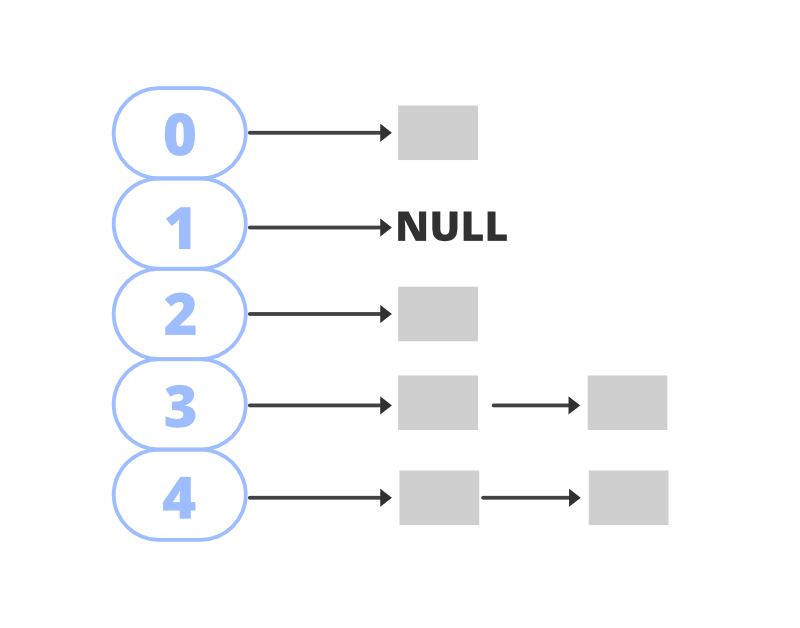
Hashtable internally uses an array of buckets to store key-value pairs. It uses the hashCode() method to determine the index (bucket) where the data should be stored.
- The hash function converts a key into an index, ensuring fast access.
- The equals() method is used to compare keys and identify the correct value.
- In case of collision (same hashcode), elements are stored in a linked list (bucket) at that index.
Methods of Hashtable
- **K : The type of the keys in the map.
- **V : The type of values mapped in the map.
Advantages
- Provides fast data retrieval using key-value pairs.
- Thread-safe because all methods are synchronized.
- Stores unique keys to avoid duplicate entries.
- Search, insertion, and deletion operations are efficient.
- Suitable for multi-threaded applications where data safety is required.
Limitations
- Hashtable is synchronized, so it is slower compared to HashMap.
- It does not allow null keys or null values.
- Iteration performance is slower because of thread-safety overhead.
- It is considered a legacy class in Java Collections Framework.
- No proper support for modern collection features like fail-fast iterators.
| Method | Description |
|---|---|
| clear() | Clears this hashtable so that it contains no keys. |
| clone() | Creates a shallow copy of this hashtable. |
| compute(K key, BiFunction< super K, super V, extends V> remappingFunction) | Attempts to compute a mapping for the specified key and its current mapped value (or null if there is no current mapping). |
| computeIfAbsent(K key, Function< super K, extends V> mappingFunction) | If the specified key is not already associated with a value (or is mapped to null), attempts to compute its value using the given mapping function and enters it into this map unless null. |
| computeIfPresent(K key, BiFunction< super K,? super V, extends V> remappingFunction) | If the value for the specified key is present and non-null, attempts to compute a new mapping given the key and its current mapped value. |
| contains(Object value) | Tests if some key maps into the specified value in this hashtable. |
| containsKey(Object key) | Tests if the specified object is a key in this hashtable. |
| containsValue(Object value) | Returns true if this hashtable maps one or more keys to this value. |
| elements() | Returns an enumeration of the values in this hashtable. |
| entrySet() | Returns a Set view of the mappings contained in this map. |
| equals(Object o) | Compares the specified Object with this Map for equality, as per the definition in the Map interface. |
| get(Object key) | Returns the value to which the specified key is mapped, or null if this map contains no mapping for the key. |
| hashCode() | Returns the hash code value for this Map as per the definition in the Map interface. |
| isEmpty() | Tests if this hashtable maps no keys to values. |
| keys() | Returns an enumeration of the keys in this hashtable. |
| keySet() | Returns a Set view of the keys contained in this map. |
| merge(K key, V value, BiFunction< super V, super V, extends V> remappingFunction) | If the specified key is not already associated with a value or is associated with null, associates it with the given non-null value. |
| put(K key, V value) | Maps the specified key to the specified value in this hashtable. |
| putAll(Map< extends K, extends V> t) | Copies all of the mappings from the specified map to this hashtable. |
| rehash() | Increases the capacity of and internally reorganizes this hashtable, in order to accommodate and access its entries more efficiently. |
| remove(Object key) | Removes the key (and its corresponding value) from this hashtable. |
| size() | Returns the number of keys in this hashtable. |
| toString() | Returns a string representation of this Hashtable object in the form of a set of entries, enclosed in braces and separated by the ASCII characters ", " (comma and space). |
| values() | Returns a Collection view of the values contained in this map. |
Methods Declared in interface java.util.Map
| Method | Description |
|---|---|
| forEach(BiConsumer< super K, super V> action) | Performs the given action for each entry in this map until all entries have been processed or the action throws an exception. |
| getOrDefault(Object key, V defaultValue) | Returns the value to which the specified key is mapped, or defaultValue if this map contains no mapping for the key. |
| putIfAbsent(K key, V value) | If the specified key is not already associated with a value (or is mapped to null) associates it with the given value and returns null, else returns the current value. |
| remove(Object key, Object value) | Removes the entry for the specified key only if it is currently mapped to the specified value. |
| replace(K key, V value) | Replaces the entry for the specified key only if it is currently mapped to some value. |
| replace(K key, V oldValue, V newValue) | Replaces the entry for the specified key only if currently mapped to the specified value. |
| replaceAll(BiFunction< super K, super V, extends V> function) | Replaces each entry's value with the result of invoking the given function on that entry until all entries have been processed or the function throws an exception. |