Hibernate OnetoMany Mapping (original) (raw)
Hibernate - One-to-Many Mapping
Last Updated : 9 Apr, 2026
Hibernate One-to-Many mapping defines a relationship where one entity is associated with multiple instances of another entity. It is commonly used to model parent-child relationships in database-driven applications. Hibernate simplifies this by managing the association and underlying database operations.
- Supports bidirectional mapping for navigation from both parent and child
- Provides cascade options to propagate operations like save and delete
- Uses collections (List/Set) to store multiple child entities
Syntax
This mapped variable of the other tables is responsible for mapping between two tables.
_@oneToMany(mappedby=”nameofmappedvariable”)
For this example, we will map the _id field of _m to the _manufacture_id of the _model entity.

Real-Life Example
Consider bike manufacturers:
- A manufacturer can produce multiple bike models.
- The same bike model cannot be produced by multiple manufacturers.
This is a classic one-to-many relationship, where one manufacturer>many models.
Step by Step Implementation
Step 1. Create the MySQL database
CREATE DATABASE mapping;
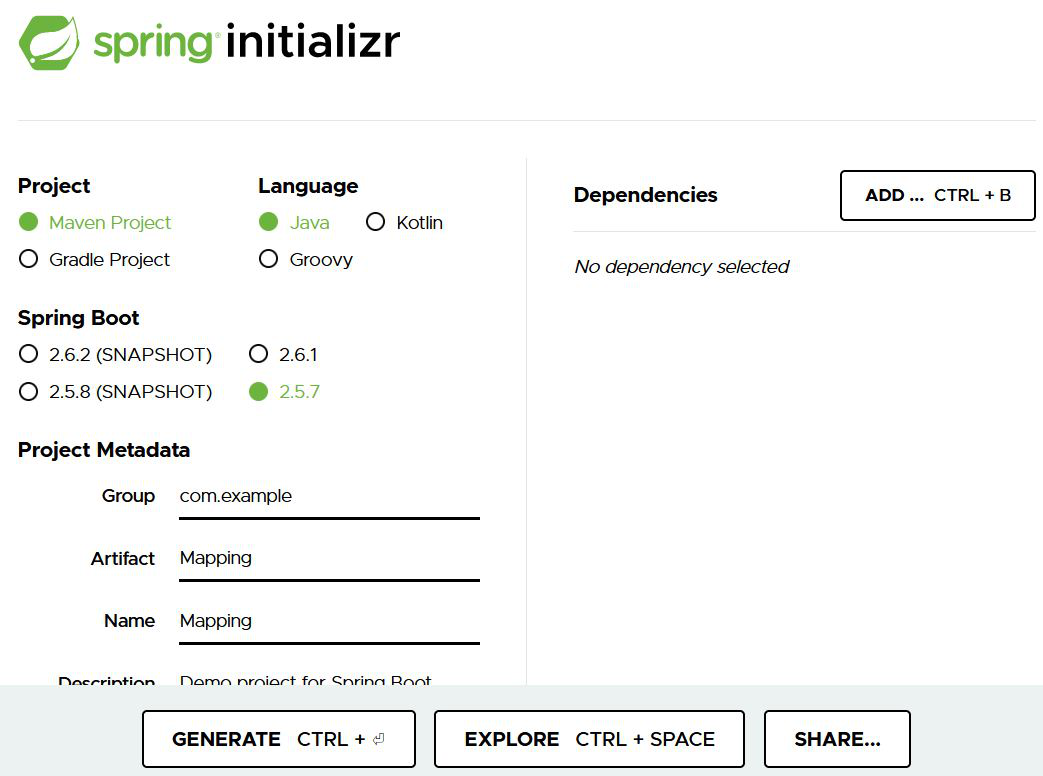
Step 2. Generate the starter project (spring Initializr)
**Project: Maven
**Language: Java
**Spring Boot: 2.5.7
**Packaging: JAR
**Java: 11
**Dependencies:
- Spring Web
- Spring Data JPA
- MySql Driver
**Click Generate
Step 3. Importing the Project
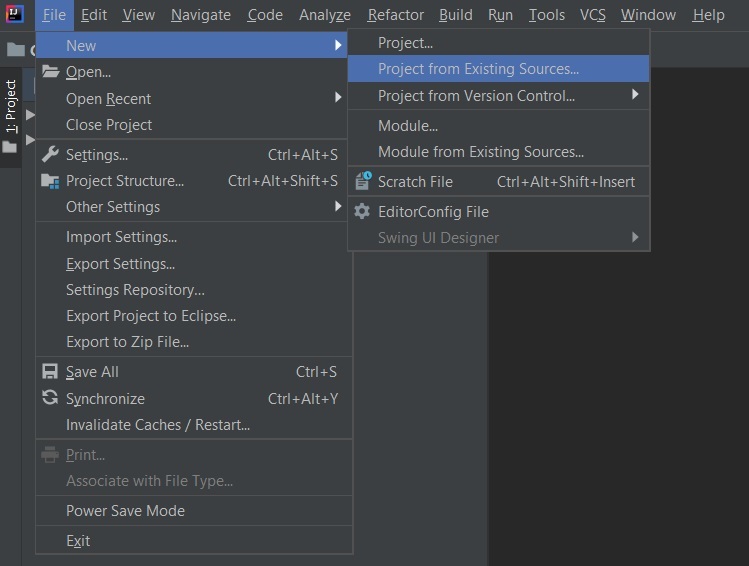
- Open your IDE.
- **File > New > Project from Existing Sources.
- Select
pom.xmland import the project.
Step 4: Database configuration
Database configuration required for connection of Mysql database to the Spring Boot Application.
**application.properties
spring.datasource.username=root
spring.datasource.password=Aayush
spring.datasource.url=jdbc:mysql://localhost:3306/mapping
spring.jpa.hibernate.ddl-auto=update
Step 5: Create folder structure
Go to src-> main -> java -> com -> example -> Mapping and create two files in the models folder i.e _Manufactures.java and _Model.java

Step 6: Add entity
**1. Create Manufactures.java class : This contains the entity Manufactures, which contains the required associated fields.
**Manufactures.java class
Java `
package com.example.Mapping.Models;
import javax.persistence.*; import java.util.List;
@Entity @Table(name = "manufactures") public class Manufactures {
// Unique identifier for the manufacturer
@Id
@GeneratedValue(strategy = GenerationType.IDENTITY)
private int id;

// Name of the manufacturer
private String manufactures_name;

// A manufacturer can have many models
@OneToMany(mappedBy = "manufacturer", cascade = CascadeType.ALL)
private List models;
// Constructor with both id and name
public Manufactures(String manufactures_name) {
this.manufactures_name = manufactures_name;
}
// Default constructor
public Manufactures() {
}

// Getters and setters for id and name

public int getId() {
    return id;
}

public void setId(int id) {
    this.id = id;
}

public String getManufactures_name() {
    return manufactures_name;
}

public void setManufactures_name(String manufactures_name) {
    this.manufactures_name = manufactures_name;
}

// Getter for models
public List<Model> getModels() {
    return models;
}

// Setter for models
public void setModels(List<Model> models) {
    this.models = models;
}
}
`
**2. Create Model.java
This contains the entity Model with various fields and methods-
Java `
package com.example.Mapping.Models;
import javax.persistence.Entity; import javax.persistence.Id; import javax.persistence.JoinColumn; import javax.persistence.ManyToOne;
@Entity @Table(name = "models") public class Model {
// Unique identifier for the model
@Id
private int model_id;

// Name of the model
private String name;

// A model belongs to one manufacturer Foreign key referencing the manufacturer table
@ManyToOne
@JoinColumn(name = "manufacture_id")
private Manufactures manufacturer;

// Constructor with all fields
public Model(int model_id, String name, Manufactures manufacturer) {
    this.model_id = model_id;
    this.name = name;
    this.manufacturer = manufacturer;
}

// Default constructor
public Model() {
}

// Getters and setters

public int getModel_id() {
    return model_id;
}

public void setModel_id(int model_id) {
    this.model_id = model_id;
}

public String getName() {
    return name;
}

public void setName(String name) {
    this.name = name;
}

public Manufactures getManufacturer() {
    return manufacturer;
}

public void setManufacturer(Manufactures manufacturer) {
    this.manufacturer = manufacturer;
}
}
`
Step 7. Add repositories
**1. Create ManufactureRepo Class: This Interface contains the forms the bridge of entity Manufactures to the Database
**ManufacturesRepo.java
Java `
package com.example.Mapping.Repositories;
import com.example.Mapping.Models.Manufactures; import org.springframework.data.jpa.repository.JpaRepository;
public interface ManufacturesRepo extends JpaRepository<Manufactures, Integer> { }
`
**2. Create ModelRepo.java class: This Interface contains the forms the bridge of entity _Model to the Database
**ModelRepo.java
Java `
package com.example.Mapping.Repositories;
import com.example.Mapping.Models.Model; import org.springframework.data.jpa.repository.JpaRepository;
public interface ModelRepo extends JpaRepository<Model, Integer> { }
`
Step 8. Application drive
Driver class for Spring Boot application to test the One-to-Many Mapping of Hibernate.
- This Spring Boot application initializes and saves data using JPA repositories.
- It creates a Manufacturer__("Honda")_ entity and two associated Model (_"AYZ" and "ZET") entities with a one-to-many relationship.
- The data is then stored in corresponding repositories during the application's run.
**MappingApplication.java
Java `
package com.example.Mapping;
import com.example.Mapping.Models.Manufactures; import com.example.Mapping.Models.Model; import com.example.Mapping.Repositories.ManufacturesRepo; import com.example.Mapping.Repositories.ModelRepo; import org.springframework.beans.factory.annotation.Autowired; import org.springframework.boot.CommandLineRunner; import org.springframework.boot.SpringApplication; import org.springframework.boot.autoconfigure.SpringBootApplication;
/**
Spring Boot application for mapping relationships between Manufactures and Models. */ @SpringBootApplication public class MappingApplication implements CommandLineRunner {
// Injecting Manufactures and Model repositories using autowiring @Autowired private ManufacturesRepo manufacturesRepo; @Autowired private ModelRepo modelRepo;
public static void main(String[] args) { SpringApplication.run(MappingApplication.class, args); }
@Override public void run(String... args) throws Exception {
 // Creating a new Manufactures object with ID 1 and name "Honda"
 Manufactures data = new Manufactures("Honda");

 // Saving the Manufactures record
 manufacturesRepo.save(data);

 // Creating two new Model objects associated with the "Honda" manufacturer
 Model model1 = new Model(1, "AYZ", data);
 Model model2 = new Model(2, "ZET", data);

 // Saving the Model records
 modelRepo.save(model1);
 modelRepo.save(model2);
}
}
`
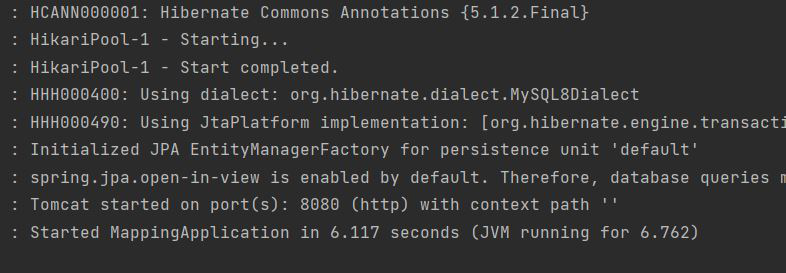
**Run the main application:
Console log of project running.
**Step 9. Verify the DB content
Database view of _manufactures table:
SELECT * FROM manufactures;

**Model Table
Database view of _model table:
SELECT * FROM model;

The below image depicts rows in manufactures and model. model will contain manufacture_id values linking to manufactures.