Introduction to Java Servlets (original) (raw)
Last Updated : 24 Apr, 2026
Java Servlet is a Java program that runs on a Java-enabled web server or application server. It handles client requests, processes them and generates responses dynamically. Servlets are the backbone of many server-side Java applications due to their efficiency and scalability.
- Work on the server-side to manage request-response lifecycle.
- Capable of handling multiple client requests efficiently.
- Suitable for building robust and scalable enterprise applications.
Servlets Architecture
Servlet architecture defines how client requests are processed by the server using servlets. It follows a request-response model where the web container manages execution.
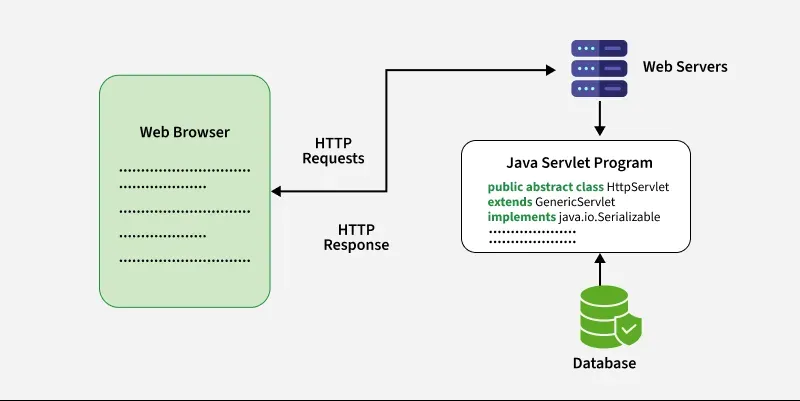
Servlet Architecture
Servlet Architecture Workflow
Execution of Servlets basically involves Six basic steps:
- The Clients send the request to the Web Server.
- The Web Server receives the request.
- The Web Server passes the request to the corresponding servlet.
- The Servlet processes the request and generates the response in the form of output.
- The Servlet sends the response back to the webserver.
- The Web Server sends the response back to the client and the client browser displays it on the screen.
Need of Server-Side Extensions
- Server-side extensions allow dynamic web page generation by running programs on the server.
- Web servers provide APIs to help developers build these applications.
- Java Servlets (part of Jakarta EE) are a key API for Java-based web development.
Servlet Container
Servlet container, also known as Servlet engine, is an integrated set of objects that provide a run time environment for Java Servlet components. It is a system that manages Java Servlet components on top of the Web server to handle the Web client requests.
Services provided by the Servlet container:
- **Network Services: Loads a Servlet class. The loading may be from a local file system, a remote file system or other network services. The Servlet container provides the network services over which the request and response are sent.
- **Decode and Encode MIME-based messages: Provides the service of decoding and encoding MIME-based messages.
- **Manage Servlet container: Manages the lifecycle of a Servlet.
- **Resource management: Manages the static and dynamic resources, such as HTML files, Servlets and JSP pages.
- **Security Service: Handles authorization and authentication of resource access.
- **Session Management: Maintains a session by appending a session ID to the URL path
Steps to implementation of creating a basic servlet program
Below are the basic steps to create and run a simple servlet program in Java
Prerequisites
- Install JDK (Java Development Kit)
- Install Apache Tomcat server (e.g., version 9 or 10)
- Install an IDE like Eclipse or IntelliJ IDEA
- Download the Servlet API JAR (already included in Tomcat)
Step 1: Create a Dynamic Web Project (in Eclipse)
- Open Eclipse -> File ->New ->Dynamic Web Project
- Name the project (e.g., HelloWorldServlet)
- Target runtime -> Select Apache Tomcat
- Click Finish
Step 2: Create Servlet class
- Right-click on src -> New-> Servlet
- Name it HelloWorldServlet and click Finish
**HelloWorldServlet.java
Java `
import java.io.; import jakarta.servlet.; import jakarta.servlet.http.*;
public class HelloWorldServlet extends HttpServlet { protected void doGet(HttpServletRequest request, HttpServletResponse response) throws ServletException, IOException { response.setContentType("text/html"); PrintWriter out = response.getWriter(); out.println("
Hello, World!
"); } }`
**Explanation: This servlet handles a GET request and sends an HTML response to the client. It sets the response type to text/html, gets the PrintWriter, and prints a simple “Hello, World!” message inside HTML tags.
Configuring a Servlet
To deploy a servlet, you need to configure it in the web.xml file. This file maps URLs to servlets. For example,
**XML-Based Configuration (web.xml):
XML `
<servlet>
    <servlet-name>HelloWorldServlet</servlet-name>
    <servlet-class>HelloWorldServlet</servlet-class>
</servlet>

<servlet-mapping>
    <servlet-name>HelloWorldServlet</servlet-name>
    <url-pattern>/hello</url-pattern>
</servlet-mapping>
`
**Explanation: This is a web.xml file used for mapping URLs to servlets. So, when you visit http://localhost:8080/yourApp/hello, the servlet runs and shows "Hello, World!" in the browser.
Annotation-Based Configuration (Modern Approach)
From Servlet 3.0, servlet configuration can also be done using annotations. Instead of using web.xml, we can configure the servlet using the @WebServlet annotations.
Java `
@WebServlet("/hello") public class HelloWorldServlet extends HttpServlet { protected void doGet(HttpServletRequest request, HttpServletResponse response) throws ServletException, IOException { response.setContentType("text/html"); PrintWriter out = response.getWriter(); out.println("
Hello, World!
"); } }`
**Explanation: Here we have used the @WebServlet("/hello") annotation to register the servlet directly in code (no need for web.xml). It maps the servlet to the URL /hello.
Why Choose Java Servlet over other Technologies?
Dynamic web content requires server-side technologies. While there are many options, Java Servlet stand out due to their advantages over alternatives like Common Gateway Interface (CGI)
**Limitations of CGI:
- Process Overhead: CGI creates and destroys a process for every client request, leading to high resource consumption.
- Scalability Issues: Poor performance with increased client requests.
Difference Between Java Servlets and CGI
The table below demonstrates the difference between servlet and CGI
| Servlet | CGI (Common Gateway Interface) |
|---|---|
| Servlets are portable and efficient. | CGI is not portable. |
| In Servlets, sharing data is possible. | In CGI, sharing data is not possible. |
| Servlets can directly communicate with the webserver. | CGI cannot directly communicate with the webserver. |
| Servlets are less expensive than CGI. | CGI is more expensive than Servlets. |
| Servlets can handle the cookies. | CGI cannot handle the cookies. |
Key Classes and Interfaces
Various classes and interfaces present in these packages are:
| Component | Type | Package |
|---|---|---|
| Servlet | Interface | jakarta.servlet.* |
| ServletRequest | Interface | jakarta.servlet.* |
| ServletResponse | Interface | jakarta.servlet.* |
| GenericServlet | Class | jakarta.servlet.* |
| HttpServlet | Class | jakarta.servlet.http.* |
| HttpServletRequest | Interface | jakarta.servlet.http.* |
| HttpServletResponse | Interface | jakarta.servlet.http.* |
| Filter | Interface | jakarta.servlet.* |
| ServletConfig | Interface | jakarta.servlet.* |