Introduction to Hibernate Framework (original) (raw)
Hibernate is an open-source Object Relational Mapping (ORM) framework for Java. It simplifies database connection by mapping Java classes (objects) to database tables and Java data types to SQL data types. Instead of writing long SQL queries, developers can use Hibernate APIs or HQL (Hibernate Query Language) to perform CRUD operations.
- Maps Java objects to database tables, reducing the need for manual SQL.
- Supports CRUD operations through Hibernate APIs or HQL.
- Handles database connections, caching, and transaction management automatically.
- Hibernate acts as a bridge between Java objects and relational databases.
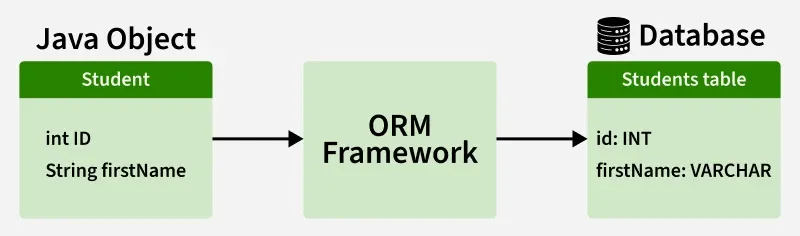
ORM Framework
Hibernate Architecture
The architecture of Hibernate is layered and consists of several key components working together.
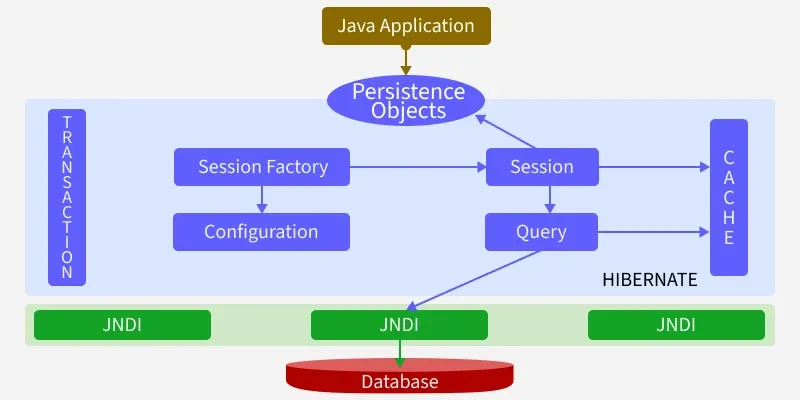
Architecture
Hibernate Workflow
1. Application loads configuration (hibernate.cfg.xml).
2. Hibernate builds a SessionFactory.
3. Application requests a Session from SessionFactory.
4. Inside a Session:
- Begin Transaction
- Perform CRUD operations
- Commit or Rollback transaction
5. Hibernate translates operations -> SQL-> executes via JDBC.
6. Results are returned as Java objects
**Key Components of Hibernate Architecture
1. Configuration
Configuration is a class which is present in org.hibernate.cfg package. It activates Hibernate framework. It reads both configuration file and mapping files.
- Activates Hibernate framework.
- Reads configuration (hibernate.cfg.xml) and mapping files.
- Throws an exception if the configuration is invalid.
- Creates in-memory metadata representing the configuration.
Configuration cfg = new Configuration();
cfg.configure(); // Reads and validates hibernate.cfg.xml
2. SessionFactory
The SessionFactory interface creates Session objects and maintains a second-level cache. It is heavyweight and thread-safe, so usually one per application.
- Factory for Session objects.
- One per database is sufficient.
SessionFactory factory = cfg.buildSessionFactory();
3. Session
The Session interface interacts with the database and provides CRUD operations. It maintains a first-level cache (session-level).
Session session = factory.openSession();
4. Transaction
The Transaction interface handles atomic database operations, ensuring data integrity through commit or rollback.
Transaction tx = session.beginTransaction();
tx.commit(); // or tx.rollback();
5. Query
The Query interface executes HQL, Criteria API or native SQL queries to fetch or manipulate data.
Query query = session.createQuery("from Student");
List students = query.list();
6. Persistent Classes (Entities)
Java classes annotated with @Entity represent database tables. Each object maps to a row.
- Represents database tables.
- Mapped via annotations or XML.
- Enables object-oriented access to data.
@Entity
class Student {
@Id
private Long id;
private String name;
}
7. Mapping
Defines the relationship between Java classes and database tables. Can be done via annotations or XML files.
- Maps classes to tables and fields to columns.
- Supports relationships: One-to-One, One-to-Many, Many-to-One, Many-to-Many.
@Entity
@Table(name="student")
class Student { ... }
8. JDBC Layer
Handles low-level database communication. Hibernate internally uses JDBC to execute SQL and retrieve results.
- Connects to database using JDBC API.
- Executes SQL queries generated by Hibernate.
- Manages connection pooling and result fetching.
Step-by-Step Implementation of Hibernate Setup
Step 1 Create a Hibernate Project
- Open IntelliJ IDEA ->New Project-> Maven.
- Set GroupId ->com.example
- Set ArtifactId-> HibernateDemo.
- Select JDK 17+.
- Finish
**Project Structure:
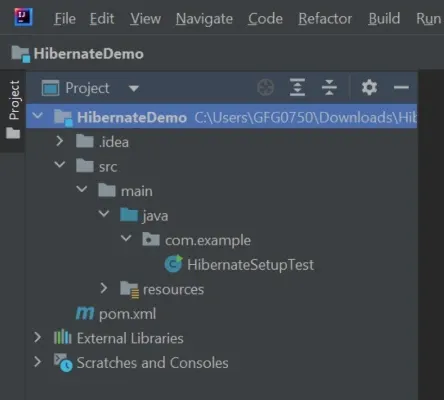
Structure
Step 2: Add Dependencies
Java `
<modelVersion>4.0.0</modelVersion>

<groupId>com.example</groupId>
<artifactId>HibernateDemo</artifactId>
<version>1.0-SNAPSHOT</version>
<packaging>jar</packaging>

<name>HibernateDemo</name>

<properties>
    <project.build.sourceEncoding>UTF-8</project.build.sourceEncoding>
    <maven.compiler.source>17</maven.compiler.source>
    <maven.compiler.target>17</maven.compiler.target>
</properties>

<dependencies>
    <!-- Hibernate Core -->
    <dependency>
        <groupId>org.hibernate.orm</groupId>
        <artifactId>hibernate-core</artifactId>
      <version>7.x.x.Final</version>
    </dependency>

    <!-- JPA API -->
    <dependency>
        <groupId>jakarta.persistence</groupId>
        <artifactId>jakarta.persistence-api</artifactId>
        <version>3.1.0</version>
    </dependency>

    <!-- MySQL Connector/J -->
    <dependency>
        <groupId>com.mysql</groupId>
        <artifactId>mysql-connector-j</artifactId>
        <version>8.0.33</version>
    </dependency>

    <!-- Optional: Logging (Hibernate requires slf4j) -->
    <dependency>
        <groupId>org.slf4j</groupId>
        <artifactId>slf4j-api</artifactId>
        <version>2.0.9</version>
    </dependency>
    <dependency>
        <groupId>org.slf4j</groupId>
        <artifactId>slf4j-simple</artifactId>
        <version>2.0.9</version>
    </dependency>
</dependencies>

<build>
    <plugins>
        <!-- Maven Compiler Plugin -->
        <plugin>
            <groupId>org.apache.maven.plugins</groupId>
            <artifactId>maven-compiler-plugin</artifactId>
            <version>3.11.0</version>
            <configuration>
                <source>17</source>
                <target>17</target>
            </configuration>
        </plugin>
    </plugins>
</build>
`
**Explanation: pom.xml is a Maven configuration file that manages project dependencies like Hibernate, JPA, and MySQL, and also defines build settings and Java version for the application.
Step 3: Add Hibernate Configuration File
- Go to src/main/resources.
- Create hibernate.cfg.xml: Java `
<session-factory>
    ...
</session-factory> <property name="hibernate.dialect">org.hibernate.dialect.MySQL8Dialect</property>
<property name="hibernate.show_sql">true</property>
<property name="hibernate.hbm2ddl.auto">update</property>
<!-- Entities mapping will be added later -->
<!-- <mapping class="com.example.Student"/> -->
</session-factory>`
**Explanation: hibernate.cfg.xml configures database connection and Hibernate settings, and defines mappings between Java classes and database tables.
Step 4: Test Hibernate Setup
Open main class and run the application
Java `
import org.hibernate.SessionFactory; import org.hibernate.cfg.Configuration;
public class HibernateSetupTest { public static void main(String[] args) { try { SessionFactory sessionFactory = new Configuration().configure().buildSessionFactory(); System.out.println("Hibernate setup successful!"); } catch (Exception e) { e.printStackTrace(); } } }
`
**Explanation: This class tests Hibernate setup by loading the configuration file and creating a SessionFactory to verify that the connection is working successfully.
If you see the message Hibernate setup successful! in the console, your Hibernate database connection is correctly configured and ready to use.

output
Advantages of Hibernate
When working with JDBC, several challenges often arise:
- **Database Portability Issues: Changing the database in the middle of a project is costly because JDBC code is not portable across different database systems.
- **Mandatory Exception Handling: JDBC requires explicit handling of exceptions for every database operation, which increases code complexity.
- **Lack of Object-Level Relationships: JDBC works at the table level, so there is no direct support for managing object relationships.
- **Boilerplate Code: For every project, repetitive code is needed for tasks like establishing connections, executing queries and handling results. This increases code length and reduces readability.
To overcome the above problems we use ORM tool i.e. nothing but Hibernate framework. By using Hibernate we can avoid all the above problems and we can enjoy some additional set of functionalities.
- **ORM (Object-Relational Mapping): Maps Java classes to database tables and Java objects to rows, enabling object-oriented database interaction.
- **Database Independence: Hibernate applications can run on multiple databases with minimal changes, providing portability.
- **HQL (Hibernate Query Language): Supports database-independent, object-oriented queries for fetching and manipulating data.
- **Transaction Management: Integrates with JDBC or JTA to provide reliable and consistent transaction handling.
- **Caching: Improves performance with first-level (session) and optional second-level caching across sessions.
- **Relationship Mapping: Supports mapping of object relationships like one-to-one, one-to-many, many-to-one and many-to-many.