Java Hello World Program (original) (raw)
Last Updated : 12 May, 2026
Java Hello World Program is the first and simplest program that beginners learn. It demonstrates the basic structure of a Java program and how to display output on the console using Java syntax.
- It helps understand the basic structure of a Java program (class, main method)
- It is the starting point for learning Java programming
Prerequisites
Implementation of Java Hello World
The below-given program is the most simple program of Java printing "Hello World" to the screen. Let us try to understand every bit of code step by step.
Java `
public class HelloWorld {
// Your program begins with a call to main()

public static void main(String[] args)
{
    // Prints "Hello, World" to the terminal window.

    System.out.println("Hello, World");
}
}
`
Understanding the Java Hello World Program
**1. Class Definition
Every Java program must have at least one class. Here, the class is defined using the **class keyword:
public class HelloWorld {
// Statements go here
}
**Note:
If the class is public, the filename must match the class name HelloWorld.java
**2. main Method
In the Java programming language, every application must contain a main method as it is the entry point of the application:
public static void main(String[] args)
- **public: Allows JVM to access the method from anywhere.
- **static: Method can run without creating an object.
- **void: It doesn’t return any value.
- **String[] args: Accepts command-line arguments.
**3. System.out.println()
This prints output to the console.
System.out.println("Hello, World");
- **System: Built-in class from java.lang package.
- **out: Static member (PrintStream object) of System.
- **println(): Method that prints to console and moves to the next line.
Steps to Implement a Java Program
Java is a platform-independent language that follows a two-step execution process:
- Compilation (source code -> bytecode)
- Execution (bytecode -> machine code via JVM)
1. Compilation in Java
Java source code (.java files) is compiled by the Java Compiler (javac) into Bytecode, stored in .class files. This bytecode is platform-independent and ready to run on any system with a JVM.
- **Internally, compilation involves:
- **Parsing: Converts code into syntax trees (AST).
- **Entering: Populates symbol tables.
- **Annotation Processing: Handles annotations.
- **Attribution: Performs type checking and name resolution.
- **Flow **Analysis: Checks for variable use and reachability.
- **Desugaring: Removes syntactic shortcuts.
- **Generation: Produces .class files.
2. Execution via JVM
The .class files are executed by the Java Virtual Machine (JVM), which includes the following stages:
Class Loader
Loads the main class and other dependencies into memory.
- **Primordial Loader: Default system loader.
- **Non-primordial Loader: Custom loaders for advanced control.
Class r = loadClass(String className, boolean resolveIt);
**Bytecode Verifier
Checks that the loaded bytecode is safe to execute. It ensures:
- Variables are initialized
- Method signatures are correct
- Private access rules aren’t violated
- No stack overflows
**Just-In-Time (JIT) Compiler
Converts bytecode into native machine code at runtime for faster execution.
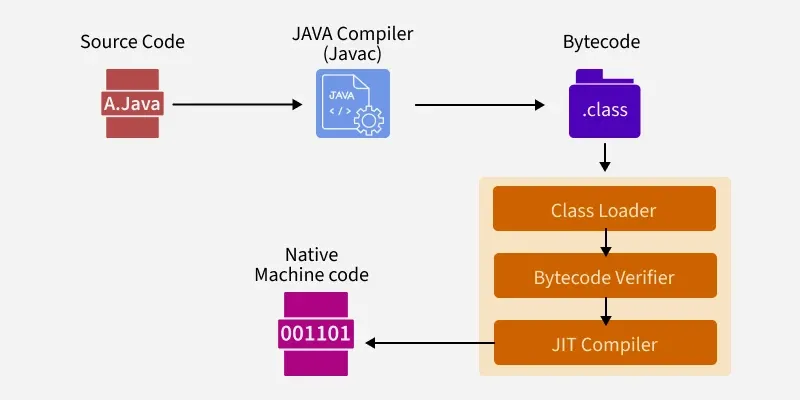
Just-In-Time (JIT) Compiler
Java Compilation and Execution Example
Java `
class HelloWorld{ public static void main(String[] args) { System.out.print("Hello, World"); } }
`
Steps to Run
**1. Create File: Save the file as HelloWorld.java.
**2. Open Terminal: Navigate to the folder containing the file.
**3. Compile:
javac HelloWorld.java
**4. Run:
java HelloWorld
**Output
Hello, World
**1. In Windows
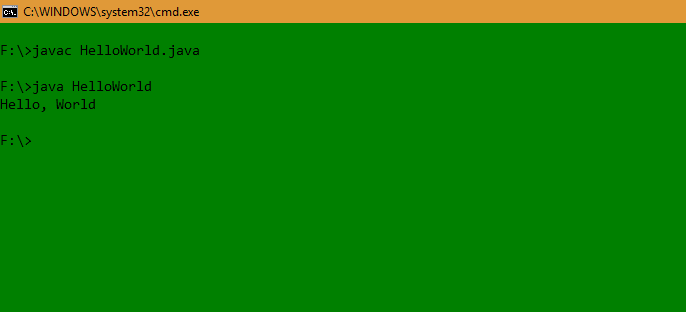
Shell
**2. In Linux
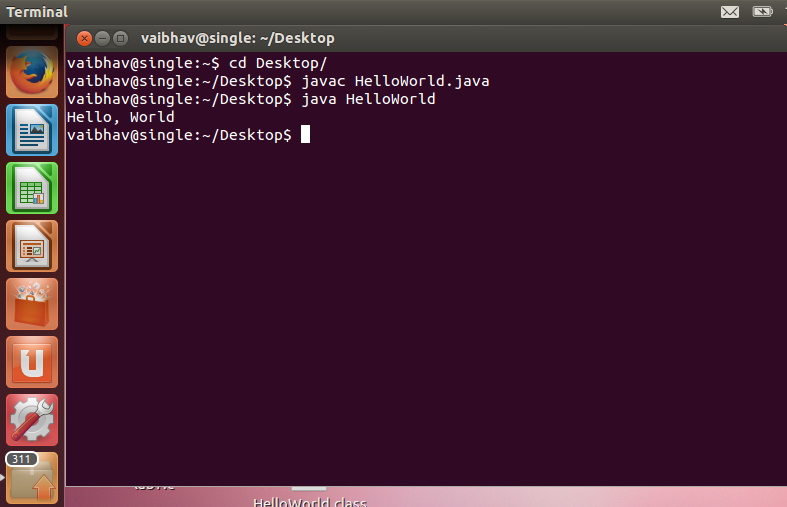
Shell
**Note: If you get ClassNotFoundException, ensure the .class file is in the correct directory or check your CLASSPATH.