Java if statement (original) (raw)
Last Updated : 14 Oct, 2025
In Java, an if statement is the simplest decision-making statement. It is used to execute a block of code only if a specific condition is true. If the condition is false, the code inside the if block is skipped.
- The condition must evaluate to a Boolean value (true or false).
- If curly braces {} are omitted, only the immediately next statement is considered part of the if block.
**Syntax:
if (condition) {
// Statements executed if the condition is true
}
**Example: with Curly Braces
Java `
class GfG{
public static void main(String args[]){
    int i = 10;

    // using if statement
    if (i < 15){
        System.out.println("10 is less than 15");
    }

    System.out.println("Outside if-block");

    // both statements will be printed
}
}
`
Output
10 is less than 15 Outside if-block
**Explanation:
- The condition i < 15 evaluates to true, so the message inside the if block is printed.
- The second System.out.println() executes regardless of the condition.
**Example: without Curly Braces
Java `
class GFG { public static void main(String args[]){
    int i = 5;

    // if statement without braces
    if (i > 0)
        System.out.println("i is positive");

    System.out.println(
        "This statement runs regardless of if condition");
}
}
`
Output
i is positive This statement runs regardless of if condition
**Explanation:
- Only the first statement after if is executed when the condition is true.
- The second System.out.println() is not part of the if block, so it executes in all cases.
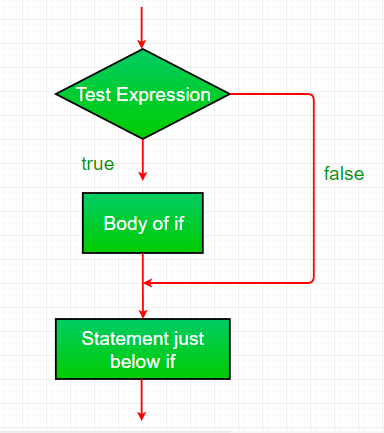
Working of if statement
- Control reaches the if statement.
- The condition is evaluated.
- If the condition is true, the body inside the if block executes.
- If the condition is false, the program skips the if block.
- Flow continues with the statements after the if block.
**Flowchart if statement: