JRE in Java (original) (raw)
Last Updated : 8 Jun, 2026
Java Runtime Environment (JRE) is a software package that provides the environment required to run Java applications. It contains the Java Virtual Machine (JVM), core class libraries, and supporting files needed to execute Java bytecode. JRE is a part of the Java Development Kit (JDK) and is responsible for running Java programs on different platforms.
- Executes platform-independent Java bytecode.
- Handles class loading, memory management, and security checks.
- Enables Java's Write Once, Run Anywhere (WORA) capability
Components of Java JRE
JRE consists of several components that work together to execute Java programs.
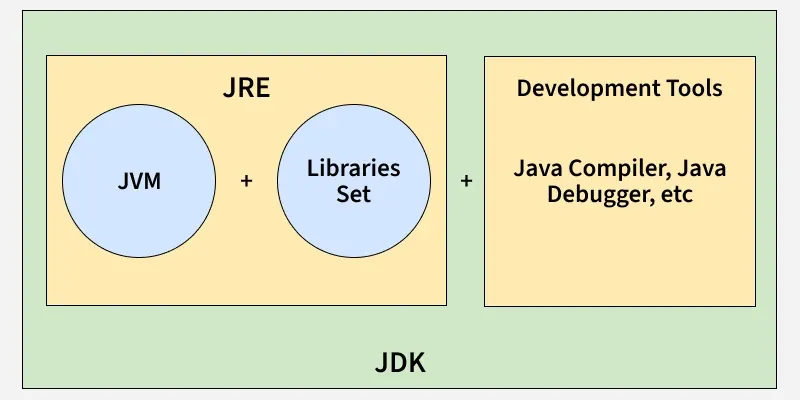
JDK vs JRE vs JVM
1. Java Virtual Machine (JVM)
The JVM is the core component of JRE that executes Java bytecode.
- Converts bytecode into machine-specific instructions.
- Manages memory allocation and garbage collection.
2. Class Libraries
Java class libraries provide pre-built classes and APIs required by Java applications.
- Contain reusable Java classes and packages.
- Provide functionality for collections, I/O, networking, security, and more.
3. Integration Libraries
Integration libraries help Java applications communicate with databases, remote systems, and other services. It includes JDBC, JNDI, RMI etc.
- Enable database connectivity.
- Support distributed applications.
4. User Interface Libraries
These libraries are used to build graphical user interfaces (GUI). It includes Swing, AWT, Java 2D , Image I/O etc.
- Help create desktop applications.
- Provide graphical components such as buttons, windows, and menus
5. Base Libraries
Base libraries provide core functionalities required by Java applications. It includes java.lang , java.util , Collections Framework etc.
- Form the foundation of Java programming.
- Provide utility classes and essential APIs.
6. Other Supporting Libraries
These libraries extend Java's capabilities. It includes JNI , JMX , Networking APIs etc.
- Enable communication with native code.
- Support network programming and security.
**Working of JRE
Java Development Kit (JDK) and Java Runtime Environment (JRE) both interact with each other to create a sustainable runtime environment that enables Java-based applications to run seamlessly on any operating system. The JRE runtime architecture consists of the following elements as listed:
1. Class Loader
The Class Loader loads required classes into memory during program execution.
- Loads classes dynamically.
- Loads classes only when required.
- Reduces memory usage.
2. Bytecode Verifier
The Bytecode Verifier checks the generated bytecode before execution.
- Verifies code validity.
- Checks memory access rules.
- Prevents unauthorized operations.
3. Interpreter
The Interpreter executes the verified bytecode.
- Reads bytecode instructions.
- Converts them into machine-specific instructions.
- Executes the program on the underlying operating system.

Working of JRE
JRE has an object of JVM with it, development tools, and library classes. To understand the working of Java Runtime Environment let us see an example of a simple Java program that prints "GeeksForGeeks".
**Example:
Java `
// Java class class GFG {
// Main driver method
public static void main(String[] args) {

    // Print statement
    System.out.println("GeeksForGeeks");
}
}
`
Once you write your Java program, you must save it with a file name with a ".java" extension. Then after you Compile your program. The output of the Java compiler is byte code which is a platform-independent code. After compiling, the compiler generates a .class file that contains the byte code. Bytecode is platform-independent that runs on all devices which contain Java Runtime Environment (JRE).