LinkedList in Java (original) (raw)
Last Updated : 18 Nov, 2025
LinkedList is a part of the Java Collection Framework and is present in the java.util package. It implements a doubly-linked list data structure where elements are not stored in contiguous memory. Each node contains three parts: the data, a reference to the next node, and a reference to the previous node
- **Dynamic Size: LinkedList grows or shrinks dynamically at runtime.
- **Maintains Insertion Order: Elements are stored in the order they are added.
- **Allows Duplicates: Duplicate elements are allowed.
- **Not Synchronized: By default, LinkedList is not thread-safe. To make Thread-safe use of Collections.synchronizedList().
- **Efficient Insertion/Deletion: Adding or removing elements at the beginning or middle is faster compared to ArrayList. Java `
import java.util.LinkedList;
public class Geeks {
public static void main(String[] args){

    // Creating a LinkedList
    LinkedList<String> l = new LinkedList<String>();

    // Adding elements to the LinkedList using add() method
    l.add("One");
    l.add("Two");
    l.add("Three");
    l.add("Four");
    l.add("Five");

    System.out.println(l);
}
}
`
Output
[One, Two, Three, Four, Five]
**Explanation:
- Creates an empty LinkedList of Strings.
- Adds elements "One" to "Five" using the add() method.
- Prints the LinkedList showing elements in insertion order: [One, Two, Three, Four, Five].
**Note: LinkedList nodes cannot be accessed directly by index; elements must be accessed by traversing from the head.
Hierarchy of LinkedList
It implements the List and Deque interfaces, both of which are sub-interfaces of the Collection Interface.
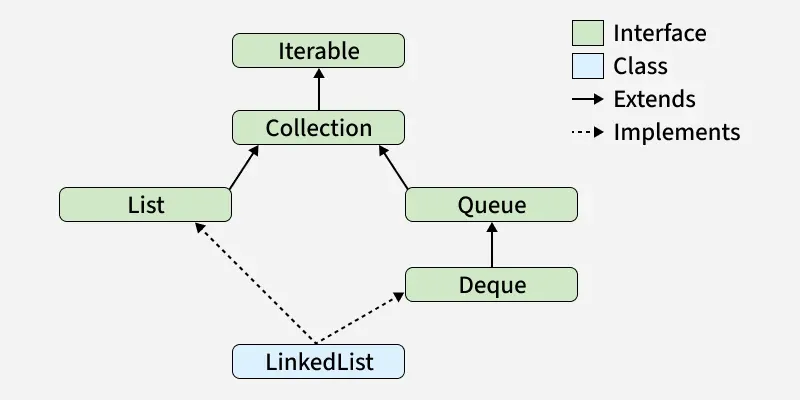
Constructors of LinkedList
In order to create a LinkedList, we need to create an object of the LinkedList class. The LinkedList class consists of various constructors that allow the possible creation of the list. The following are the constructors available in this class:
**1. LinkedList()
This constructor is used to create an empty linked list. If we wish to create an empty LinkedList with the name list, then it can be created as:
LinkedList list = new LinkedList();
2. LinkedList(Collection C)
This constructor is used to create an ordered list that contains all the elements of a specified collection, as returned by the collection's iterator. If we wish to create a LinkedList with the name list, then, it can be created as:
LinkedList list = new LinkedList(C);
Performing Different Operations on LinkedList
1. Adding Elements
With the help of the add() method, we can add elements to a LinkedList This method can perform multiple operations based on different parameters. They are:
- **add(Object): This method is used to add an element at the end of the LinkedList.
- **add(int index, Object): This method is used to add an element at a specific index in the LinkedList. Java `
import java.util.*;
public class Geeks {
public static void main(String args[])
{
    LinkedList<String> ll = new LinkedList<>();

    ll.add("Geeks");
    ll.add("Geeks");
    ll.add(1, "For");

    System.out.println(ll);
}
}
`
Output
[Geeks, For, Geeks]
2. Update Elements
With the help of the set() method, we can update an element in a LinkedList. This method takes an index and the updated element which needs to be inserted at that index.
Java `
import java.util.*;
public class Geeks {
public static void main(String args[])
{
    LinkedList<String> ll = new LinkedList<>();

    ll.add("Geeks");
    ll.add("Geeks");
    ll.add(1, "Geeks");

    System.out.println("Initial LinkedList " + ll);

    ll.set(1, "For");

    System.out.println("Updated LinkedList " + ll);
}
}
`
Output
Initial LinkedList [Geeks, Geeks, Geeks] Updated LinkedList [Geeks, For, Geeks]
3. Removing Elements
Removes the first occurrence of the specified element from the list, if it exists. They are:
- **remove(Object): Removes the first occurrence of the specified object from the LinkedList.
- **remove(int index): Removes the element at the given index and shifts subsequent elements. Java `
import java.util.*;
public class Geeks {
public static void main(String args[])
{
    LinkedList<String> ll = new LinkedList<>();

    ll.add("Geeks");
    ll.add("Geeks");
    ll.add(1, "For");

    System.out.println("Initial LinkedList " + ll);

      // Function call
    ll.remove(1);

    System.out.println("After the Index Removal " + ll);

    ll.remove("Geeks");

    System.out.println("After the Object Removal "
                       + ll);
}
}
`
Output
Initial LinkedList [Geeks, For, Geeks] After the Index Removal [Geeks, Geeks] After the Object Removal [Geeks]
4. Iterating a LinkedList
There are multiple ways to iterate through LinkedList. The most famous ways are by using the basic for loop in combination with a get() method to get the element at a specific index and the advanced for-loop.
Java `
import java.util.*;
public class Geeks {
public static void main(String args[])
{
    LinkedList<String> ll
        = new LinkedList<>();

    ll.add("Geeks");
    ll.add("Geeks");
    ll.add(1, "For");

    // Using the Get method and the for loop
    for (int i = 0; i < ll.size(); i++) {

        System.out.print(ll.get(i) + " ");
    }

    System.out.println();

    // Using the for each loop
    for (String str : ll)
        System.out.print(str + " ");
}
}
`
Output
Geeks For Geeks Geeks For Geeks
Methods for Java LinkedList
| Method | Description |
|---|---|
| add(int index, E element) | Inserts element at given index. |
| add(E e) | This method Appends the specified element to the end of this list. |
| addAll(int index, Collection c) | Inserts all elements of collection starting at index. |
| addAll(Collection c) | Appends all elements of collection to end |
| addFirst(E e) | This method Inserts the specified element at the beginning of this list. |
| addLast(E e) | This method Appends the specified element to the end of this list. |
| clear() | This method removes all of the elements from this list. |
| clone() | This method returns a shallow copy of this LinkedList. |
| contains(Object o) | This method returns true if this list contains the specified element. |
| descendingIterator() | This method returns an iterator over the elements in this deque in reverse sequential order. |
| element() | This method retrieves but does not remove, the head (first element) of this list. |
| get(int index) | This method returns the element at the specified position in this list. |
| getFirst() | This method returns the first element in this list. |
| getLast() | This method returns the last element in this list. |
| indexOf(Object o) | Return first index of element or -1 if element is not present |
| lastIndexOf(Object o) | Return Last index of element or -1 if element is not present |
| listIterator(int index) | This method returns a list-iterator of the elements. |
| offer(E e) | This method Adds the specified element as the tail (last element) of this list. |
| offerFirst(E e) | This method Inserts the specified element at the front of this list. |
| offerLast(E e) | This method Inserts the specified element at the end of this list. |
| peek() | This method retrieves but does not remove, the head (first element) of this list. |
| peekFirst() | This method retrieves, but does not remove, the first element of this list or returns null if this list is empty. |
| peekLast() | This method retrieves, but does not remove, the last element of this list or returns null if this list is empty. |
| poll() | This method retrieves and removes the head (first element) of this list. |
| pollFirst() | This method retrieves and removes the first element of this list or returns null if this list is empty. |
| pollLast() | This method retrieves and removes the last element of this list or returns null if this list is empty. |
| pop() | This method Pops an element from the stack represented by this list. |
| push(E e) | This method pushes an element onto the stack represented by this list. |
| remove() | This method retrieves and removes the head (first element) of this list. |
| remove(int index) | This method removes the element at the specified position in this list. |
| remove(Object o) | This method removes the first occurrence of the specified element from this list if it is present. |
| removeFirst() | This method removes and returns the first element from this list. |
| removeFirstOccurrence(Object o) | This method removes the first occurrence of the specified element in this list. |
| removeLast() | This method removes and returns the last element from this list. |
| removeLastOccurrence(Object o) | This method removes the last occurrence of the specified element in this list. |
| set(int index, E element) | This method replaces the element at the specified position in this list with the specified element. |
| size() | This method returns the number of elements in this list. |
| spliterator() | This method creates a late-binding and fail-fast Spliterator over the elements in this list. |
| toArray() | This method returns an array containing all of the elements in this list in proper sequence. |
| toArray(T[] a) | Returns array of all elements in given type. |
| toString() | This method returns string representation of list. |
ArrayList vs LinkedList
| ArrayList | LinkedList |
|---|---|
| Underlying structure is Dynamic Array | Underlying structure is Doubly-linked list |
| O(1) - Fast random access | O(n) - Slow random access |
| Memory is lower (contiguous memory) | Memory is higher (extra pointers per node) |
| Iteration speed is faster | Iteration speed is slower. |
| Insertion and deletion is slower | Insertion and deletion is faster. |