List Interface in Java (original) (raw)
Last Updated : 18 Nov, 2025
The List interface in Java extends the Collection interface and is part of the java.util package. It is used to store ordered collections where duplicates are allowed and elements can be accessed by their index.
- Maintains insertion order
- Allows duplicate elements
- Supports null elements (implementation dependent)
- Supports bidirectional traversal using ListIterator
Declaration of Java List Interface
public interface List extends Collection { }
To use a List, we must instantiate a class that implements it. Example classes that implement it are ArrayList and LinkedList
List list = new ArrayList();
Java `
import java.util.*;
class Geeks {
public static void main(String[] args)
{
    // Creating a List of Strings using ArrayList
    List<String> li = new ArrayList<>();

    // Adding elements in List
    li.add("Java");
    li.add("Python");
    li.add("DSA");
    li.add("C++");

    System.out.println("Elements of List are:");

    // Iterating through the list
    for (String s : li) {
        System.out.println(s);
    }
} }
`
Output
Elements of List are: Java Python DSA C++
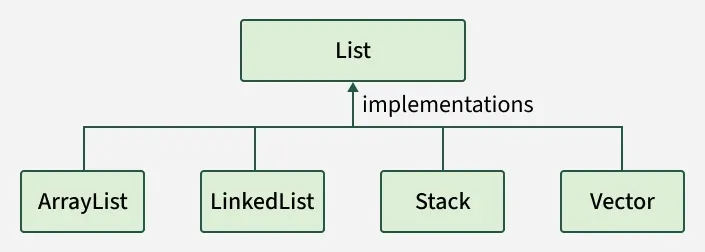
The common implementation classes of the List interface are
list-implemented-classes
- **ArrayList:It is implemented using resizable array, offers fast random access but slower insert/delete.
- **LinkedList: It is implemented usingDoubly-linked list, efficient for frequent insertions and deletions.
- **Vector: It is implemented using Legacy synchronized dynamic array, thread-safe but slower.
- **Stack: It is implemented using a LIFO (Last-In-First-Out) subclass of Vector for stack operations.
Java List - Operations
List can be used only with a class that implements this interface. Now, let's see how to perform a few frequently used operations on the List.
1. Adding Elements
To add an element to the list, we can use the add() method. This method is overloaded to perform multiple operations based on different parameters.
- **add(Object o): This method is used to add an element at the end of the List.
- **add(int index, Object o): This method is used to add an element at a specific index in the List Java `
import java.util.*;
class Geeks {
public static void main(String args[])
{
    List<String> al = new ArrayList<>();

    // Adding elements to object of List interface Custom elements
    al.add("Geeks");
    al.add("Geeks");
    al.add(1, "For");

    System.out.println(al);
}
}
`
Output
[Geeks, For, Geeks]
**Note: If we try to add element at index 1 before adding elements at index 0 it will throw an error. It is always recommended to add elements in a particular index only when the size is defined or to add them sequentially.
2. Updating Elements
To update an element in a list, use the set() method with the target index and the new value. Since List is indexed, the element is replaced at the specified position.
Java `
import java.util.*;
class Geeks {
public static void main(String args[])
{
    // Creating an object of List interface
    List<String> al = new ArrayList<>();

    // Adding elements to object of List class
    al.add("Geeks");
    al.add("Geeks");
    al.add(1, "Geeks");

    System.out.println("Initial ArrayList " + al);

    // Setting (updating) element at 1st index using set() method
    al.set(1, "For");

    System.out.println("Updated ArrayList " + al);
}
}
`
Output
Initial ArrayList [Geeks, Geeks, Geeks] Updated ArrayList [Geeks, For, Geeks]
3. Searching Elements
Searching in a List can be done using indexOf(), lastIndexOf() methods.
- **indexOf(Object o): It returns the index of the first occurrence of the specified element in the list or -1 if the element is not found
- **lastIndexOf(Object o): It returns the index of the last occurrence of the specified element in the list or -1 if the element is not found Java `
import java.util.*;
class Geeks {
public static void main(String[] args)
{
    // create a list of integers
    List<Integer> al = new ArrayList<>();

    // add some integers to the list
    al.add(1);
    al.add(2);
    al.add(3);
    al.add(2);

    // use indexOf() to find the first occurrence of an element in the list
    int i = al.indexOf(2);

    System.out.println("First Occurrence of 2 is at Index: "+i);

    // use lastIndexOf() to find the last occurrence of an element in the list
    int l = al.lastIndexOf(2);

    System.out.println("Last Occurrence of 2 is at Index: "+l);
}
}
`
Output
First Occurrence of 2 is at Index: 1 Last Occurrence of 2 is at Index: 3
4. Removing Elements
To remove an element from a list, we can use the remove() method. This method is overloaded to perform multiple operations based on different parameters.
- **remove(Object o): Removes the first occurrence of the specified object from the list.
- **remove(int index): Removes the element at the specified index and shifts subsequent elements left. Java `
import java.util.ArrayList; import java.util.List;
class Geeks {
public static void main(String args[])
{

    // Creating List class object
    List<String> al = new ArrayList<>();

    // Adding elements to the object Custom inputs
    al.add("Geeks");
    al.add("Geeks");

    // Adding For at 1st indexes
    al.add(1, "For");

    System.out.println("Initial ArrayList " + al);

    // Now remove element from the above list present at 1st index
    al.remove(1);

    System.out.println("After the Index Removal " + al);

    // Now remove the current object from the updated List
    al.remove("Geeks");

    System.out.println("After the Object Removal " + al);
}
}
`
Output
Initial ArrayList [Geeks, For, Geeks] After the Index Removal [Geeks, Geeks] After the Object Removal [Geeks]
5. Accessing Elements
To access an element in the list, we can use the get() method, which returns the element at the specified index.
**get(int index): This method returns the element at the specified index in the list.
Java `
import java.util.*;
class Geeks {
public static void main(String args[])
{

    List<String> al = new ArrayList<>();

    // Adding elements to object of List interface
    al.add("Geeks");
    al.add("For");
    al.add("Geeks");

    // Accessing elements using get() method
    String first = al.get(0);
    String second = al.get(1);
    String third = al.get(2);

    System.out.println(first);
    System.out.println(second);
    System.out.println(third);
    System.out.println(al);
}
}
`
Output
Geeks For Geeks [Geeks, For, Geeks]
6. Checking if an element is present or not
To check if an element is present in the list, we can use the contains() method. This method returns true if the specified element is present in the list, otherwise, it returns false.
**contains(Object o): This method takes a single parameter, the object to be checked if it is present in the list.
Java `
import java.util.*;
class Geeks {
public static void main(String args[])
{

    List<String> al = new ArrayList<>();

    // Adding elements to object of List interface
    al.add("Geeks");
    al.add("For");
    al.add("Geeks");

    // Checking if element is present using contains() method
    boolean isPresent = al.contains("Geeks");

    // Printing the result
    System.out.println("Is Geeks present in the list? "+ isPresent);
}
}
`
Output
Is Geeks present in the list? true
Iterating over List Interface in Java
For larger datasets, Lists can be iterated using:
- Basic for loop with get(index)
- Enhanced for-each loop
These methods allow efficient traversal of elements.
Java `
import java.util.*;
public class Geeks {
public static void main(String args[])
{
    // Creating an empty Arraylist of string type
    List<String> al = new ArrayList<>();

    // Adding elements to above object of ArrayList
    al.add("Geeks");
    al.add("Geeks");

    // Adding element at specified position inside list object
    al.add(1, "For");

    // Using  for loop for iteration
    for (int i = 0; i < al.size(); i++) {

        // Using get() method to access particular element
        System.out.print(al.get(i) + " ");
    }

    // New line for better readability
    System.out.println();

    // Using for-each loop for iteration
    for (String str : al)

        System.out.print(str + " ");
}
}
`
Output
Geeks For Geeks Geeks For Geeks
Complexity of List Interface in Java
| Operation | Time Complexity | Space Complexity |
|---|---|---|
| Adding Element in List Interface | O(1) | O(1) |
| Remove Element from List Interface | O(N) | O(1) |
| Replace Element in List Interface | O(1) | O(1) |
| Traversing List Interface | O(N) | O(1) |
Methods of the List Interface
| Methods | Description |
|---|---|
| add(int index, element) | This method is used with Java List Interface to add an element at a particular index in the list. When a single parameter is passed, it simply adds the element at the end of the list. |
| addAll(int index, Collection collection) | This method is used with List Interface in Java to add all the elements in the given collection to the list. When a single parameter is passed, it adds all the elements of the given collection at the end of the list. |
| size() | This method is used with Java List Interface to return the size of the list. |
| clear() | This method is used to remove all the elements in the list. However, the reference of the list created is still stored. |
| remove(int index) | This method removes an element from the specified index. It shifts subsequent elements(if any) to left and decreases their indexes by 1. |
| remove(element) | This method is used with Java List Interface to remove the first occurrence of the given element in the list. |
| get(int index) | This method returns elements at the specified index. |
| set(int index, element) | This method replaces elements at a given index with the new element. This function returns the element which was just replaced by a new element. |
| indexOf(element) | This method returns the first occurrence of the given element or -1 if the element is not present in the list. |
| lastIndexOf(element) | This method returns the last occurrence of the given element or -1 if the element is not present in the list. |
| equals(element) | This method is used with Java List Interface to compare the equality of the given element with the elements of the list. |
| hashCode() | This method is used with List Interface in Java to return the hashcode value of the given list. |
| isEmpty() | This method is used with Java List Interface to check if the list is empty or not. It returns true if the list is empty, else false. |
| contains(element) | This method is used with List Interface in Java to check if the list contains the given element or not. It returns true if the list contains the element. |
| containsAll(Collection collection) | This method is used with Java List Interface to check if the list contains all the collection of elements. |
| sort(Comparator comp) | This method is used with List Interface in Java to sort the elements of the list on the basis of the given comparator. |
List vs Set
Both the List interface and the Set interface inherits the Collection interface. However, there exists some differences between them.
| List | Set |
|---|---|
| The List is an ordered sequence. | The Set is an unordered sequence. |
| List allows duplicate elements | Set doesn’t allow duplicate elements. |
| Elements by their position can be accessed. | Position access to elements is not allowed. |
| Multiple null elements can be stored. | The null element can store only once. |
| List implementations are ArrayList, LinkedList, Vector, Stack | Set implementations are HashSet, LinkedHashSet. |