Serialization and Deserialization in Java (original) (raw)
Serialization and Deserialization are important Java mechanisms used to convert objects into a byte stream and reconstruct them back into objects. Together, they enable object persistence, data transfer, and communication between different systems while preserving an object's state.
- Serialization converts an object into a byte stream for storage or transmission.
- Deserialization converts the byte stream back into the original Java object.
Serialization
The serialization process converts a Java object into a byte stream, allowing it to be stored or transmitted while preserving its state. Since the generated byte stream is platform-independent, an object serialized on one platform can be deserialized on another platform.
- Implemented using the Serializable marker interface.
- Enables object persistence by saving object data to files or databases.
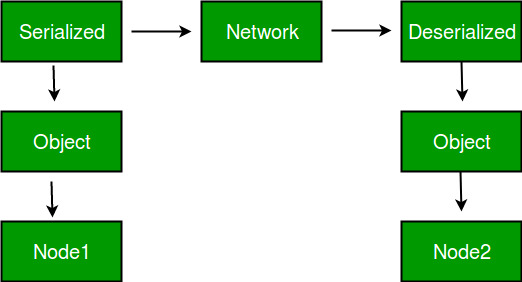
- Facilitates object transfer across networks in distributed applications.
**Deserialization
The deserialization process converts a byte stream back into its original Java object, restoring the object's state and data. This allows previously serialized objects to be retrieved and used within the application.
- Performed using the ObjectInputStream class.
- Recreates objects from data previously saved through serialization.
- Helps retrieve and use stored object data without manual reconstruction.
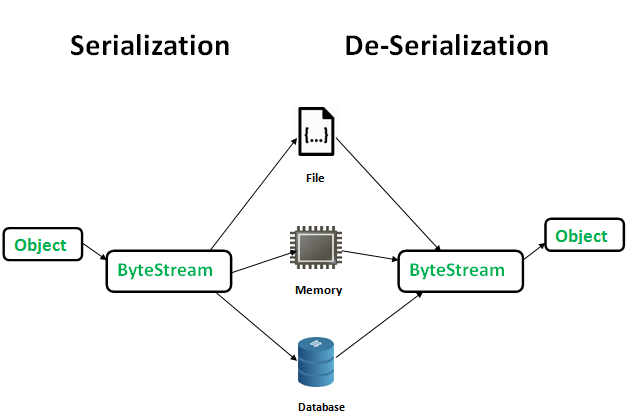
Visual Representation of Serialization and Deserialization Process
The image below demonstrates the process of serialization and deserialization.
Steps in Serialization
- The class must implement the Serializable interface.
- Create an ObjectOutputStream object connected to a file or output stream.
- Use the writeObject() method to serialize the object.
- The object's state is converted into a byte stream and written to the destination.
**Method Used for Serialization:
public final void writeObject(Object obj) throws IOException
- Writes the specified object to the output stream.
- Converts the object and its state into a byte stream.
- Throws IOException if an input/output error occurs during serialization.
Steps in Deserialization
- Create an ObjectInputStream object connected to the source containing the serialized data.
- Use the readObject() method to read the byte stream.
- The byte stream is converted back into the original Java object.
- Typecast the returned object to its appropriate class type.
**Method Used for Deserialization:
public final Object readObject() throws IOException, ClassNotFoundException
- Reads and reconstructs an object from the input stream.
- Restores the object's state that was saved during serialization.
- Throws IOException for input/output errors and ClassNotFoundException if the object's class cannot be found.
Advantages of Deserialization
- Converts stored byte stream data back into the original Java objects.
- Preserves object state, making objects usable just as they were before serialization.
- Facilitates data exchange between different applications, systems, or network environments.
Serializable Interface and Marker Interfaces
The Serializable interface is used to make a Java class eligible for serialization. Only objects of classes that implement the java.io.Serializable interface can be serialized and converted into a byte stream.
A marker interface is an interface that does not contain any methods or fields. It is used to provide special information to the JVM or compiler about a class's capabilities.
Points to remember while using Serialization:
- If a parent class implements Serializable, its child classes are automatically serializable.
- Static variables are not serialized because they belong to the class, not the object.
- Variables marked as transient are excluded from serialization.
- Constructors are not called during deserialization.
- All referenced objects must implement Serializable, otherwise a NotSerializableException occurs.
**Example:
class A implements Serializable{
// B also implements Serializable
// interface.
B ob=new B();
}
SerialVersionUID
SerialVersionUID is a unique version identifier for a Serializable class. During deserialization, it ensures that the serialized object and the corresponding class have compatible versions.
- Used to verify version compatibility during serialization and deserialization.
- Prevents deserialization of objects when class definitions are incompatible.
- If the SerialVersionUID values do not match, an InvalidClassException is thrown.
**Syntax:
private static final long serialVersionUID = 3L;
- If serialVersionUID is not declared, Java automatically generates one based on the class structure.
- Explicitly declaring it is recommended because automatic generation may change when the class is modified or compiled differently.
- Using the private access modifier is preferred since serialVersionUID is not intended to be inherited
serialver Tool
The serialver tool is provided with the JDK and is used to generate or display the serialVersionUID value of a Serializable class.
- Retrieves the generated serialVersionUID for a class.
- Helps developers define a consistent UID explicitly.
- Useful when maintaining compatibility across different class versions.
Example of Getting SerialVersionUID using Serialver
We can run the following command to get serialVersionUID serialver [-classpath classpath] [-show] [classname **Example: Serialization and Deserialization of a Java Object.
Java `
import java.io.*;
class Demo implements Serializable { public int a; public String b;
public Demo(int a, String b) {
    this.a = a;
    this.b = b;
}
}
public class Geeks { public static void main(String[] args) { Demo object = new Demo(1, "geeksforgeeks"); String filename = "file.ser";
    // Serialization
    try {
        FileOutputStream file = new FileOutputStream(filename);
        ObjectOutputStream out = new ObjectOutputStream(file);
        out.writeObject(object);
        out.close();
        file.close();
        System.out.println("Object has been serialized");

    } catch (IOException ex) {
        System.out.println("IOException is caught");
    }

    Demo object1 = null;

    // Deserialization
    try {
        FileInputStream file = new FileInputStream(filename);
        ObjectInputStream in = new ObjectInputStream(file);
        object1 = (Demo) in.readObject();
        in.close();
        file.close();
        System.out.println("Object has been deserialized");
        System.out.println("a = " + object1.a);
        System.out.println("b = " + object1.b);

    } catch (IOException ex) {
        System.out.println("IOException is caught");
    } catch (ClassNotFoundException ex) {
        System.out.println("ClassNotFoundException is caught");
    }
}
}
`
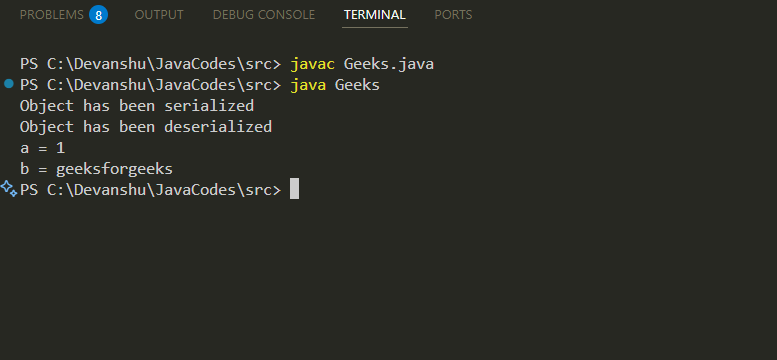
**Output:
**Example: Serialization with Transient and Static Fields.
Java `
import java.io.*;
class Emp implements Serializable { private static final long serialVersionUID = 129348938L; transient int a; static int b; String name; int age;
public Emp(String name, int age, int a, int b) {
    this.name = name;
    this.age = age;
    this.a = a;
    this.b = b;
}
}
public class Geeks{ public static void printData(Emp object1) { System.out.println("name = " + object1.name); System.out.println("age = " + object1.age); System.out.println("a = " + object1.a); System.out.println("b = " + object1.b); }
public static void main(String[] args) {
    Emp object = new Emp("ab", 20, 2, 1000);
    String filename = "shubham.txt";

    // Serialization
    try {
        // Saving of object in a file
        FileOutputStream file = new FileOutputStream(filename);
        ObjectOutputStream out = new ObjectOutputStream(file);
        out.writeObject(object);
        out.close();
        file.close();
        System.out.println("Object has been serialized\nData before Deserialization.");
        printData(object);

        // Change static variable b
        object.b = 2000;

    } catch (IOException ex) {
        System.out.println("IOException is caught");
    }

    object = null;

    // Deserialization
    try {
        // Reading the object from a file
        FileInputStream file = new FileInputStream(filename);
        ObjectInputStream in = new ObjectInputStream(file);
        object = (Emp) in.readObject();
        in.close();
        file.close();
        System.out.println("Object has been deserialized\nData after Deserialization.");
        printData(object);

    } catch (IOException ex) {
        System.out.println("IOException is caught");
    } catch (ClassNotFoundException ex) {
        System.out.println("ClassNotFoundException is caught");
    }
}
}
`
Output
Object has been serialized Data before Deserialization. name = ab age = 20 a = 2 b = 1000 Object has been deserialized Data after Deserialization. name = ab age = 20 a = 0 b = 2000
**Explanation In the above code while deserializing the object the values of a and b has changed. The reason being a was marked as transient and b was static.
- In case of **transient variables:- A variable defined with transient keyword is not serialized during serialization process.This variable will be initialized with default value during deserialization. (e.g: for objects it is null, for int it is 0).
- In case of **static Variables:- A variable defined with static keyword is not serialized during serialization process.This variable will be loaded with current value defined in the class during deserialization.
**Transient Vs Final
The main difference between Transient and Final is listed below:
- Final variables are serialized by their value directly.
- Declaring a final variable as transient has no use because the compiler replaces final variables with their literal values in the bytecode.
**Example:
final int x= 10;
int y = 20;
System.out.println(x);// compiler will replace this as System.out.println(10)->10
because x is final.
System.out.println(y);//20
**Example: Demonstration of transient and final behaviour together while serialization.
Java `
import java.io.*;
class Dog implements Serializable{ int i=10; transient final int j=20; } class Geeks { public static void main (String[] args)throws IOException, ClassNotFoundException { Dog d1=new Dog(); //Serialization started
      System.out.println("serialization started");

      FileOutputStream fos= new FileOutputStream("abc.ser");
      ObjectOutputStream oos=new ObjectOutputStream(fos);

      oos.writeObject(d1);
      System.out.println("Serialization ended");

      //Deserialization started
      System.out.println("Deserialization started");
      FileInputStream fis=new FileInputStream("abc.ser");
      ObjectInputStream ois=new ObjectInputStream(fis);
      Dog d2=(Dog) ois.readObject();
      System.out.println("Deserialization ended");
      System.out.println("Dog object data");
      //final result
      System.out.println(d2.i+"\t" +d2.j);
}
}
`
Output
serialization started Serialization ended Deserialization started Deserialization ended Dog object data 10 20
Serialization vs Deserialization
| Feature | Serialization | Deserialization |
|---|---|---|
| **Definition | Process of converting a Java object into a byte stream. | Process of converting a byte stream back into a Java object. |
| **Purpose | Used to save or transmit an object's state. | Used to restore and use a previously saved object. |
| **Direction | Object -> Byte Stream | Byte Stream -> Object |
| **Main Class Used | ObjectOutputStream | ObjectInputStream |
| **Method Used | writeObject() | readObject() |
| **Output | Serialized byte stream. | Reconstructed Java object. |
| **Common Use Cases | File storage, caching, network communication. | Reading stored data, object recovery, data transfer. |
| **Exception Handling | May throw IOException. | May throw IOException and ClassNotFoundException. |
| **Constructor Invocation | Constructor is used when creating the original object. | Constructor is not called during deserialization. |