String Constant Pool in Java (original) (raw)
Last Updated : 28 Oct, 2025
The Java String Pool (also called the String Intern Pool) is a special memory area inside the heap that stores string literals.
When the JVM encounters a string literal:
- It first checks whether an identical string already exists in the pool.
- If found, it reuses the existing reference.
- If not, it creates a new string object in the pool.
This mechanism reduces memory consumption by reusing immutable string objects.
How Java Stores Strings
When a string is declared in Java, two separate memory areas are involved:
- **Stack: Stores the variable reference.
- **Heap (String Constant Pool): Stores the actual string object value.
**Example:
String str1 = "Hello";
Here, the variable str1 is stored in the stack, while "Hello" is stored in the String Constant Pool inside the heap.
Example 1: String Literals
Java `
public class Example1 { public static void main(String[] args) { String s1 = "abc"; String s2 = "abc";
    if (s1 == s2)
        System.out.println("Yes");
    else
        System.out.println("No");
}
}
`
Both s1 and s2 refer to the same "abc" object in the String Constant Pool, so their references are identical.
Example 2: Using new Keyword
Java `
public class Example2 { public static void main(String[] args) { String s1 = new String("abc"); String s2 = new String("abc");
    if (s1 == s2)
        System.out.println("Yes");
    else
        System.out.println("No");
}
}
`
Using the new keyword forces the JVM to create new objects in the heap outside the String Constant Pool, even if an identical value already exists there. Hence, s1 and s2 refer to different heap objects.
How String Pool Works?
When a string is created, Java determines how to allocate memory based on its declaration type:
1. String Literal Declaration
Java `
String str1 = "Hello"; String str2 = "Hello";
`
**Behavior:
- Only one object "Hello" is created in the String Constant Pool.
- Both str1 and str2 point to the same pooled object.
**Memory Representation:
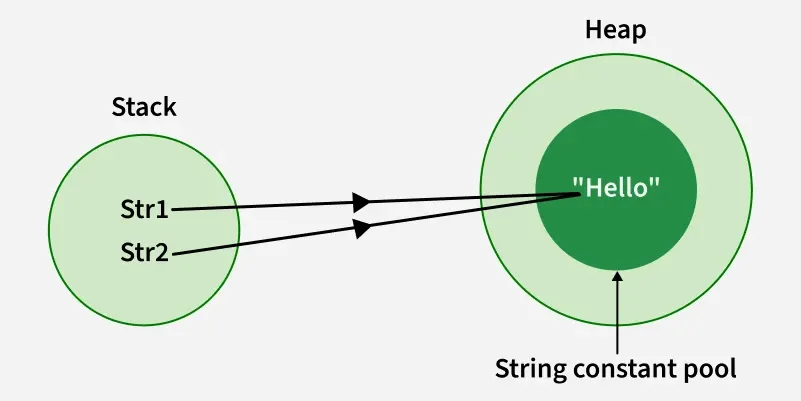
String creation using literal declaration
2. Using new Keyword
Java `
String str1 = new String("John"); String str2 = new String("Doe");
`
**Behavior:
- Each call to new creates a separate object in the heap.
- Even though the literals "John" and "Doe" exist in the SCP, new allocates fresh heap objects referencing those literal values internally.
**Memory Representation:
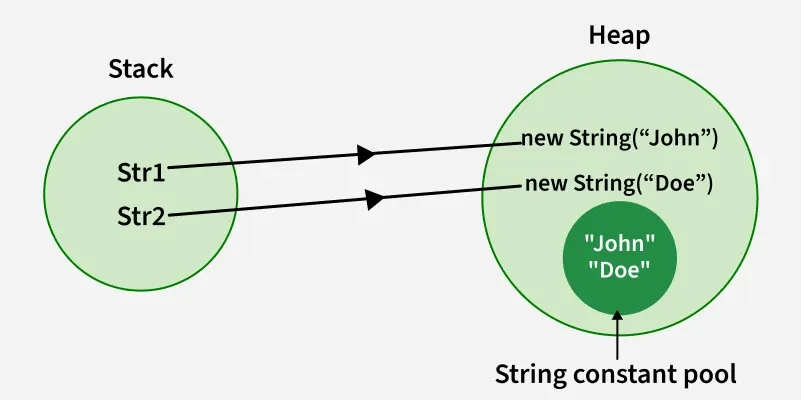
String creation using new keyword