Traverse Through a HashMap in Java (original) (raw)
Last Updated : 11 Jul, 2025
HashMap stores the data in (Key, Value) pairs, and you can access them by an index of another type. HashMap class implements Map interface which allows us to store key. hashMap is a part of the java collections framework been up since Java 1.2. It internally uses hashing technique which is pretty fast.
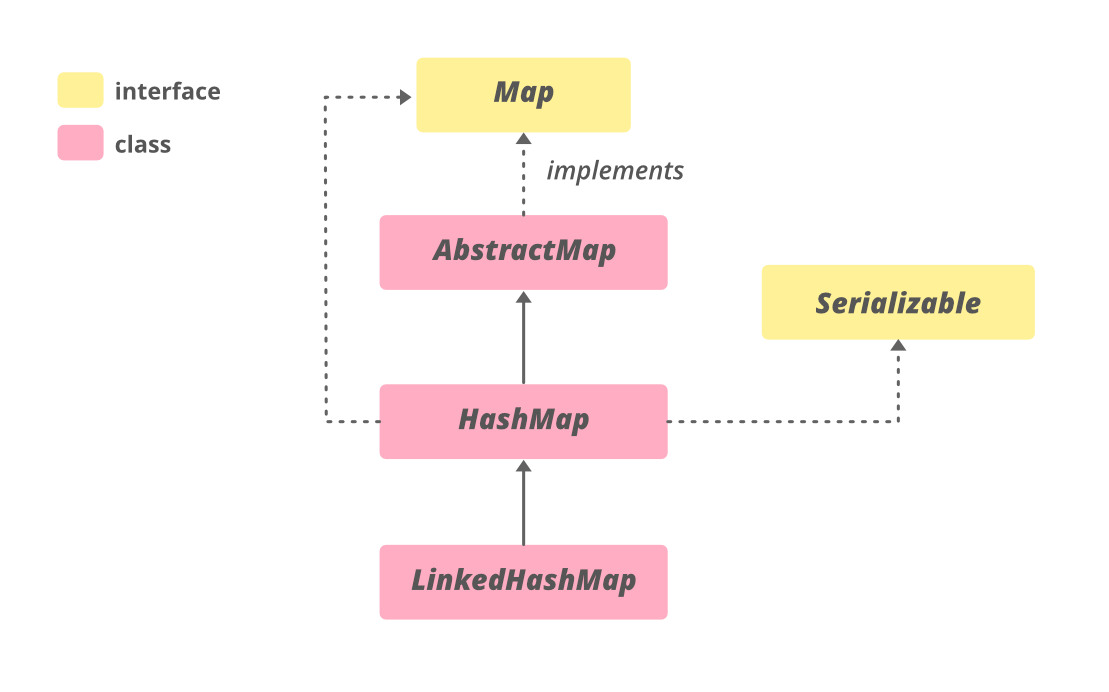
Syntax:
public class HashMap<K,V> extends AbstractMap<K,V> implements Map<K,V>, Clonnable, Serial
Different Ways of Traversal
We can iterate over mapping that is key and value pairs a was listed below that are later described as follows:
Methods:
- Using an Iterator
- Using enhanced for Loop (for-each loop)
- Using forEach() Method
Method 1: Using an Iterator
Iterator is an interface in java.util package which is used to iterate through a collection. As such there is nothing special to discuss iterators so do we will be proposing out methods of Iterator interface been used to traverse over HashMap.
- hm.entrySet() is used to retrieve all the key-value pairs called Map.Entries and stores internally into a set.
- hm.entrySet().iterator() returns an iterator that acts as a cursor and points at the first element of the set and moves on till the end.
- hmIterator.hasNext() checks for the next element in the set and returns a boolean
- hmIterator.next() returns the next element(Map.Entry) from the set.
- mapElement.getKey() returns the key of the associated Map.Entry
- mapElement.getValue() return the value of the associated Map.Entry
Example:
Java `
// Java Program to Traverse through HashMap // Using Iterator
// Importing required classes import java.util.*;
// Main class class GFG {
// Main driver method
public static void main(String[] args)
{

    // Creating an Hashmap of string-integer pairs
    // It contains student name and their marks
    HashMap<String, Integer> hm
        = new HashMap<String, Integer>();

    // Adding mappings to above HashMap
    // using put() method
    hm.put("GeeksforGeeks", 54);
    hm.put("A computer portal", 80);
    hm.put("For geeks", 82);

    // Printing all elements of HashMap
    System.out.println("Created hashmap is" + hm);

    // Getting an iterator
    Iterator hmIterator = hm.entrySet().iterator();

    // Display message only
    System.out.println(
        "HashMap after adding bonus marks:");

    // Iterating through Hashmap and
    // adding some bonus marks for every student
    while (hmIterator.hasNext()) {

        Map.Entry mapElement
            = (Map.Entry)hmIterator.next();
        int marks = ((int)mapElement.getValue() + 10);

        // Printing mark corresponding to string entries
        System.out.println(mapElement.getKey() + " : "
                           + marks);
    }
}
}
`
Output
Created hashmap is{GeeksforGeeks=54, A computer portal=80, For geeks=82} HashMap after adding bonus marks: GeeksforGeeks : 64 A computer portal : 90 For geeks : 92
Method 2: Using for-each Loop
Example:
Java `
// Java program for Traversing through HashMap // Using for-each Loop
// Importing required classes import java.util.*;
// Main class class GFG {
// Main driver method
public static void main(String[] args)
{

    // creating an empty HashMap of string and integer
    // pairs Mappings denotes Student name and marks
    HashMap<String, Integer> hm
        = new HashMap<String, Integer>();

    // Adding mappings to HashMap
    // using put() method
    hm.put("GeeksforGeeks", 54);
    hm.put("A computer portal", 80);
    hm.put("For geeks", 82);

    // Printing all elements of above Map
    System.out.println("Created hashmap is" + hm);

    // Display message only
    System.out.println(
        "HashMap after adding bonus marks:");

    // Looping through the HashMap
    // Using for-each loop
    for (Map.Entry<String,Integer> mapElement : hm.entrySet()) {
        String key = mapElement.getKey();

        // Adding some bonus marks to all the students
        int value = (mapElement.getValue() + 10);

        // Printing above marks corresponding to
        // students names
        System.out.println(key + " : " + value);
    }
}
}
`
Output:
Created hashmap is{GeeksforGeeks=54, A computer portal=80, For geeks=82} HashMap after adding bonus marks: GeeksforGeeks : 64 A computer portal : 90 For geeks : 92
Method 3: Using forEach() method
forEach() is a method of HashMap that is introduced in java 8. It is used to iterate through the hashmap and also reduces the number of lines of code as proposed below as follows:
Example:
Java `
// Java program for traversing Through HashMap // Using forEach() Method
// Importing required classes import java.util.*;
// Main class class GFG {
// Main driver method
public static void main(String[] args)
{

    // Creating an  empty HashMap of string-integer
    // pairs
    HashMap<String, Integer> hm
        = new HashMap<String, Integer>();

    // Adding mappings to HashMap
    // using put() method
    hm.put("GeeksforGeeks", 54);
    hm.put("A computer portal", 80);
    hm.put("For geeks", 82);

    // Printing all elements of above HashMap
    System.out.println("Created hashmap is" + hm);

    // Display message only
    System.out.println(
        "HashMap after adding bonus marks:");

    // Looping through HashMap and adding bonus marks
    // using HashMap.forEach()
    hm.forEach((k, v)
                   -> System.out.println(k + " : "
                                         + (v + 10)));
}
}
`
Output:
Created hashmap is{GeeksforGeeks=54, A computer portal=80, For geeks=82} HashMap after adding bonus marks: GeeksforGeeks : 64 A computer portal : 90 For geeks : 92