What is Google Web Toolkit(GWT)? (original) (raw)
Last Updated : 23 Jul, 2025
Google Web Toolkit (GWT) is an open-source web application framework developed by Google. It is a Java-based framework that allows developers to write web applications in Java and compile the code to highly optimized JavaScript, HTML, and CSS. The framework was first released in 2006 and has since become a popular choice for developers who want to build large, scalable, and maintainable web applications. Additionally, GWT offers a comprehensive selection of user interface elements and makes it simple for developers to build complex and sophisticated web applications with ease.
Features of GWT
GWT has a number of features that make it a popular choice for web developers. Here are some of the key features of GWT:
- Rich User Interface Components: GWT provides a rich set of user interface components, including buttons, text boxes, menus, and more. These components are customizable and can be easily integrated into your web application.
- Cross-Browser Compatibility: GWT generates optimized JavaScript code that is compatible with all major web browsers, including Chrome, Firefox, and Safari.
- RPC Mechanism: GWT includes a built-in RPC mechanism that allows developers to easily communicate between the client-side and server-side of their web application.
- Internationalization: GWT provides support for internationalization, which allows developers to create applications that can be easily translated into different languages and adapted to different regions and cultures. By using `Constants` and `Messages` interface property files, and the `LocaleInfo` class, one can create applications for different regions.
- Development Mode: GWT includes a development mode that allows developers to test their applications without deploying them to a web server. This can save a lot of time during the development process.
Components of GWT
Components in GWT can be breakdown into 4 parts:
1. Java to JavaScript Compiler
This creates a JavaScript equivalent for the Java programming language. It works by analyzing the Java source code, followed by generating JavaScript files. During the compilation process, the GWT compiler optimizes the generated code for performance, removes unused code, and minimizes the size of the output files to reduce the download time.
2. GWT Development Mode
This enables the execution of GWT apps in development mode (the program runs in the JVM as Java rather than compiling to JavaScript). Before version 2.0, GWT-hosted mode had a dedicated "hosted browser" to help you debug your GWT code. In version 2.0, a standard browser is used to see the web page that is being debugged. For several well-known browsers, a native-code plugin called the Google Web Toolkit Developer Plugin supports development mode.
3. JRE Emulation Library
JavaScript implementations of the most frequently employed classes from the Java standard class library, comprising the majority of the classes found in java.lang package and a portion of the classes in java.util package.
4. GWT Web UI class library
It is a set of pre-built widgets and components that are used to create widgets such as history management, UI components, etc. It includes components such as labels, buttons, text boxes, tables, and menus. Since these components are built on top of the GWT framework, they are cross-compatible and work seamlessly across all browsers.
Why use GWT?
The following are some of the reasons, why one should use GWT:
- Easy for developers to design: Extensible Markup Language (XML), HyperText Markup Language (HTML), Cascading Style Sheets (CSS), and Java are all easily bound by GWT, which makes it easier for developers to quickly design, develop, and deploy complex applications.
- Offers a library of widgets: Additionally, GWT offers a library of widgets and panels that can be utilized directly with a few adjustments.
- Compatibility with IDEs: Since GWT is based on Java, applications can be built, developed, and debugged on IDEs on which Java runs, for example, Eclipse IDE, IntelliJ IDEA, etc.
- Includes Java-to-Javascript Compiler: As GWT includes a Java-to-Javascript compiler to produce browser-specific Javascript code, developers are not required to create Javascript code.
Breakdown of GWT
The breakdown of a typical GWT application can be described as follows:
- Entry point class: Every GWT application has an entry point class that serves as the starting point for the application. This class extends the GWT EntryPoint interface and contains the main() method, which is called when the application is loaded in the browser.
- User interface (UI): The UI of a GWT application is created using GWT widgets, which are a set of pre-built user interface components that can be customized and combined to create complex user interfaces. GWT provides a wide range of widgets, including buttons, text boxes, tables, and panels, among others.
- Event handling: GWT uses the concept of event handling to respond to user interactions with the UI. Events are created using the GWT Event class and are handled using event listeners.
- Communication with the server: GWT makes it easy to communicate with the server-side code using AJAX (Asynchronous JavaScript and XML) requests. This allows the application to update the UI without refreshing the page.
- MVP architecture: GWT applications typically follow the Model-View-Presenter (MVP) architecture pattern. The Model represents the data, the View represents the UI, and the Presenter acts as the mediator between the two, handling all the business logic.
- Compilation: GWT applications are compiled into JavaScript and HTML code that can be deployed to a web server and accessed by users via a web browser.

Widgets
Widgets in GWT are a set of pre-built user interface components that can be customized and combined to create complex user interfaces. GWT provides a wide range of widgets, including buttons, text boxes, tables, and panels, among others. Here's a table that lists some of the most commonly used widgets in GWT:
| Widget | Description |
|---|---|
| Button | A clickable button that can trigger actions or events. |
| TextBox | A text input field where users can enter text. |
| TextArea | A larger text input field that can handle multiple lines. |
| ListBox | A drop-down list of selectable options. |
| CheckBox | A checkbox that can be checked or unchecked. |
| RadioButton | A set of mutually exclusive radio buttons. |
| Label | A simple text label that displays text. |
| HTML | A widget that displays HTML-formatted text or images. |
| Image | A widget that displays an image. |
| TabPanel | A panel that can contain multiple tabs of content. |
| Hyperlink | A clickable hyperlink that can lead to other pages or actions. |
| FlexTable | A table with a flexible layout that can be dynamically updated. |
| VerticalPanel | A panel that arranges widgets vertically. |
| HorizontalPanel | A panel that arranges widgets horizontally. |
These are just a few examples of the many widgets available in GWT. Developers can also create their own custom widgets by extending the GWT Widget class and implementing their own logic and functionality.
Application Development Process
First, to use GWT in your project, you need to download the SDK.
Step 1: Go to the official website at https://www.gwtproject.org/ and click on the "Download" button. This will take you to a page where you can choose the version of GWT you want to download.
Step 2: Once you have downloaded the zip file, extract it to a directory on your local machine. From there, you can use the GWT compiler to build your application.

Contents of the zip file, after extracting it.
Once you are done with downloading and extracting the SDK, you can use it in an IDE of your choice. Here, IntelliJ IDEA will be used.
Step 3: Open IntelliJ IDEA and go to File > Settings (or press Ctrl + Alt + S on Windows, or Command +, on macOS).
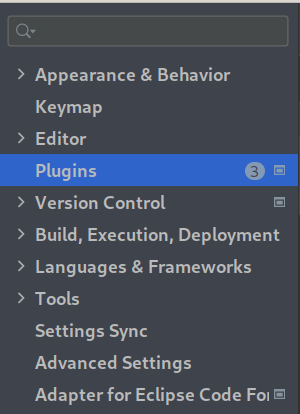
Step 4: In the Settings window, navigate to Plugins and click on the Marketplace tab.
Step 5: Search for "GWT-Platform(GWTP) IntelliJ IDEA" in the search bar and select "GWT-Platform(GWTP) IntelliJ IDEA" from the list of plugins.
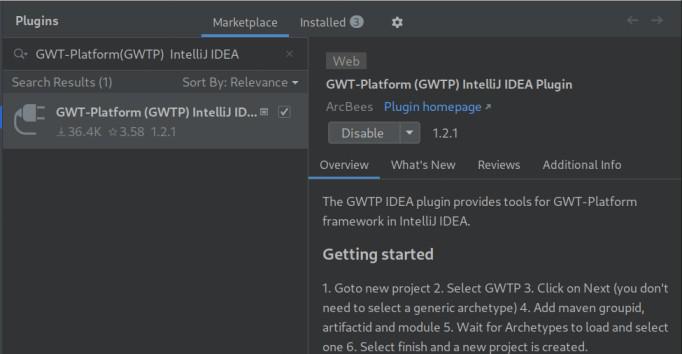
Step 6: Click on the Install button and follow the prompts to install the plugin.
Step 7: After the installation is complete, restart IntelliJ IDEA.
Step 8: Once IntelliJ IDEA has restarted, create a new project and select "GWTP" from the list of available options under Generators.
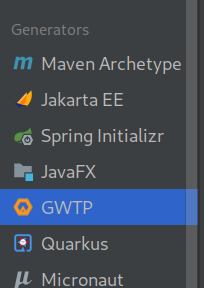
Step 9: Follow the prompts to set up your project and configure GWT.
Step 10: You may add a new ArtifactId, GroupId, and Module or leave it as default.

Step 11: Once your project is set up, you can start using GWT in your code. This plugin will allow you to create GWT modules, which are the building blocks of your GWT application.
Benefits of GWT
- Java-Based Development: One of the major advantages of GWT is that it allows developers to write web applications in Java, a popular and widely used programming language. This makes it easy for developers who are familiar with Java to learn and use GWT.
- Cross-Platform Compatibility: GWT supports cross-platform development, allowing developers to write applications that work seamlessly across multiple web browsers and devices. This means that developers can write code once and have it work on different platforms without having to worry about compatibility issues.
- Robust User Interface: GWT provides a rich set of pre-built widgets and components that can be customized and combined to create robust and responsive user interfaces. This makes it easy for developers to create complex UIs that are both intuitive and easy to use.
- Seamless Integration with Other Google Services: GWT is part of the Google Cloud Platform, which means it can easily integrate with other Google services like Google App Engine and Google Cloud Storage. This makes it easy to develop, deploy, and scale web applications using Google's cloud infrastructure.
- Productivity Tools: GWT includes a number of productivity tools, including the GWT Designer visual layout tool, which makes it easy to design and layout user interfaces using drag-and-drop functionality. Additionally, GWT's compiler and debugging tools help developers identify and fix errors quickly and efficiently.
- Community Support: GWT has a large and active community of developers who contribute to the development of the framework and provide support to other developers. This means that developers can find answers to their questions and get help with their projects from a wide range of sources.
Limitations of GWT
- Steep Learning Curve: While GWT is based on Java, which is a widely-used programming language, it can still have a steep learning curve for developers who are not familiar with the framework. Developers may need to spend time learning how to use GWT's APIs, widgets, and tools before they can develop applications efficiently.
- Limited Flexibility: While GWT provides a rich set of pre-built widgets and components, it may not be as flexible as some other web development frameworks. Developers may find it challenging to customize the pre-built components to meet specific requirements or to integrate other third-party libraries into their GWT application.
- Compilation Time: GWT applications need to be compiled into JavaScript before they can be run in the browser. Depending on the size and complexity of the application, compilation can take a significant amount of time, which can slow down the development process.
- Debugging: Debugging GWT applications can be more challenging than debugging traditional Java applications. Developers may need to use specialized tools to debug their applications, which can be more time-consuming and require additional effort.
- Limited Community Support: While GWT has a large and active community, it may not be as extensive as some other web development frameworks. This can make it more difficult for developers to find answers to their questions or to get support for their projects.
Overall, GWT is an excellent choice for developers who want to build complex, scalable, and maintainable web applications. With its cross-browser compatibility, built-in RPC mechanism, an extensive set of UI widgets, and support for internationalization, GWT is a popular choice for web developers looking to create robust and scalable web applications. It also provides a robust development environment with debugging and profiling tools that allow developers to easily test and optimize their applications.