Create a GitHub Profile Search using HTML CSS and JavaScript (original) (raw)
Last Updated : 2 May, 2026
This project demonstrates how to build an interactive GitHub Profile Search application using HTML, CSS, and JavaScript, allowing users to fetch and view GitHub user data in real time. It helps in understanding API integration and dynamic UI updates.
- Users can search for any GitHub username and view profile details instantly.
- Fetches data using the GitHub API and displays repositories dynamically.
- Enhances front-end skills like DOM manipulation and asynchronous JavaScript.
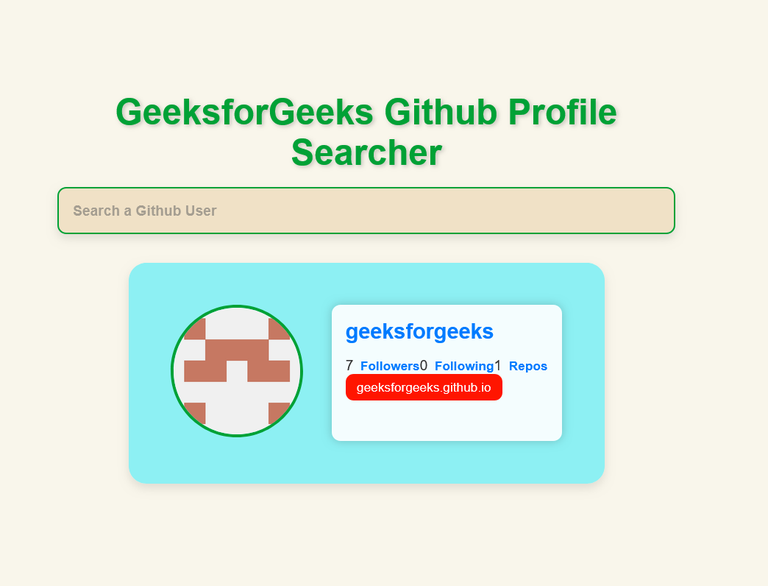
Preview
**Prerequisites: HTML CSS JavaScript
Approach
- Create the GitHub Profile Search layout and structure using HTML tags. We have used the tag to take the input from the user.
- The entire styling of the application is done through the CSS file. All the colors, card layout, alignment, and heading are managed through the CSS file.
- In JavaScript code, we define the API URL and axios script in the variables, and then we store the reference of HTML elements like the search bar and in variables.
- The user-defined function named "**userGetFunction" makes an API call by taking the username as the parameter and also catches the error in case of profile is not present.
- Then **repoGetFunction is used to fetch the repos of the user searched through the search bar.
- All this information is displayed in the attractive card component using the function "**userCard".
- In the "**repoCardFunction", the repositories which are fetched can be visited by clicking on the repo. We are fetching and displaying 5 repositories of the user in the card.
**Example: This describes the basic implementation of the Github Profile Search application using HTML, CSS, and Javascript.
HTML `
GeeksforGeeks GithubGeeksforGeeks Github
CSS
/* styles.css */ @import url( "https://fonts.googleapis.com/css2?family=Pacifico&display=swap");
- { box-sizing: border-box; margin: 0; padding: 0; } form { margin: auto; max-width: 50%; margin-bottom: 20px; } h1 { color: #00a136; font-size: 2.5rem; margin: auto; text-align: center; text-shadow: 2px 2px 4px rgba(0, 0, 0, 0.2); transition: transform 0.3s ease-in-out;
} h1:hover { transform: scale(1.1); }
.inputForm input { width: 80%; margin: auto; margin-top: 20px; display: block; background-color: #f0e1c6; border: 2px solid #00a136; border-radius: 7px; color: #333; font-weight: bold; padding: 10px; } .inputForm input::placeholder { color: #666; font-weight: bold; } .inputForm input:focus { outline: none; border-color: #007bff; box-shadow: 0 5px 10px rgba(0, 0, 0, 0.2); } .card { max-width: 50%; background-color: rgb( 141, 240, 243 ); border-radius: 20px; box-shadow: 0 5px 10px rgba(0, 0, 0, 0.1); display: flex; padding: 2rem; margin: auto; } .avatar { border-radius: 50%; border: 4px solid #00a136; height: 150px; width: 150px; transition: transform 0.3s ease-in-out; } .avatar:hover { transform: scale(1.1); } .user-info { color: #333; margin-left: 2rem; padding: 1rem; background-color: rgba( 255, 255, 255, 0.9 ); border-radius: 10px; box-shadow: 0 0 10px rgba(0, 0, 0, 0.2); } .user-info h2 { margin-top: 0; font-size: 1.5rem; color: #007bff; } .user-info p { font-size: 1rem; margin-top: 0.5rem; } .user-info ul { list-style-type: none; display: flex; justify-content: space-between; padding: 0; max-width: 400px; margin-top: 1rem; } .user-info ul li { display: flex; align-items: center; } .user-info ul li strong { font-size: 0.9rem; margin-left: 0.5rem; color: #007bff; } .repo { text-decoration: none; color: #fff; background-color: #ff1500; font-size: 0.9rem; padding: 0.4rem 0.8rem; margin-right: 0.5rem; margin-bottom: 0.5rem; display: inline-block; border-radius: 9px; transition: background-color 0.3s, transform 0.2s; } .repo:hover { background-color: #cc0c00; transform: scale(1.05); } @media (max-width: 500px) { .card { flex-direction: column; align-items: center; } .inputForm { max-width: 400px; } }
` JavaScript ``
// script.js
let api = "https://api.github.com/users/";
let fetch = document.createElement("script"); fetch.src = `https://cdnjs.cloudflare.com/ajax/libs/axios/0.21.0/axios.min.js%60;
fetch.integrity =
ha512-DZqqY3PiOvTP9HkjIWgjO6ouCbq+dxqWoJZ/Q+zPYNHmlnI2dQnbJ5bxAHpAMw+LXRm4D72EIRXzvcHQtE8/VQ==;
fetch.crossOrigin = "anonymous";
document.head.appendChild(fetch);
let main =
document.getElementById("main");
let inputForm =
document.getElementById("userInput");
let inputBox =
document.getElementById("inputBox");
const userGetFunction = (name) => {
axios(api + name)
.then((response) => {
userCard(response.data);
repoGetFunction(name);})
.catch((err) => {
if (
err.response.status ==
404) {
errorFunction(
"No profile with this username");}});}
const repoGetFunction = (name) => {
axios(
api +
name +
"/repos?sort=created")
.then((response) => {
repoCardFunction(
response.data);})
.catch((err) => {
errorFunction(
"Problem fetching repos");});}
const userCard = (user) => {
let id = user.name || user.login;
let info = user.bio
? <p>${user.bio}</p>: "";
let cardElement = `
${id}
${info}- ${user.followers} Followers
- ${user.following} Following
- ${user.public_repos} Repos
const errorFunction = (error) => { let cardHTML = `
${error}
const repoCardFunction = (repos) => { let reposElement = document.getElementById( "repos"); for (let i = 0; i < 5 && i < repos.length; i++) { let repo = repos[i]; let repoEl = document.createElement("a"); repoEl.classList.add("repo"); repoEl.href = repo.html_url; repoEl.target = "_blank"; repoEl.innerText = repo.name; reposElement.appendChild(repoEl);}} inputForm.addEventListener("submit", (e) => { e.preventDefault(); let user = inputBox.value; if (user) { userGetFunction(user); inputBox.value = "";}});
``
**Output: