HTML DOM cookie Property (original) (raw)
Last Updated : 11 Jul, 2025
Almost every website stores cookies (small text files) on the user's computer for recognition and to keep track of his preferences. DOM cookie property sets or gets all the key/value pairs of cookies associated with the current document.
**Getting all the Cookies:
The **document.cookie method returns a string containing semicolon-separated list of all the cookies(key=value pairs) of the current document.
**Syntax:
document.cookie
**Example: Below is the program to get all of the cookies associated with the current document:
HTML `
CookieGeeksforGeeks!
Here are the cookies baked by this document:
<!-- Paragraph element to display all cookies -->
<p id="cookies"></p>

<!-- Fetch cookies and display them in the
    above paragraph element -->
<script>
    function getCookies() {
        document.getElementById("cookies").innerHTML =
            document.cookie;
    }
</script>
`
**Output:
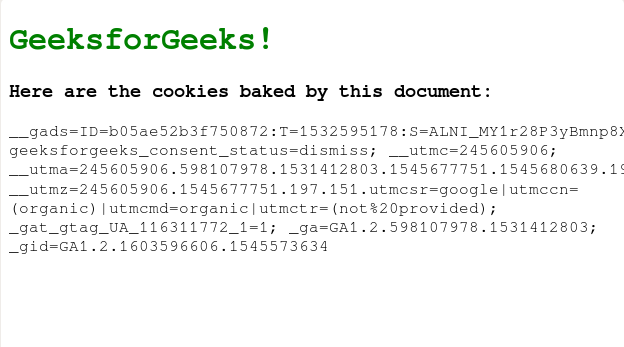
**Setting a Cookie:
A new cookie can be written for the current document by providing a string containing **key=value pair separated by a colon with other cookies(key=value pairs) or any of the following optional values:
- **expires=date: where the date is in GMT format. By default, the cookie expires when the browser is closed.
- **path=path: specifies the directory to store cookies the on computer. By default, the path is set to the path of the current document location.
- **max-age=seconds
- **domain=domainname: specifies the domain name of the cookie. If not specified, defaults to the domain name of the current page.
- **secure=boolean: specifies if the cookie has to be sent through https server.
**Syntax:
document.cookie = NewCookie
**Example: In this example, we are setting a cookie.
HTML `
CookieGeeksforGeeks!
<!-- Name for Cookie -->
<input type="text" id="key" placeholder="Name">

<!-- Value for the cookie -->
<input type="text" id="val" placeholder="Value">
<br>

<!-- button to set cookie -->
<button onclick="setCookie()">Set a cookie</button>
<br>

<!-- Button to get cookie -->
<button onclick="getCookie()">Get cookies</button>

<!-- Empty Paragraph element to display Cookies -->
<p id="cookies"></p>
<script>
    // Set cookies
    function setCookie() {
        document.cookie =
            document.getElementById('key').value + "="
            + document.getElementById('val').value;
    }
    // Get cookies
    function getCookie() {
        document.getElementById("cookies").innerHTML =
            document.cookie;
    }
</script>
`