JavaScript Cheat Sheet A Basic Guide to JavaScript (original) (raw)
JavaScript is a lightweight, cross-platform programming language used to create dynamic and interactive web content. It is single-threaded and interpreted, meaning the code is executed line by line for greater flexibility. JavaScript plays a key role in modern web development by enhancing user interaction and responsiveness.
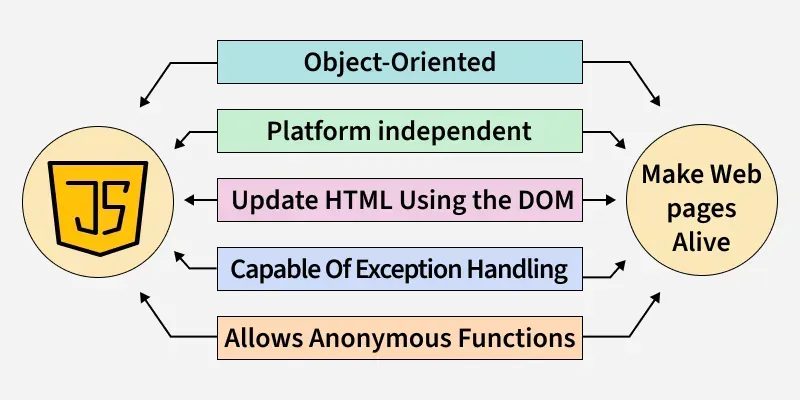
- JavaScript can be added to a web page using the .
- JavaScript comments help explain and improve code readability.
- Single-line comments in js starts with "//".
- Multi-line comments are wrapped between /* and*/.
Variables
Variables in JavaScript are containers used to store data. JavaScript allows variables to be declared in three ways:
- **var: The var keyword is used to declare a variable that can be redeclared and reassigned. It is function-scoped.
- **let: The let keyword is similar to var, but it is block-scoped and cannot be redeclared within the same block.
- **const: The const keyword is used to declare a variable whose value cannot be reassigned. It is also block-scoped. Node `
// Using var keyword console.log("Using var Keyword"); var x = 1; if (x === 1) { var x = 2; console.log(x); } console.log(x);
// Using let keyword console.log("Using let Keyword"); let x1 = 1; if (x1 === 1) { let x1 = 2; console.log(x1); } console.log(x1);
// Using const keyword console.log("Using const Keyword"); const number = 48;
// Changing const value will display TypeError try { const number = 42; } catch (err) { console.log(err); } console.log(number);
`
Output
Using var Keyword 2 2 Using let Keyword 2 1 Using const Keyword 48
- Use
letfor variables whose values will change. - Use
constfor variables with constant values. - Avoid using
varin modern JavaScript due to potential scoping issues.
Datatypes
In JavaScript, data types determine the kind of value a variable can store. Understanding these types is essential for evaluating expressions correctly and performing appropriate operations on variables.
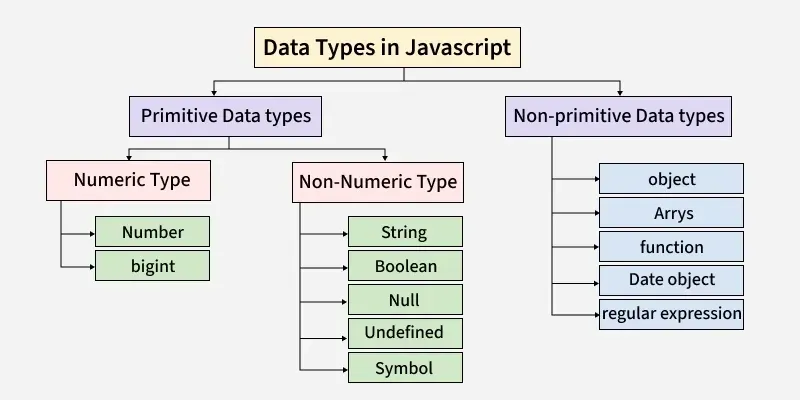
JavaScript supports both primitive and non-primitive data types:
- **Number: The Number data type represents numeric values, including integers and real numbers.
- **String: A String is a sequence of characters written inside quotes.
- **Boolean: The Boolean type has only two values: true or false.
- **Null: Null is a special value that indicates that a variable is intentionally empty.
- **Undefined: The Undefined type represents a variable that is declared but not assigned any value.
- **Object: An Object is a complex data type used to store collections of data in key–value pairs.
- **Array: An Array is a structure that stores multiple values of the same type in a single variable.
- **Function: A Function is an object that can be called to execute a block of code. JavaScript `
// Number const n = 10; console.log(n);
// string let s = "hello geeks"; console.log(s);
// Boolean const x = "true"; console.log(x);
// Undefined let name; console.log(name);
// Null const num = null; console.log(num);
//array var arr = [1,3,4,6]; console.log(arr);
// object const obj = { firstName: "geek", lastName: null, batch: 2, }; console.log(obj);
// Symbol const val1 = Symbol("hello"); const val2 = Symbol("hello"); // Here both values are different as they are symbol type which is immutable object console.log(val1); console.log(val2);
`
Output
10 hello geeks true undefined null [ 1, 3, 4, 6 ] { firstName: 'geek', lastName: null, batch: 2 } Symbol(hello) Symbol(hello)
- Primitive types (like Number, String, Boolean, Null, and Undefined) store single values.
- Non-primitive types (like Object, Array, and Function) can store collections of data or executable code.
Operators
JavaScript operators are symbols used to perform various operations on variables (operands). Following are the different types of operators:
**1. Arithmetic: Basic arithmetic operations on variables are performed using Arithmetic operators.
**2. Comparison: Two operands are compared or evaluated using a Comparison operator.
**3. Bitwise: Bitwise operators are used to perform operations at the bit level.
**4. Logical: Logical operations are carried out using Logical operators.JavaScript provides three logical operators:
- **Logical AND (&&): Returns true when all the operands are true.
- **Logical OR (||): Returns true when one or more operands are true.
- **Logical NOT (!): The NOT operator inverts a value, converting true to false and false to true.
**5. Assignment: Assignment operators are used to assign values to JavaScript variables.
JavaScript `
let x = 5; let y = 3;
// Addition console.log("x + y = ", x); // 8
// Subtraction console.log("x - y = ", x - y); // 2
// Multiplication console.log("x * y = ", x * y); // 15
// Division console.log("x / y = ", x / y);
// Remainder console.log("x % y = ", (x % y)); // 2
// Increment console.log("++x = ", ++x); // x is now 6 console.log("x++ = ", x++); console.log("x = ", x); // 7
// Decrement console.log("--x = ", --x); // x is now 6 console.log("x-- = ", x--); console.log("x = ", x); // 5
// Exponentiation console.log("x ** y =", x ** y);
// Comparison console.log(x > y); // true
// Equal operator console.log((2 == 2)); // true
// Not equal operator console.log((3 != 2)); // true
// Strict equal operator console.log((2 === 2)); // true
// Strict not equal operator console.log((2 !== 2)); // false
// Logical Operator
// Logical AND console.log((x < 6 && y < 5)); // true
// Logical OR console.log((x < 6 || y > 6)); // true
// Logical NOT console.log(!(x < 6)); // false
`
Output
x + y = 5 x - y = 2 x * y = 15 x / y = 1.6666666666666667 x % y = 2 ++x = 6 x++ = 6 x = 7 --x = 6 x-- = 6 x = 5 x ** y = 125 true true true true false true true false
JS scope and scope chain
Scope determines where a variable is accessible in your program. It defines the context in which variables can be referenced or modified. JavaScript has three main types of scope:
- **Function Scope: Variables declared inside a function are only accessible within that function.
- **Global Scope: Variables declared outside any function are accessible throughout the program.
- **Block Scope: Variables declared with
letorconstinside a block (e.g., loops or conditionals) are only accessible within that block.
**Scope Chain:
The scope chain helps the JavaScript engine resolve variable references by searching through the current scope and its outer scopes (from local to global).
- If a variable isn't found in the current scope, the engine looks in outer scopes until it either finds the variable or reaches the global scope.
- If it cannot find the variable, it either declares it in the global scope (non-strict mode) or throws an error (strict mode). JavaScript `
let a = 10;
function example() {
// Exists in function scope
let b = 20;

if (true) {

    // Exists in function scope (due to 'var')
    var c = 30;

    // Exists in block scope
    const d = 40;
}

// Accessible from global scope
console.log(a);

// Accessible from function scope
console.log(b);

// Accessible from function scope (due to 'var')
console.log(c);

// Error: 'd' is not accessible outside block scope
console.log(d);
}
example();
`
Functions
A JavaScript function is a block of code designed to perform a particular task. It is executed when invoked or called. Instead of writing the same piece of code again and again you can put it in a function and invoke the function when required.
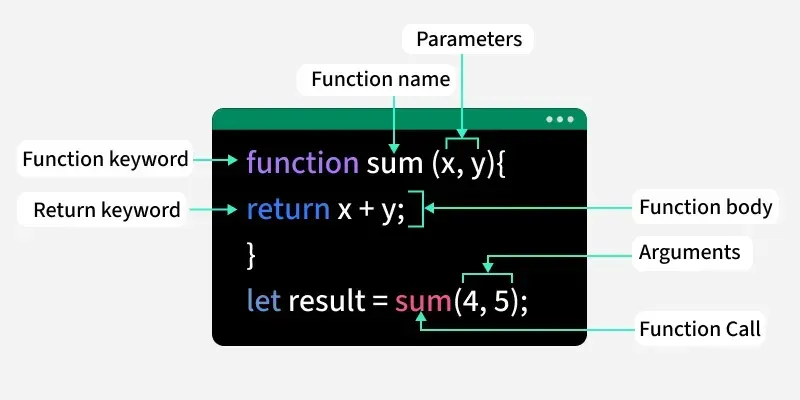
JavaScript function can be created using the functions keyword. Some of the functions in JavaScript are:
- **parseInt(): The parseInt() function parses a given argument and returns an integer.
- **parseFloat(): The parseFloat() function parses the argument and returns a floating-point number.
- **isNaN(): The isNaN() function checks whether a value is Not a Number.
- **Number(): The Number() function converts the given argument into a number.
- **eval(): The eval() function evaluates JavaScript code provided as a string.
- **prompt(): The prompt() function displays a dialog box to take input from the user.
- **encodeURI(): The encodeURI() function encodes a URI using the UTF-8 scheme.
- **match(): The match() function searches a string for a match using a regular expression. JavaScript `
// JS parseInt function: const num1 = parseInt("100.45"); console.log('Using parseInt("100.45") = ' + num1);
// JS parseFloat function: const num2 = parseFloat("123.45abc"); console.log('parseFloat("123.45abc") = ' + num2);
// JS isNaN function: console.log(isNaN("hello"));
// JS Number() function: const num3 = Number("123"); console.log("Value of '123': " + num3);
// JS eval() function: function evalExample() { const expression = "2 + 3 * 4"; // Example expression to evaluate const result = eval(expression); // Evaluates '2 + 3 * 4' and returns 14 console.log(result); } evalExample();
// JS encodeURI function: const url = "https://example.com/hello world?query=javascript"; const encodedURL = encodeURI(url); // Encodes spaces as '%20' and ensures valid URL. console.log(encodedURL);
`
Output
Using parseInt("100.45") = 100 parseFloat("123.45abc") = 123.45 true Value of '123': 123 14 https://example.com/hello%20world?query=javascript
Arrays
In JavaScript, array is a single variable that is used to store different elements. It is often used when we want to store list of elements and access them by a single variable. Arrays use numbers as index to access its "elements".
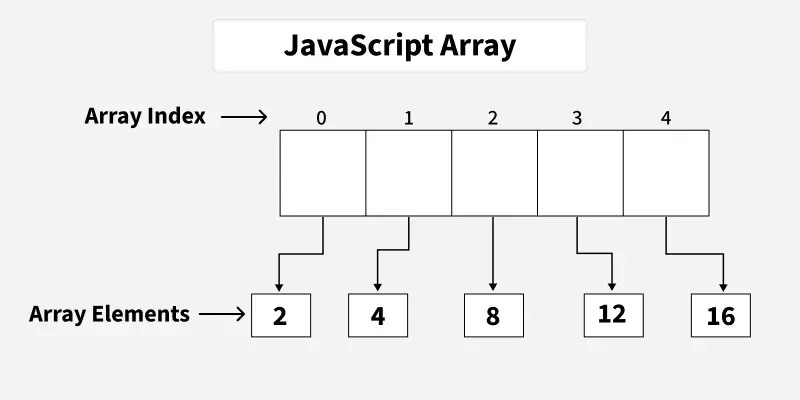
Declaration of an Array: There are basically two ways to declare an array.
**Example:
var House = [ ]; // Method 1
var House = new Array(); // Method 2
There are various operations that can be performed on arrays using JavaScript methods. Some of these methods are:
- **push(): The push() method adds a new element to the end of an array.
- **pop(): The pop() method removes the last element of an array.
- **concat(): The concat() method joins multiple arrays into a single array.
- **shift(): The shift() method removes the first element of an array.
- **unshift(): The unshift() method adds new elements at the beginning of an array.
- **reverse(): The reverse() method reverses the order of array elements.
- **slice(): The slice() method copies a portion of an array into a new array.
- **splice(): The splice() method adds or removes elements at a specific position.
- **toString(): The toString() method converts array elements into a string.
- **valueOf(): The valueOf() method returns the array’s primitive value.
- **indexOf(): The indexOf() method returns the first index at which a given element appears.
- **lastIndexOf(): The lastIndexOf() method returns the final index at which an element appears.
- **join(): The join() method combines array elements into a single string and returns it.
- **sort(): The sort() method sorts array elements based on a condition. JavaScript `
// Declaring and initializing arrays
// Num Array let arr = [10, 20, 30, 40, 50]; let arr1 = [110, 120, 130, 140];
// String array let string_arr = ["Alex", "peter", "chloe"];
// push: Adding elements at the end of the array arr.push(60); console.log("After push op " + arr);
// unshift() Adding elements at the start of the array arr.unshift(0, 10); console.log("After unshift op " + arr );
// pop: removing elements from the end of the array arr.pop(); console.log("After pop op" + arr);
// shift(): Removing elements from the start of the array arr.shift(); console.log("After shift op " + arr);
// splice(x,y): removes x number of elements // starting from index y arr.splice(2, 1); console.log("After splice op" + arr);
// reverse(): reverses the order of elements in array arr.reverse(); console.log("After reverse op" + arr);
// concat(): merges two or more array console.log("After concat op" + arr.concat(arr1));
`
Output
After push op 10,20,30,40,50,60 After unshift op 0,10,10,20,30,40,50,60 After pop op0,10,10,20,30,40,50 After shift op 10,10,20,30,40,50 After splice op10,10,30,40,50 After reverse op50,40,30,10,10 Af...
Loops
Loops are a useful feature in most programming languages. With loops you can evaluate a set of instructions/functions repeatedly until certain condition is reached. They let you run code blocks as many times as you like with different values while some condition is true.
Loops can be created in the following ways in JavaScript:
- **for: The for loop iterates over a block of code with conditions specified at the beginning.
- **while: The while loop is an entry-control loop that executes only after checking the condition.
- **do-while: The do-while loop is an exit-control loop that executes once before checking the condition.
- **for-in: The for-in loop provides a simpler way to iterate over the properties of an object. JavaScript `
// Illustration of for loop let x;
for (x = 2; x <= 4; x++) { console.log("Value of x:" + x); }
// creating an Object let languages = { first: "C", second: "Java", third: "Python", fourth: "PHP", fifth: "JavaScript", };
// Iterate through every property of the object for (itr in languages) { console.log(languages[itr]); }
// Illustration of while loop let y = 1;
// Exit when x becomes greater than 4 while (y <= 4) { console.log("Value of y:" + y); y++; }
// Illustration of do-while loop let z = 21;
do {
console.log("Value of z:" + z);

z++;
} while (z < 20);
`
Output
Value of x:2 Value of x:3 Value of x:4 C Java Python PHP JavaScript Value of y:1 Value of y:2 Value of y:3 Value of y:4 Value of z:21
If-else
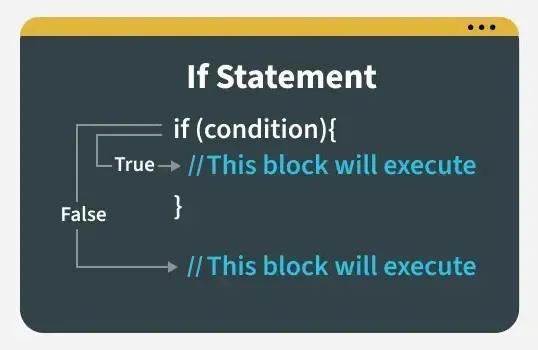
The if-else statement in JavaScript is used to execute code conditionally. It allows a program to run different code blocks based on whether a condition is true or false.
- Executes the if block when a condition is satisfied; otherwise, the else block runs.
- Supports nested if statements, allowing one if condition inside another.
JavaScript `
// JavaScript program to illustrate if-else statement const i = 10;
if (i < 15) console.log("Value of i is less than 15"); else console.log("Value of i is greater than 15");
`
Output
Value of i is less than 15
Strings
Strings in JavaScript are primitive and immutable data types used for storing and manipulating text data which can be zero or more characters consisting of letters, numbers or symbols. JavaScript provides a lot of methods to manipulate strings.
Some most used ones are:
- **concat(): The concat() method is used to merge multiple strings into one string.
- **match(): The match() method is used to find matches of a string against a given pattern.
- **replace(): The replace() method finds and replaces a specified part of a string.
- **substr(): The substr() method extracts a specific number of characters from a string.
- **slice(): The slice() method extracts a portion of a string and returns it.
- **lastIndexOf(): The lastIndexOf() method returns the position of the last occurrence of a specified value.
- **charAt(): The charAt() method returns the character at a given index of the string.
- **valueOf(): The valueOf() method returns the primitive value of a string object.
- **split(): The split() method splits a string into an array of substrings.
- **toUpperCase(): The toUpperCase() method converts a string to uppercase.
- **toLowerCase(): The toLowerCase() method converts a string to lowercase. JavaScript `
let gfg = 'GFG '; let geeks = 'stands-for-GeeksforGeeks';
// Print the string as it is console.log(gfg); console.log(geeks);
// concat() method console.log(gfg.concat(geeks));
// match() method console.log(geeks.match(/eek/));
// charAt() method console.log(geeks.charAt(5));
// valueOf() method console.log(geeks.valueOf());
// lastIndexOf() method console.log(geeks.lastIndexOf('for'));
// substr() method console.log(geeks.substr(6));
// indexOf() method console.log(gfg.indexOf('G'));
// replace() method console.log(gfg.replace('FG', 'fg'));
// slice() method console.log(geeks.slice(2, 8));
// split() method console.log(geeks.split('-'));
// toUpperCase method console.log(geeks.toUpperCase(geeks));
// toLowerCase method console.log(geeks.toLowerCase(geeks));
`
Output
GFG stands-for-GeeksforGeeks GFG stands-for-GeeksforGeeks [ 'eek', index: 12, input: 'stands-for-GeeksforGeeks', groups: undefined ] s stands-for-GeeksforGeeks 16 -for-GeeksforGeeks 0 Gfg an...
Regular Expressions
A regular expression is a sequence of characters that forms a search pattern.
- The search pattern can be used for text search and text to replace operations.
- A regular expression can be a single character or a more complicated pattern.
Regular Expression Modifiers:
Modifiers can be used to perform multiline searches. Some of the pattern modifiers that are allowed in JavaScript:
- **[abc]: The [abc] pattern matches any one of the characters inside the brackets.
- **[0-9]: The [0-9] pattern matches any digit between 0 and 9.
- ****(x|y):** The (x|y) pattern matches either x or y as alternatives.
Regular Expression Patterns:
Metacharacters are characters with a special meaning. Some of the metacharacters that are allowed in JavaScript:
- ****. :** The . metacharacter matches any single character except a newline or line terminator.
- **\d: The \d metacharacter is used to match any digit.
- **\s: The \s metacharacter is used to match any whitespace character.
- **\uXXXX: The \uXXXX pattern is used to match a Unicode character specified by its hexadecimal code.
Quantifiers
They provide the minimum number of instances of a character, group, or character class in the input required to find a match.
Some of the quantifiers allowed in JavaScript are:
- **n+: The n+ quantifier matches any string containing at least one n.
- **n*: The n* quantifier matches any string containing zero or more occurrences of n.
- **n?: The n? quantifier matches any string containing zero or one occurrence of n.
- **n{x}: The n{x} quantifier matches strings that contain exactly x occurrences of n.
- **^n: The ^n pattern matches strings that start with n.
Here is an example to help you understand regular expression better.
JavaScript `
// Program to validate the email address function validateEmail(email) {
// Regex pattern for email
const re = /\S+@\S+\.\S+/g;

// Check if the email is valid
let result = re.test(email);

if (result) {
    console.log("The email is valid.");
} else {
    console.log("The email is not valid.");
}
}
// Input Email Id let email = "abc@gmail.com" validateEmail(email);
email = "abc#$#@45com" validateEmail(email);
`
Output
The email is valid. The email is not valid.
Data Transformation
Data transformation is converts data from one format to another. It can be done with the usage of higher-order functions which can accept one or more functions as inputs and return a function as the result.
All higher-order functions that take a function as input are:
- **map(): The map() method iterates over an array and calls a function on every element.
- **filter(): The filter() method creates a new array by keeping elements that meet a given condition.
- **reduce(): The reduce() method reduces an array to a single value using a function. JavaScript `
const num = [16, 25];
/* Using JS map() Method */ console.log(num.map(Math.sqrt));
const ages = [19, 37, 16, 42];
/* Using JS filter() Method */ console.log(ages.filter(checkAdult));
function checkAdult(age) { return age >= 18; }
/* Using JS reduce() Method */ const numbers = [165, 84, 35]; console.log(numbers.reduce(myFunc));
function myFunc(total, num) { return total - num; }
`
Output
[ 4, 5 ] [ 19, 37, 42 ] 46
Date objects
The Date object is an inbuilt datatype of JavaScript language. It is used to deal with and change dates and times. There are four different way to declare a date, the basic things is that the date objects are created by the new Date() operator.
**Syntax:
new Date()
new Date(milliseconds)
new Date(dataString)
new Date(year, month, date, hour, minute, second, millisecond)
There are various methods in JavaScript used to get date and time values or create custom date objects. Some of these methods are:
- **getDate(): The getDate() method returns the day of the month (1-31).
- **getTime(): The getTime() method returns the milliseconds elapsed since January 1, 1970.
- **getMinutes(): The getMinutes() method returns the current minute (0-59).
- **getFullYear(): The getFullYear() method returns the full year as a four-digit number (yyyy).
- **getDay(): The getDay() method returns the weekday as a number (0-6).
- **parse(): The parse() method returns the number of milliseconds since January 1, 1970, after parsing a date string.
- **setDate(): The setDate() method sets the day of the month (1-31).
- **setTime(): The setTime() method sets the time in milliseconds since January 1, 1970. JavaScript `
// Here a date has been assigned by creating a date obj let DateObj = new Date("October 13, 1996 05:35:32");
// getDate() let A = DateObj.getDate();
// Printing date of the month console.log(A);
// getTime() let B = DateObj.getTime();
// Printing time in milliseconds. console.log(B);
// getMinutes() let minutes = DateObj.getMinutes();
// Printing minute. console.log(minutes);
// getFullYear() let C = DateObj.getFullYear();
// Printing year console.log(C);
// getDay() let Day = DateObj.getDay();
// Printing day of the week console.log("Number of Day: " + Day);
// setDate DateObj.setDate(15);
let D = DateObj.getDate();
// Printing new date of the month console.log(D);
// parse(), taking wrong date string as input. let date = "February 48, 2018 12:30 PM";
// calling parse function. let msec = Date.parse(date); console.log(msec);
`
Output
13 845184932000 35 1996 Number of Day: 0 15 NaN
DOM
DOM stands for Document Object Model. It defines the logical structure of documents and the way a document is accessed and manipulated. JavaScript can not understand the tags in HTML document but can understand objects in DOM.
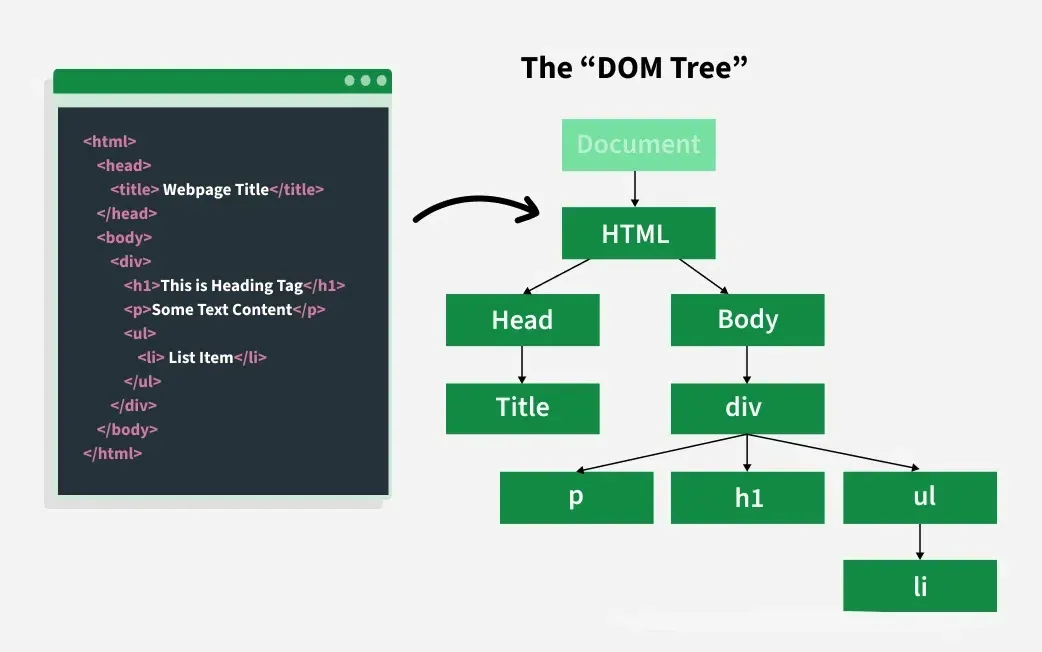
Below are some of the methods provided by JavaScript to manipulate these nodes and their attributes in the DOM:
- **appendChild(): The appendChild() method adds a new child node as the last child of an element.
- **cloneNode(): The cloneNode() method duplicates an HTML element.
- **hasAttributes(): The hasAttributes() method returns true if an element has attributes; otherwise, it returns false.
- **removeChild(): The removeChild() method removes a child node from an element.
- **getAttribute(): The getAttribute() method returns the value of a specified attribute from an element.
- **getElementsByTagName(): The getElementsByTagName() method returns a list of all child elements with a given tag name.
- **isEqualNode(): The isEqualNode() method checks whether two elements are the same. HTML `
GeeksforGeeks
DOM appendChild() Method
<div id="sudo">
    The Good Website is learning for Computer Science is-
</div>
<button onclick="geeks()">Submit</button>
<br />

<div class="box">
    <h1>GeeksforGeeks</h1>
    <h2>A computer science portal for geeks</h2>
</div>

<h2>DOM cloneNode() Method</h2>
<button onclick="nClone()">Click here to clone the above elements.</button>
<br />

<h2>DOM hasAttributes() Method</h2>
<p id="gfg">
    Click on the button to check if that body element has any attributes
</p>
<button onclick="hasAttr()">Submit</button>
<br />

<h2>DOM removeChild() Method</h2>
<p>Sorting Algorithm</p>
<ul id="listitem">
    <li>Insertion sort</li>
    <li>Merge sort</li>
    <li>Quick sort</li>
</ul>
<button onclick="Geeks()">Click Here!</button>
<br />

<h2>DOM getAttribute() Method</h2>
<button id="button" onclick="getAttr()">Submit</button>
<p id="gfg1"></p>
<br />

<h2>DOM getElementsByTagName()</h2>
<p>A computer science portal for geeks.</p>
<button onclick="getElement()">Try it</button>

<h3>DOM isEqualNode() method</h3>
<div>GeeksforGeeks</div>
<div>GfG</div>
<div>GeeksforGeeks</div>
<button onclick="isequal()">Check</button>
<p id="result"></p>

<script src="script.js"></script>
CSS
#sudo { border: 1px solid green; background-color: green; margin-bottom: 10px; color: white; font-weight: bold; padding: 5px; }
h1, h2 { text-align: center; color: green; font-weight: bold; }
.box { border: 3px solid green; margin-top: 10px; padding: 10px; }
JavaScript
function geeks() { var node = document.createElement("p"); var t = document.createTextNode("GeeksforGeeks"); node.appendChild(t); document.getElementById("sudo").appendChild(node); }
function nClone() { var geek = document.getElementsByTagName("div")[0]; var clone = geek.cloneNode(true); document.body.appendChild(clone); }
function hasAttr() { var s = document.body.hasAttributes(); document.getElementById("gfg").innerHTML = s; }
function Geeks() { var doc = document.getElementById("listitem"); doc.removeChild(doc.childNodes[0]); }
function getAttr() { var rk = document.getElementById("button").getAttribute("onclick"); document.getElementById("gfg1").innerHTML = rk; }
function getElement() { var doc = document.getElementsByTagName("p"); doc[0].style.background = "green"; doc[0].style.color = "white"; }
function isequal() { var out = document.getElementById("result"); var divele = document.getElementsByTagName("div");
out.innerHTML =
    "element 1 equals element 1: " + divele[0].isEqualNode(divele[0]) + "<br/>" +
    "element 1 equals element 2: " + divele[0].isEqualNode(divele[1]) + "<br/>" +
    "element 1 equals element 3: " + divele[0].isEqualNode(divele[2]);
}
`
Numbers and Math
JavaScript provides various properties and methods to deal with Numbers and Math. Number Properties include MAX value, MIN value, NAN(not a number), negative infinity , positive infinity etc.
Some of the methods in JavaScript to deal with numbers are:
- **valueOf(): The valueOf() method returns a number in its original (primitive) form.
- **toString(): The toString() method converts a number to its string representation.
- **toFixed(): The toFixed() method returns a number as a string with a specified number of decimal places.
- **toPrecision(): The toPrecision() method converts a number to a string with a specified total length (precision).
- **toExponential(): The toExponential() method returns a number written in exponential (scientific) notation. JavaScript `
var num = 213; var num1 = 213.3456711;
// JS valueof() Method console.log("Output : " + num.valueOf());
// JS tostring() Method console.log("Output : " + num.toString(2));
// JS tofixed() Method console.log("Output : " + num1.toString(2));
// JS topricision() Method console.log("Output : " + num1.toPrecision(3));
// JS toexponential() Method console.log("Output : " + num1.toExponential(4));
`
Output
Output : 213 Output : 11010101 Output : 11010101.0101100001111101111001101011010110101100001 Output : 213 Output : 2.1335e+2
- Javascript provides math object which is used to perform mathematical operations on numbers.
- There are many math object properties which include euler's number, PI, square root, logarithm.
Some of the methods in JavaScript to deal with math properties are:
- **max(x, y, z…n): The max() method returns the highest-valued number from the given inputs.
- **min(x, y, z…n): The min() method returns the lowest-valued number from the given inputs.
- **exp(x): The exp() method returns the exponential value of x.
- **log(x): The log() method returns the natural logarithm (base e) of x.
- **sqrt(x): The sqrt() method returns the square root of x.
- **pow(x, y): The pow() method returns the value of x raised to the power of y.
- **round(x): The round() method rounds x to the nearest integer.
- **sin(x): The sin() method returns the sine of x (in radians).
- **tan(x): The tan() method returns the tangent of angle x. HTML `
`
Events
JavaScript has events to provide a dynamic interface to a webpage. When a user or browser manipulates the page events occur. These events are hooked to elements in the Document Object Model(DOM).
Some of the events supported by JavaScript:
- **onclick(): The onclick() event is triggered when an element is clicked.
- **onkeyup(): The onkeyup() event executes when a key is released.
- **onmouseover(): The onmouseover() event triggers when the mouse pointer hovers over an element.
- **onmouseout(): The onmouseout() event triggers when the mouse pointer moves away from an element.
- **onchange(): The onchange() event detects a change in the value of an element.
- **onload(): The onload() event fires when an element is fully loaded.
- **onfocus(): The onfocus() event triggers when an element gains focus.
- **onblur(): The onblur() event fires when an element loses focus.
- **onsubmit(): The onsubmit() event triggers when a form is submitted.
- **ondrag(): The ondrag() event triggers when an element is being dragged.
- **oninput(): The oninput() event triggers when an input field receives a value. HTML `

<!-- onclick event -->
<h2>onclick event</h2>
<button type="button" onclick="hiThere()">Click me</button>

<!-- onfocus event -->
<h2>onfocus event</h2>
<p>Take the focus into the input box below:</p>
<input id="inp" onfocus="focused()" />

<!-- onblur event -->
<h2>onblur event</h2>
<p>
    Write something in the input box and
    then click elsewhere in the document body.
</p>
<input onblur="alert(this.value)" />

<!-- onmouseover and onmouseout event -->
<h2 id="hID">onmouseover event</h2>

<!-- onchange event -->
<h2>onchange event</h2>
<p>Choose Subject:</p>
<select id="GFG" onchange="Geeks()">
    <option value="Data Structure">Data Structure</option>
    <option value="Algorithm">Algorithm</option>
    <option value="Computer Network">Computer Network</option>
    <option value="Operating System">Operating System</option>
    <option value="HTML">HTML</option>
</select>

<p id="sudo"></p>

<!-- onsubmit event -->
<h2>onsubmit event</h2>
<form onsubmit="return Geek()">
    First Name: <input type="text" /><br />
    Last Name: <input type="text" /><br />
    <input type="submit" value="Submit" />
</form>

<!-- ondrag event -->
<h2>ondrag event</h2>
<div id="geeks" draggable="true">
    GeeksforGeeks: A computer science portal for geeks
</div>

<script src="script.js"></script>
CSS
#geeks { border: 1px solid black; padding: 15px; width: 60%; cursor: grab; }
h1, h2 { color: green; }
JavaScript
function imageLoaded() { alert("Image completely loaded"); }
function hiThere() { alert("Hi there!"); }
function focused() { var e = document.getElementById("inp"); if (confirm("Got it?")) { e.blur(); } }
/* Mouseover & Mouseout */ document.addEventListener("DOMContentLoaded", function () { var heading = document.getElementById("hID");
heading.addEventListener("mouseover", function () {
    heading.style.color = "green";
});

heading.addEventListener("mouseout", function () {
    heading.style.color = "black";
});

document.getElementById("geeks").addEventListener("drag", function () {
    this.style.fontSize = "30px";
    this.style.color = "green";
});
});
/* onchange event */ function Geeks() { var x = document.getElementById("GFG").value; document.getElementById("sudo").innerHTML = "Selected Subject: " + x; }
/* onsubmit event */ function Geek() { alert("Form submitted successfully."); return false; // prevents page refresh }
`
Error
When executing JavaScript code, errors will most definitely occur when the JavaScript engine encounters a syntactically invalid code. These errors can occur due to the fault from the programmer’s side or the input is wrong or even if there is a problem with the logic of the program.
JavaScript has a few statements to deal with these errors:
- **try: The try statement tests a block of code to check for errors.
- **catch: The catch statement handles the error if one occurs.
- **throw: The throw statement allows you to create and throw custom errors.
- **finally: The finally statement executes code after the try and catch blocks, regardless of the result. HTML `
JavaScript throw try catch finally keywords
Please enter a number:
Test Input