Fetch API in JavaScript (original) (raw)
The Fetch API is a modern interface in JavaScript that allows you to make HTTP requests. It replaces the older XMLHttpRequest method and provides a cleaner and more flexible way to fetch resources asynchronously. The Fetch API uses Promises, making it easier to work with asynchronous data.
**Syntax
fetch(url, options)
.then(response => response.json())
.then(data => console.log(data))
.catch(error => console.error('Error:', error));
- **url: The API endpoint from which data is fetched.
- **options (optional): Specifies method, headers, body, etc.
- **response.json(): Parses the response as JSON.
- ****.catch(error):** Handles any errors that occur during the request.
How Fetch API Works?
- A request is sent to the specified URL.
- The server processes the request and sends a response.
- The response is converted to JSON (or another format) using .json().
- Errors are handled using .catch() or try-catch blocks.
Common HTTP Request Methods in Fetch API
- **GET: This request helps to retrieve some data from another server.
- **POST: This request is used to add some data onto the server.
- **PUT: This request is used to update some data on the server.
- **DELETE: This request is used to delete some data on the server.
Basic Fetch Request
A simple GET request to fetch data from an API.
JavaScript `
fetch('https://fakestoreapi.com/products/1') .then(response => response.json()) .then(data => console.log(data)) .catch(error => console.error('Error:', error));
`
- fetch() sends an HTTP request to the specified URL.
- .json() parses the response body as JSON.
- .then() handles the resolved promise with the fetched data, and .catch() catches any errors (e.g., network issues).
Handling Response Status Codes
When making an HTTP request, handling response status codes is crucial for determining whether the request was successful or if there was an error. The status code provides information about the result of the request.
JavaScript `
// Example of using fetch() to get data from an API // Note: The link used here (https://api.example.com/data) is just a placeholder. // It’s not a real API, so this code will NOT show any output in the console.
fetch('https://api.example.com/data') .then(response => { if (response.ok) { return response.json(); } else { throw new Error('Network response was not ok'); } }) .then(data => console.log(data)) .catch(error => console.error('There was a problem with the fetch operation:', error));
`
- **fetch(): Initiates a network request to the provided URL.
- **response.ok: Checks if the HTTP response status is in the range of 200–299, indicating success.
- **return response.json(): If the response is successful, the data is parsed as JSON for further use.
- **throw new Error(): If the status code indicates an error (e.g., 404 or 500), an error is thrown to handle it.
- **catch(error): Catches any errors (network or HTTP issues) and logs them to the console for debugging.
Using async/await with Fetch API
Using async/await makes handling asynchronous code like fetch cleaner and more readable. It allows you to write code that appears synchronous while still being non-blocking.
JavaScript `
async function getP() { try { const response = await fetch('https://fakestoreapi.com/products'); if (response.ok) { const data = await response.json(); console.log(data); } else { throw new Error('Failed to fetch data'); } } catch (error) { console.error('Error:', error); } } getP()
`
- **async function getP(): This defines an asynchronous function, meaning it can handle tasks like fetching data without blocking the rest of the program.
- **await fetch(): The await keyword pauses the function until the fetch() request is complete, so the data can be used right after it’s retrieved.
- **response.ok: Checks if the fetch request was successful by ensuring the response status is in the 200-299 range.
- **await response.json(): If the response is successful, it converts the data from the server (usually in JSON format) into a JavaScript object.
- **try/catch block: Catches any errors that may happen (like network problems) and logs them, preventing the program from crashing.
Sending custom headers with the Fetch API allows you to include additional information with your request, like authentication tokens or content types.
JavaScript ``
//server.js const express = require('express'); const app = express();
app.use(express.json()); // Middleware to parse JSON request body
app.post('/test-api', (req, res) => { console.log('Received Headers:', req.headers); console.log('Received Body:', req.body);
res.json({ message: 'Headers received successfully!', receivedHeaders: req.headers });});
const PORT = 3000;
app.listen(PORT, () => {
console.log(Server running on http://localhost:${PORT});
});
`` JavaScript `
//client.js fetch('http://localhost:3000/test-api', { method: 'POST', headers: { 'Content-Type': 'application/json', 'Authorization': 'Bearer my-secret-token', 'Custom-Header': 'HelloWorld' }, body: JSON.stringify({ message: 'Hello API!' }) }) .then(response => response.json()) .then(data => console.log('Response:', data)) .catch(error => console.error('Error:', error));
`
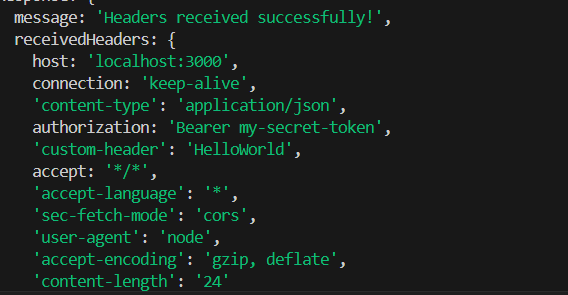
Sending Custom Headers with Fetch API
- **Purpose of Custom Headers: Custom headers allow clients to send additional information to the server beyond the standard headers. They help in authentication, tracking, and providing metadata about the request.
- **Authentication & Security: Headers like Authorization (e.g., Bearer token) enable secure API access by verifying the client’s identity before processing requests.
- **Content Negotiation: Headers such as Content-Type and Accept define the format of the request and response (e.g., application/json). This ensures proper communication between client and server.
- **Custom Headers for API Enhancements: APIs can define non-standard headers (e.g., X-Client-Version) to send extra information like app version, request source, or debugging data.
- **Server-Side Header Handling: The server extracts, validates, and processes headers before executing the request. Logging headers helps in monitoring and debugging API interactions.
Handling Different Request Methods (POST, PUT, DELETE)
1. GET Request to Retrieve Data
Fetching a list of items from an API.
JavaScript `
fetch('https://fakestoreapi.com/products/1') .then(response => response.json()) .then(items => console.log(items));
`
- fetch() sends the GET request to the specified URL.
- The response.json() method parses the JSON response.
- .then() logs the list of items once they are fetched.
2. POST Request to Submit Data
Sending data to an API using POST.
JavaScript `
const data = { name: 'Pranjal', age: 25 }; fetch('https://fakestoreapi.com/products', { method: 'POST', headers: { 'Content-Type': 'application/json' }, body: JSON.stringify(data) }) .then(response => response.json()) .then(result => console.log(result));
`
- The method: 'POST' tells Fetch to send data to the server.
- The headers include the Content-Type to indicate we are sending JSON.
- The body contains the data to be sent, which is stringified using JSON.stringify().
3. PUT Request to Update Data
Updating existing user information.
JavaScript `
const updatedData = { id: 1, price: 300 };
fetch('https://fakestoreapi.com/products/1', { method: 'PUT', headers: { 'Content-Type': 'application/json' }, body: JSON.stringify(updatedData) }) .then(response => response.json()) .then(result => console.log(result));
`
- The method: 'PUT' indicates we are updating data.
- The body sends the updated data, converted to JSON.
- The response is parsed as JSON, and the updated result is logged.
4. DELETE Request to Remove Data
Deleting a user from an API.
JavaScript `
fetch('https://fakestoreapi.com/products/1', { method: 'DELETE' }) .then(response => response.json()) .then(result => console.log('Deleted:', result));
`
- method: 'DELETE' indicates that we want to delete the specified resource.
- The response is parsed as JSON to confirm the deletion.
- The result is logged to indicate the operation was successful.
Handling Errors in Fetch API
When making requests with fetch(), errors can occur due to network issues or invalid responses. Proper error handling ensures a smooth user experience.
JavaScript ``
// Example of using fetch() to get data from an API // Note: The link used here (https://api.example.com/data) is just a placeholder. // It’s not a real API, so this code will NOT show any output in the console.
fetch('https://api.example.com/data')
.then(response => {
if (!response.ok) {
throw new Error(HTTP error! Status: ${response.status});
}
return response.json();
})
.then(data => console.log('Data:', data))
.catch(error => console.error('Fetch error:', error.message));
``