JavaScript ifelse (original) (raw)
JavaScript if-else
Last Updated : 28 Jul, 2025
JavaScript **conditional statements allow programs to make decisions based on specific conditions. They control the flow of execution, enabling different actions for different scenarios.
**JavaScript if-statement
It is a conditional statement that determines whether a specific action or block of code will run based on a condition. If the condition is true, the code executes; if false, it does not.
**Syntax
if (condition) {
// Code to be executed if the condition is true
}
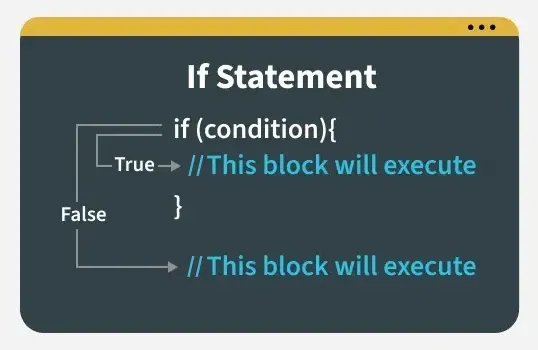
Now let's understand this with the help of an example:
JavaScript `
// JavaScript program to illustrate If statement let age = 19;
if (age > 18) console.log("Congratulations, You are eligible to drive");
`
Output
Congratulations, You are eligible to drive
**JavaScript if-else statement
The if-else statement allows you to execute one block of code if the condition is true and another block if the condition is false. It's a way to handle two possible outcomes based on a condition.
**Syntax
if (condition)
{
// Executes this block if
// condition is true
}
else
{
// Executes this block if
// condition is false
}
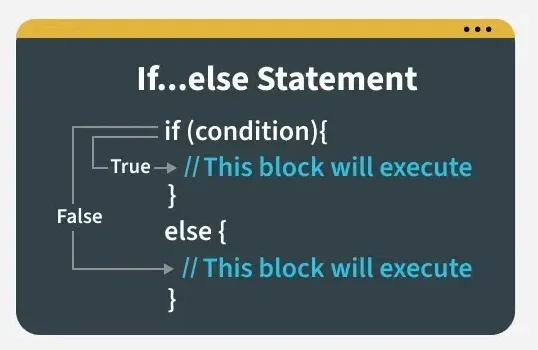
JavaScript if-else statement
Now let's understand this with the help of example
JavaScript `
// JavaScript program to illustrate If-else statement let i = 10;
if (i < 15) console.log("i is less than 15"); else console.log("I am Not in if");
`
**JavaScript nested-if statement
JavaScript lets you put an if statement inside another if statement. This is called a nested if, where one if or else is inside another.
**Syntax
if (condition1)
{
// Executes when condition1 is true
if (condition2)
{
// Executes when condition2 is true
}
}
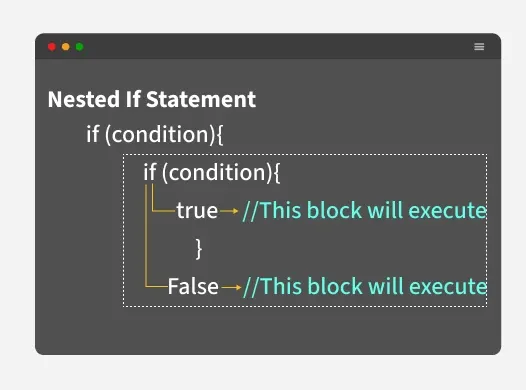
JavaScript nested-if statement
Now let's understand this with the help of example
JavaScript `
// JavaScript program to illustrate nested-if statement let i = 10;
if (i == 10) { // First if statement if (i < 15) { console.log("i is smaller than 15"); // Nested - if statement // Will only be executed if statement above // it is true if (i < 12) console.log("i is smaller than 12 too"); else console.log("i is greater than 15"); } }
`
Output
i is smaller than 15 i is smaller than 12 too
**JavaScript if-else-if statement
The if-else-if ladder is used to check multiple conditions in sequence. Once a true condition is found, its block executes, and the rest are skipped.
**Syntax
if (condition)
statement;
else if (condition)
statement;
.
.
else
statement;
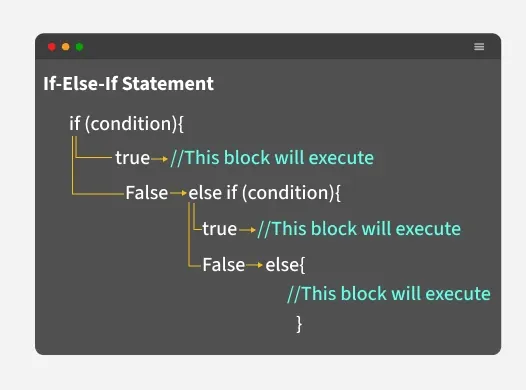
**Now let's understand this with the help of example
JavaScript `
// JavaScript program to illustrate nested-if statement let i = 20; if (i == 10) console.log("i is 10"); else if (i == 15) console.log("i is 15"); else if (i == 20) console.log("i is 20"); else console.log("i is not present");
`