jQuery :input Selector (original) (raw)
Last Updated : 11 Jul, 2025
The jQuery :input selector in jQuery is used to select input elements. This selector is also used with button element.
Syntax:
$(":input")
Note: jQuery :input selector not only selects input elements but also Buttons, Dropdowns, and Textarea elements.
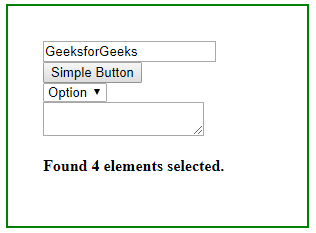
Example 1: This example use :input selector to count all input elements.
HTML `
jQuery :input Selector<script src=<select>
<option>Option</option>
</select>
<textarea></textarea>
<h4 id="GFG"></h4>
<!-- jQuery code to count all elements
selected by :input selector -->
<script>
$(document).ready(function () {
var allInputs = $(":input");
$("#GFG").text("Found " + allInputs.length
+ " elements selected.");
});
</script>`
Output:
Example 2: This example use :input selector to change the color of all buttons.
HTML `
jQuery :input SelectorSimple Button
<select>
    <option>Option</option>
</select>
<br>
<textarea></textarea>
<h4 id="GFG"></h4>
<button>Change color</button>

<!-- jQuery code to count all elements
    selected by :input selector -->
<script>
    $(document).ready(function () {
        $("button").click(function () {
            $("button").css("background-color","green");
        });
    });
</script>
`
Output:
