Android EditText in Kotlin (original) (raw)
Last Updated : 31 Jan, 2025
**EditText is a widget in Android, that is used to get input from the user. EditText is commonly used in forms and login or registration screens. EditText extends the TextView class and provides more functionalities including handing text inputs such as cursor control, keyboard display and text validation.
Example:
<EditText
android:id="@+id/textView"
android:layout_width="wrap_content"
android:layout_height="wrap_content"
android:hint="Enter a message"
android:inputType="text" />
Steps to implement EditText in Kotlin
**Step 1: Editing the activity_main.xml
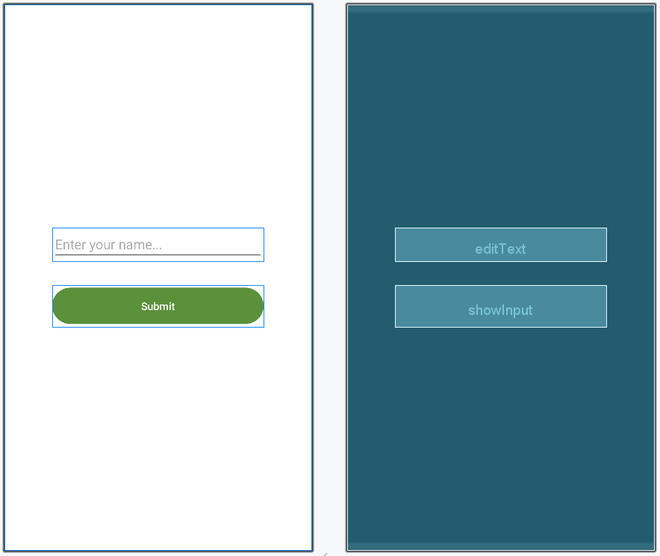
Open activity_main.xml file and add the following code__._ Here we are adding an EditText and a Button
html `
<EditText
    android:id="@+id/editText"
    android:layout_height="wrap_content"
    android:layout_width="match_parent"
    android:autofillHints="name"
    android:inputType="text"
    android:hint="Enter your name..." />

<com.google.android.material.button.MaterialButton
    android:id="@+id/showInput"
    android:layout_width="match_parent"
    android:layout_height="56dp"
    android:layout_marginTop="32dp"
    android:text="Submit"
    android:textColor="@color/white"
    android:backgroundTint="@color/green"/>
`
Layout:
**Step 2: MainActivity File
Open MainActivity.kt file and get the reference of Button and EditText defined in the layout file.
    // finding the button
    val showButton = findViewById<Button>(R.id.showInput)

    // finding the edit text
    val editText = findViewById<EditText>(R.id.editText)
Setting the onClick listener to the button
showButton.setOnClickListener {
//some functionalities...
}
Getting the text entered by user
val text = editText.text
Add the following code in the MainActivity.kt file.
java `
package com.geeksforgeeks.myfirstkotlinapp
import androidx.appcompat.app.AppCompatActivity import android.os.Bundle import android.widget.Button import android.widget.EditText import android.widget.Toast
class MainActivity : AppCompatActivity() {
override fun onCreate(savedInstanceState: Bundle?) {
    super.onCreate(savedInstanceState)
    setContentView(R.layout.activity_main)

    // finding the button
    val showButton = findViewById<Button>(R.id.showInput)

    // finding the edit text
    val editText = findViewById<EditText>(R.id.editText)

    // Setting On Click Listener
    showButton.setOnClickListener {

        // Getting the user input
        val text = editText.text

        // Showing the user input
        Toast.makeText(this, text, Toast.LENGTH_SHORT).show()
    }
}
}
`
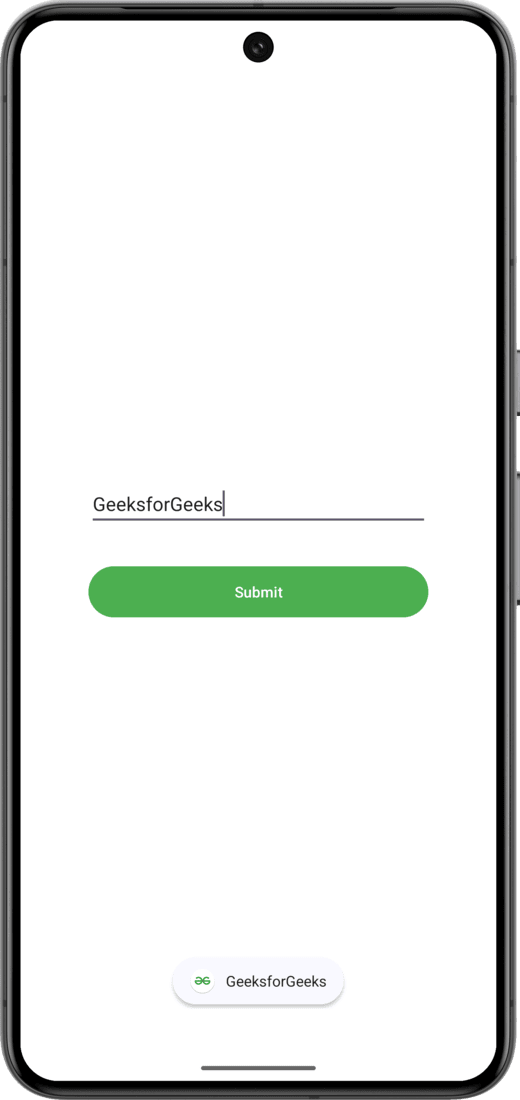
Expected Output:
Some Important attributes of EditText
| XML Attributes | Description |
|---|---|
| android:id | Used to uniquely identify the control |
| android:gravity | Used to specify how to align the text like left, right, center, top, etc. |
| android:hint | Used to display the hint text when text is empty |
| android:text | Used to set the text of the EditText |
| android:textSize | Used to set size of the text. |
| android:textColor | Used to set color of the text. |
| android:textStyle | Used to set style of the text. For example, bold, italic, bolditalic etc. |
| android:textAllCaps | Used this attribute to show the text in capital letters. |
| android:width | It makes the TextView be exactly this many pixels wide. |
| android:height | It makes the TextView be exactly this many pixels tall. |
| android:maxWidth | Used to make the TextView be at most this many pixels wide. |
| android:minWidth | Used to make the TextView be at least this many pixels wide. |
| android:background | Used to set background to this View. |
| android:backgroundTint | Used to set tint to the background of this view. |
| android:clickable | Used to set true when you want to make this View clickable. Otherwise, set false. |
| android:drawableBottom | Used to set drawable to bottom of the text in this view. |
| android:drawableEnd | Used to set drawable to end of the text in this view. |
| android:drawableLeft | Used to set drawable to left of the text in this view. |
| android:drawablePadding | Used to set padding to drawable of the view. |
| android:drawableRight | Used to set drawable to right of the text in this view. |
| android:drawableStart | Used to set drawable to start of the text in this view. |
| android:drawableTop | Used to set drawable to top of the text in this view. |
| android:elevation | Used to set elevation to this view. |
**GeekTip: Enhance your EditText by adding a text change listener in kotlin. For eg:
editText.**doOnTextChanged { text, _, _, _ ->
if (text.isNullOrEmpty()) {
editText.error = "Input can not be empty!"
}
}