adduser command in Linux (original) (raw)
Last Updated : 18 May, 2026
adduser is a Linux command used to create new user accounts on the system in an interactive and user-friendly way. It automatically handles home directory creation, default settings, and basic user configuration.
- Creates a new user along with a home directory and default files
- Prompts interactively for password and user details
- Automatically assigns a primary group to the user
- Simplifies user management compared to the low-level useradd command
Installing adduser command
To install adduser tool use the following commands as per your Linux distribution.
1. In case of Debian/Ubuntu
sudo apt-get install adduser
2. In case of CentOS/RedHat
sudo yum install adduser
3. In case of Fedora OS
sudo dnf install adduser
Working with adduser command
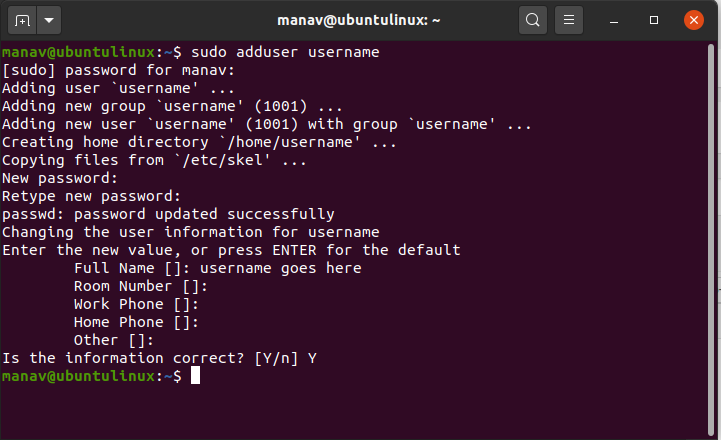
1. To add a new user
**Command:
adduser username
This command will add a new user to your Linux system. It will ask for some details and after entering those details a new user account would be created.
**Output:
**2. To add a user with a different shell.
**Command:
sudo adduser username --shell /bin/sh
This command will change the default shell for the new user to /bin/sh.
**Output:

**3. To add a new user with a different configuration file.
**Command:
adduser username --conf custom_config.conf
This command will take the configurations from the custom_config file and will create the new as per custom_config filename configurations.
**Output:

**4. To add a user with different home directory.
**Command:
adduser username --home /home/manav/
**Output:

**5. To get the version of the adduser command.
**Command:
adduser --version
This command will print the version details of the adduser command.
**Output:

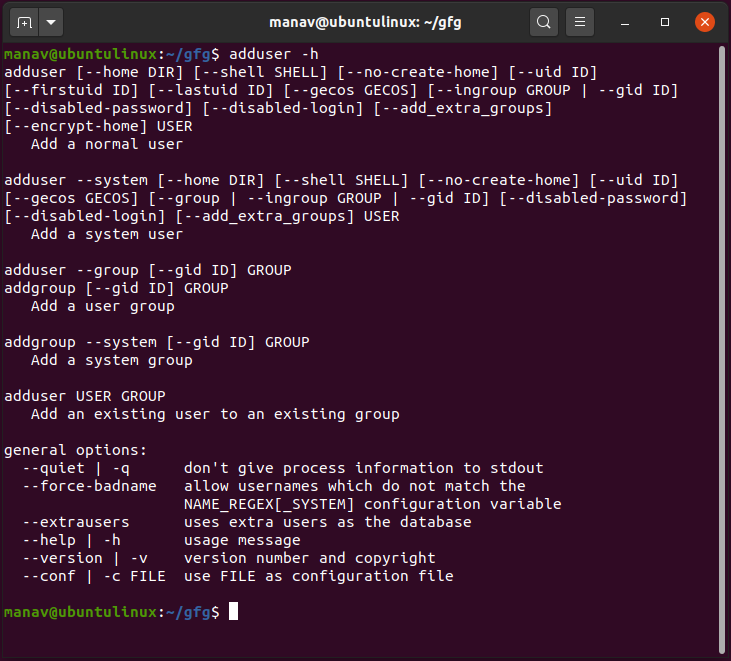
**6. To display the help section of the adduser command
**Command:
adduser -h
This command will display the help section of the adduser command.
**Output: