Bash Scripting Functions (original) (raw)
Last Updated : 6 May, 2026
A Bash script is a plain text file that contains a sequence of commands executed step by step. Instead of repeatedly typing multiple commands in the terminal, they can be stored in a script and executed whenever required.
- Functions allow commands to be grouped into reusable blocks.
- They help improve script modularity and readability.
- Functions can accept arguments to process different inputs.
- Bash functions can return status values to indicate execution results.
Example: Simple Function in Bash
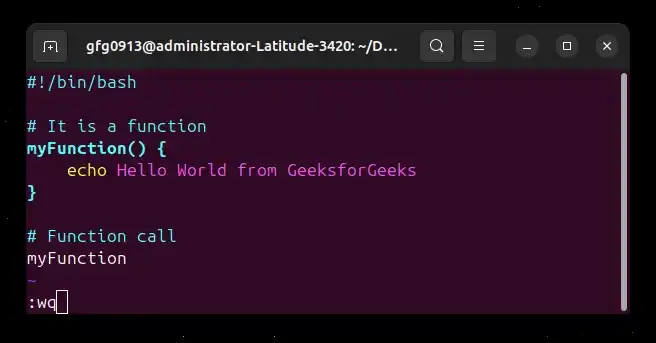
#!/bin/bash
It is a function
myFunction() {
echo Hello World from GeeksforGeeks
}
Function call
myFunction
- **myFunction(): Defines a function named myFunction.
- The commands inside { } form the body of the function.
- Calling myFunction executes the commands inside the function.
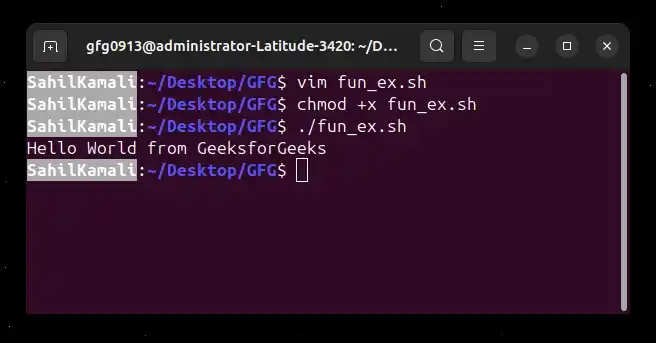
**Output:
Syntax of a Bash Function
Function definition
function_name(){
commands
...
}
Function call
function_name
- **function_name(): Name of the function being defined.
- ****{ }:** Curly braces contain the commands executed by the function.
- **commands: The operations or instructions the function performs.
- **function_name: Calling the function executes its commands.
**Note: A function must be defined before it is called in a Bash script.
Functions with Passing Arguments
Bash functions can accept arguments (parameters) when they are called. These arguments allow the function to work with different inputs each time it is executed. In Bash scripting, arguments passed to functions are accessed using positional parameters such as 1,1, 1,2, $3 and so on.
Syntax of Functions with Passing Arguments
Function definition
function_name(){
parameter_1=$1
parameter_2=$2
...
parameter_n=$n

commands
}
Function call
function_name p1 p2 ... pn
- ****$1:** First argument
- ****$2:** Second argument
- ****$n:** nth argument
**Example: Function with Arguments
#!/bin/bash
add_two_num(){
local sum=$(($1+$2))
echo sum of 1and1 and 1and2 is $sum
}
add_two_num 2 3
- **add_two_num(): Defines a function to add two numbers.
- ****$1 and $2:** Represent the numbers passed to the function.
- ****$(($1 + $2)):** Performs arithmetic addition.
- **local sum: Stores the result inside the function.
**Output:

Functions with Return Values
A function can return a value after completing its execution. In Bash scripting, the return value is stored in a special variable called $?, which represents the exit status of the most recently executed command. Return values are often used to indicate whether a function executed successfully or to return a small numeric result.
Example: Function with Return Value
#!/bin/bash
myfun(){
return 7
}
myfun
echo The return value is $?
- **return 7: Sends the value 7 back to the calling script.
- ****$?:** Stores the returned value from the last executed function.
**Note: Bash return only supports integer values between 0 and 255. Attempting to return a string or a number outside this range will produce unexpected results.
**Output:

Example: Function with Parameters and Return Value
#!/bin/bash
add_two_num(){
return ((((((1 + $2))
}
add_two_num 2 3
echo The sum is $?
**Output:
- The function receives 2 and 3 as arguments.
- The numbers are added using arithmetic expansion.
- The result is returned and accessed using $?.

**Note: In Bash, return does not return arbitrary values like in other programming languages. It only sets the function’s exit status, which is limited to the range 0–255.
Variable Scope
In programming, scope refers to the region of a program where a variable is accessible. In Bash scripting, variables behave slightly differently compared to many programming languages. By default, variables defined inside or outside a function are global unless explicitly declared as local.
- Variables declared outside functions are global.
- Variables inside functions are also global unless declared local.
- The local keyword creates variables that exist only inside a function.
- Using local variables prevents accidental modification of global variables.
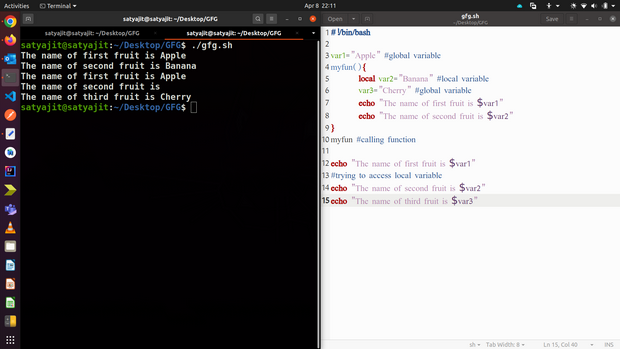
Example: Variable Scope in Bash
#!/bin/bash
var1="Apple" # global variable
myfun(){
local var2="Banana" # local variable
var3="Cherry" # global variable
echo "The name of first fruit is $var1"
echo "The name of second fruit is $var2"
}
myfun
echo "The name of first fruit is $var1"
echo "The name of second fruit is $var2"
echo "The name of third fruit is $var3"
- **var1: is a global variable, accessible everywhere.
- **var2: is declared using local, so it is only accessible inside the function.
- **var3: is declared inside the function but without local, so it becomes a global variable.
**Output:
The name of first fruit is Apple
The name of second fruit is Banana
The name of first fruit is Apple
The name of second fruit is
The name of third fruit is Cherry
Overriding Commands
Bash allows defining functions with the same name as existing commands. When this happens, the function overrides the original command behavior. This technique is useful when customizing command behavior or applying predefined options automatically.
Example: Overriding the echo Command
#!/bin/bash
#overriding command
echo(){
builtin echo "The name is : $1"
}
echo "Satyajit Ghosh"
- A function named echo() overrides the default echo command.
- builtin echo ensures the original echo command is still used internally.
- The function automatically adds "The name is :" before the provided text.
**Output:
The name is : Satyajit Ghosh
