Bash Scripting Working of Bash Scripting (original) (raw)
Last Updated : 6 May, 2026
Bash scripting automates tasks in Linux by letting you write and execute multiple commands from a single script file. These scripts are plain text files interpreted by the Bash shell, commonly used for file management, backups, system monitoring, and configuration.
- Automates repetitive command-line tasks
- Allows execution of multiple commands in a single file
- Can be scheduled or executed automatically
- Works on any system that supports the Bash shell
Bash Scripting and Bash Shell
The Bash shell is a command-line interpreter used to interact with the Linux operating system. It reads commands entered by the user or stored in scripts and executes them sequentially. Bash is the default shell in many Linux distributions and provides important scripting capabilities.
- Provides command-line access to the Linux system
- Interprets and executes shell commands and scripts
- Allows automation of complex administrative tasks
- Commonly used on servers without GUI environments
- Supports configuration through startup files

Example prompt for a normal user
[username@host ~]$
Example prompt for the root user
[root@host ~]#
- The behavior of the Bash shell can be customized using configuration files that run automatically when a new shell session begins.
Common startup configuration files include
- .bashrc
- .bash_profile

- Commands added to these files execute automatically whenever a new terminal session is opened, allowing users to configure environment variables, aliases, or startup scripts.
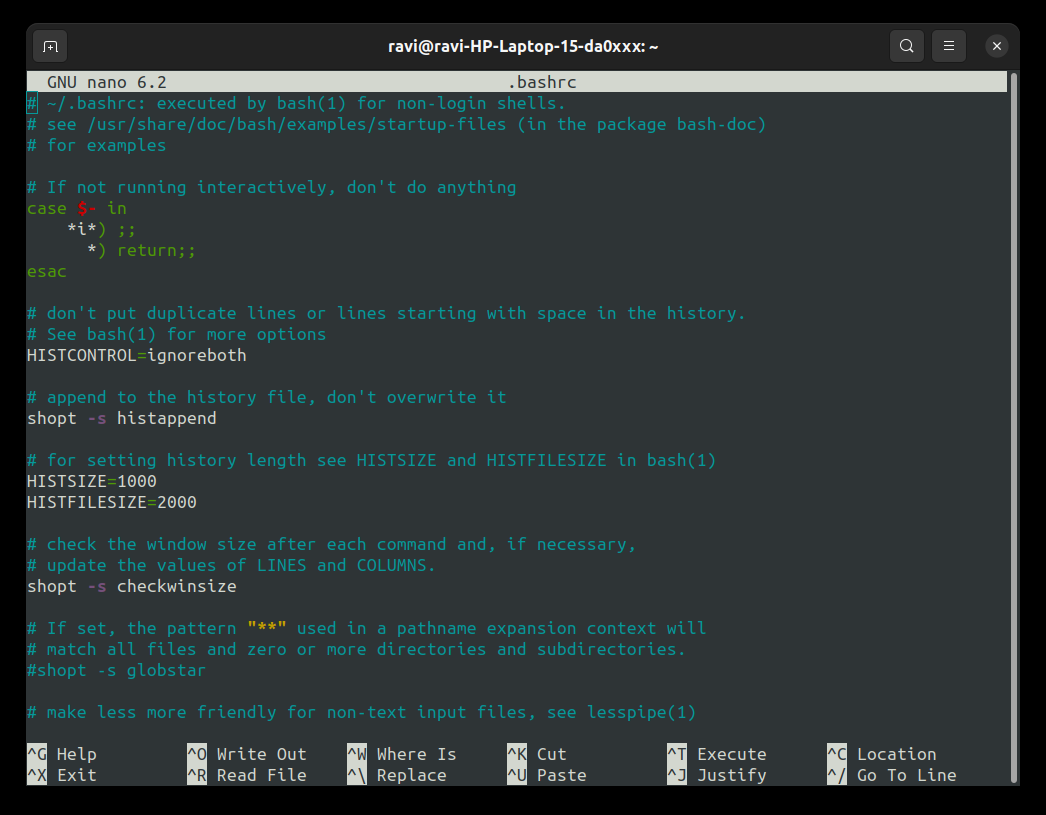
Example of editing the .bashrc configuration file
**Command:
nano .bashrc
**Output:
Working of Bash Script
In Linux systems, programs stored on disk are executed as processes when they run in memory. When a command or script is executed, the operating system loads the program into RAM and allocates the required resources for its execution. Each time a Bash script is executed, the shell starts a separate process for that script. This process contains its own execution environment, including variables, memory allocation, and runtime instructions. Once the script finishes executing all commands, the process ends and the allocated resources are released by the system.
- A running instance of a program in Linux is called a process
- Each script execution creates a separate process environment
- Memory is allocated for variables and temporary runtime data
- Multiple instances of the same program can run simultaneously
- Processes terminate automatically after completing execution
**Note: When a Bash script starts, the shell creates a new process to run that script. This separation ensures that variables and operations inside the script do not interfere with the current shell session.
Identifying a Bash Script File
A Bash script is usually saved with the .sh extension, although the extension is optional. The first line of a script normally contains the Shebang, which tells the system which interpreter should execute the script.
- Indicates the shell interpreter used for execution
- Written at the very first line of the script file
- Ensures the script runs using the correct shell
- Prevents conflicts with other available shells
- Improves script portability across systems
**Example of a Bash Shebang line:
#!/bin/bash
**Another valid format:
#!/usr/bin/bash
**Note: The sequence #! is called the Shebang, and it defines the path of the shell program used to execute the script.
Creating and Running a Simple Bash Script
A Bash script can be created using any text editor available in Linux. Commands that normally run in the terminal can be written inside the script file and executed together. When the script runs, the shell reads the commands line by line and executes them in sequence.
- Scripts are stored as plain text files
- Common editors include Nano, Vim, or graphical text editors
- Commands inside scripts run exactly like terminal commands
- Scripts improve productivity by grouping operations
- Execution requires either the Bash interpreter or executable permission
**Create a script file using Nano:
nano hello.sh
**Example Script:
#!/bin/bash
echo "hello world"
**Output:

**Running the Script:
The script can be executed using the Bash interpreter.
**Command:
bash hello.sh
- The script can also run directly if it has executable permission.
**Command:
./hello.sh
- If the file is not executable, permission can be added using
**Command:
chmod +x hello.sh
- Executable files often appear in green color when listed using the ls command, indicating that they can be executed directly from the terminal.
**Output:
