Basic Operators in Shell Scripting (original) (raw)
Last Updated : 21 Apr, 2026
In shell scripting, operators are special symbols used to perform operations on variables and values. They allow scripts to perform calculations, compare values, evaluate logical conditions, and test file properties. Bash provides several types of operators that help automate tasks and make scripts more powerful and flexible.
- Perform arithmetic calculations and logical comparisons.
- Evaluate file properties for automated scripts.
- Enable bitwise and boolean operations in scripts.
- Simplify decision-making and control flow in shell programs.
1. Arithmetic Operators
Arithmetic operators are used to perform mathematical calculations in shell scripts. These operations include addition, subtraction, multiplication, division, and more.
- **Addition (+): Adds two operands.
- **Subtraction (-): Subtracts second operand from first.
- **Multiplication (*): Multiplies two operands.
- **Division (/): Divides first operand by second.
- **Modulus (%): Returns remainder of division of first operand by second.
- **Increment (++): Increases operand value by 1 (unary operator).
- **Decrement (--): Decreases operand value by 1 (unary operator).
Example: Arithmetic Operators in Bash
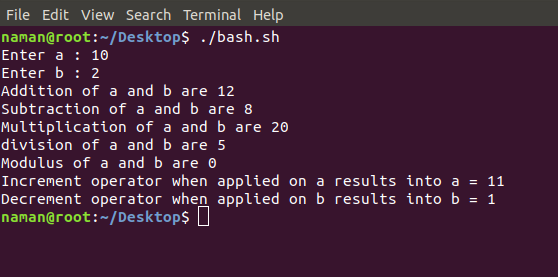
This example demonstrates basic arithmetic operations in Bash using user input. It covers addition, subtraction, multiplication, division, modulus, and shows how to use increment and decrement operators.
C `
//Driver Code Starts #!/bin/bash
This script demonstrates arithmetic operations in Bash using user input
//Driver Code Ends
Reading two numbers from the user
read -r -p "Enter a: " a
-r prevents backslash escapes from being interpreted
-p displays a prompt message
read -r -p "Enter b: " b
Addition
add=$((a + b))
$(( )) is used for arithmetic evaluation
The result of a + b is stored in variable 'add'
echo "Addition of a and b is: ${add}"
Subtraction
sub=$((a - b)) echo "Subtraction of a and b is: ${sub}"
Multiplication
mul=$((a * b)) echo "Multiplication of a and b is: ${mul}"
Division
div=$((a / b)) echo "Division of a and b is: ${div}"
//Driver Code Starts
Modulus (remainder)
mod=$((a % b)) echo "Modulus of a and b is: ${mod}"
Increment operator
((++a))
Increments value of 'a' by 1
echo "Increment operator applied on a results in: ${a}"
Decrement operator
((--b))
Decrements value of 'b' by 1
echo "Decrement operator applied on b results in: ${b}" //Driver Code Ends
`
**Output:
2. Relational Operators
Relational operators in Bash are used to compare two numeric values. They return true (1) if the condition is satisfied or false (0) if it is not. These operators are commonly used in if statements and loops to make decisions based on numeric comparisons.
- ****'==' Operator**: Double equal to operator compares the two operands. Its returns true is they are equal otherwise returns false.
- ****'!=' Operator**: Not Equal to operator return true if the two operands are not equal otherwise it returns false.
- ****'<' Operator**: Less than operator returns true if first operand is less than second operand otherwise returns false.
- ****'<=' Operator**: Less than or equal to operator returns true if first operand is less than or equal to second operand otherwise returns false
- ****'>' Operator**: Greater than operator return true if the first operand is greater than the second operand otherwise return false.
- ****'>=' Operator**: Greater than or equal to operator returns true if first operand is greater than or equal to second operand otherwise returns false
Example: Relational Operators in Bash
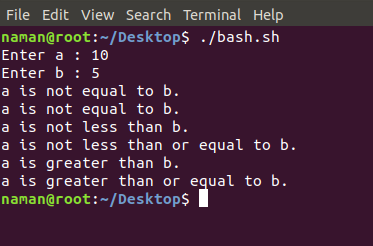
This example demonstrates how to compare two numbers using relational operators and print the results.
C `
//Driver Code Starts #!/bin/bash
Script to demonstrate relational operators
Reading two numbers from the user
read -r -p "Enter a: " a read -r -p "Enter b: " b //Driver Code Ends
Check if a is equal to b
if (( a == b )); then echo "a is equal to b" else echo "a is not equal to b" fi
Check if a is not equal to b
if (( a != b )); then echo "a is not equal to b" else echo "a is equal to b" fi
Check if a is less than b
if (( a < b )); then echo "a is less than b" else echo "a is not less than b" fi
Check if a is less than or equal to b
if (( a <= b )); then echo "a is less than or equal to b" else echo "a is not less than or equal to b" fi
Check if a is greater than b
if (( a > b )); then echo "a is greater than b" else echo "a is not greater than b" fi
Check if a is greater than or equal to b
if (( a >= b )); then echo "a is greater than or equal to b" else echo "a is not greater than or equal to b"
//Driver Code Starts fi //Driver Code Ends
`
**Output:
3. Logical (Boolean) Operators
Logical operators (also called Boolean operators) are used to combine or invert conditions in shell scripting. They are essential for making decisions based on multiple conditions in if statements or loops.
- ****(&&) Logical AND** : Returns true if both conditions are true.
- ****(||) Logical OR** : Returns true if either one or both conditions are true. It returns false only if both operands are false.
- ****(!) Logical NOT**: Inverts the truth value; returns true if the condition is false, and false if the condition is true.
**Note: Logical operators are usually used with (( )) for numeric expressions or [[ ]] for conditional tests.
Example: Logical Operators in Bash
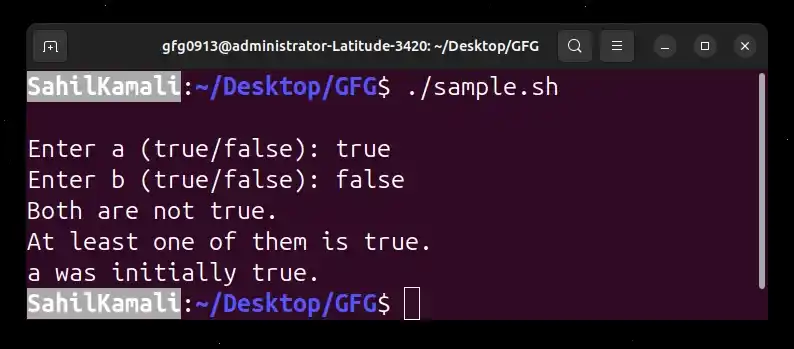
This example demonstrates AND, OR, and NOT operations using numeric comparisons.
C `
//Driver Code Starts #!/bin/bash
reading data from the user
read -p "Enter a (true/false): " a read -p "Enter b (true/false): " b
//Driver Code Ends
Both true
if [[ "$a" == "true" && "$b" == "true" ]]; then echo "Both are true." else echo "Both are not true." fi
At least one true
if [[ "$a" == "true" || "$b" == "true" ]]; then echo "At least one of them is true." else echo "None of them is true." fi
a is false
if [[ "$a" != "true" ]]; then echo "a was initially false." else echo "a was initially true." fi
`
**Output:
4. Bitwise Operators
Bitwise operators perform operations directly on binary representations (bits) of numbers. These are mainly used in low-level programming or performance-sensitive tasks.
- ****(&) Bitwise AND**: Performs AND on each bit of two numbers.
- ****(|) Bitwise OR**: Performs OR on each bit of two numbers.
- ****(^) Bitwise XOR**: Performs XOR on each bit; result is 1 if bits are different.
- ****(~) Bitwise NOT**: Inverts all bits of a number.
- ****(<<) Left Shift**: Shifts bits of the first operand to the left by the number of positions specified by the second operand.
- ****(>>) Right Shift**: Shifts bits of the first operand to the right by the number of positions specified by the second operand.
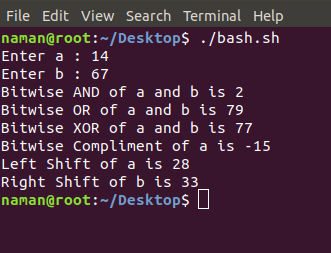
Example: Bitwise Operators in Bash
This example demonstrates all basic bitwise operations using two numeric inputs.
C `
//Driver Code Starts #!/bin/bash
Script to demonstrate bitwise operators
Reading two numbers from the user
read -r -p "Enter a: " a read -r -p "Enter b: " b //Driver Code Ends
Bitwise AND
and=$((a & b)) echo "Bitwise AND of a and b: $and"
Bitwise OR
or=$((a | b)) echo "Bitwise OR of a and b: $or"
Bitwise XOR
xor=$((a ^ b)) echo "Bitwise XOR of a and b: $xor"
Bitwise NOT (on a)
not_a=$((~a)) echo "Bitwise NOT of a: $not_a"
//Driver Code Starts
Left Shift a by 1
left_shift=$((a << 1)) echo "Left shift a by 1: $left_shift"
Right Shift a by 1
right_shift=$((a >> 1)) echo "Right shift a by 1: $right_shift" //Driver Code Ends
`
**Output:
5. File Test Operators
File test operators in Bash are used to check properties of files and directories. They return true (0) if the condition is satisfied, or false (1) if not. These operators are commonly used in scripts to verify file existence, permissions, or types before performing operations.
- **-b: Checks whether a file is a block special file (used for block-based devices like disks). Returns true if it is, otherwise false.
- **-c: Checks whether a file is a character special file (used for character-based devices like terminals). Returns true if it is, otherwise false.
- **-d: Checks whether a given path is an existing directory. Returns true if the directory exists, otherwise false.
- **-e: Checks whether a file or directory exists at the specified path. Returns true if found, otherwise false.
- **-r: Checks whether the file has read permission for the current user. Returns true if readable, otherwise false.
- **-w: Checks whether the file has write permission for the current user. Returns true if writable, otherwise false.
- **-x: Checks whether the file has execute permission for the current user. Returns true if executable, otherwise false.
- **-s: Checks whether a file exists and has a size greater than zero (i.e., it is not empty).
Example: File Test Operators in Bash
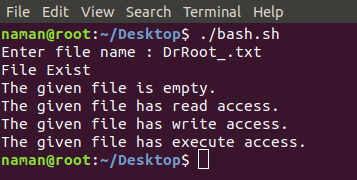
This example demonstrates checking various file properties using different file test operators.
C `
//Driver Code Starts #!/bin/bash
Script to demonstrate file test operators
//Driver Code Ends
Reading file/directory name from user
read -r -p "Enter file or directory name: " file
Check if it is a block special file
if [ -b "$file" ]; then echo "$file is a block special file" else echo "$file is not a block special file" fi
Check if it is a character special file
if [ -c "$file" ]; then echo "$file is a character special file" else echo "$file is not a character special file" fi
Check if it is a directory
if [ -d "$file" ]; then echo "$file is a directory" else echo "$file is not a directory" fi
Check if file exists
if [ -e "$file" ]; then echo "$file exists" else echo "$file does not exist" fi
Check read permission
if [ -r "$file" ]; then echo "$file has read permission" else echo "$file does not have read permission"
//Driver Code Starts fi
Check write permission
if [ -w "$file" ]; then echo "$file has write permission" else echo "$file does not have write permission" fi
Check execute permission
if [ -x "$file" ]; then echo "$file has execute permission" else echo "$file does not have execute permission" fi
Check if file size > 0
if [ -s "$file" ]; then echo "$file is not empty" else echo "$file is empty or does not exist" fi //Driver Code Ends
`
**Output: