cal command in Linux with Examples (original) (raw)
Last Updated : 11 Jul, 2025
The '**cal' command in Linux is a versatile tool that displays calendars directly in the terminal. If a user wants a quick view of the calendar in the Linux terminal, '**cal' is the command for you. Here’s a look at the usage and features of '**cal' command in Linux.
What is the 'cal' command?
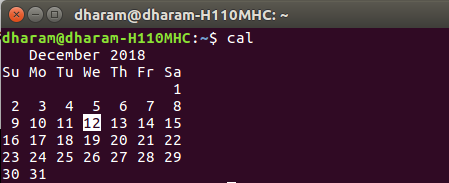
**cal command is a calendar command in Linux which is used to see the calendar of a specific month or a whole year. By default, entering cal in the terminal shows the calendar of the current month, with today's date highlighted. This provides a quick overview of the month at hand.
**Syntax:
cal [ [ month ] year]
The rectangular bracket means it is optional, so if used without an option, it will display a calendar of the current month and year.
Displaying Different Time Frames
****'cal':** Shows current month calendar on the terminal with the current date highlighted.
****'cal -y':** Shows the calendar of the complete current year with the current date highlighted.

****'cal [month] [year]':** Shows calendar of selected month and year. For example, '**cal 08 2000' displays the calendar for August 2000.

****'cal [year]':** Shows the whole calendar of the year. For example, '**cal 2018' displays the calendar for the year 2018.
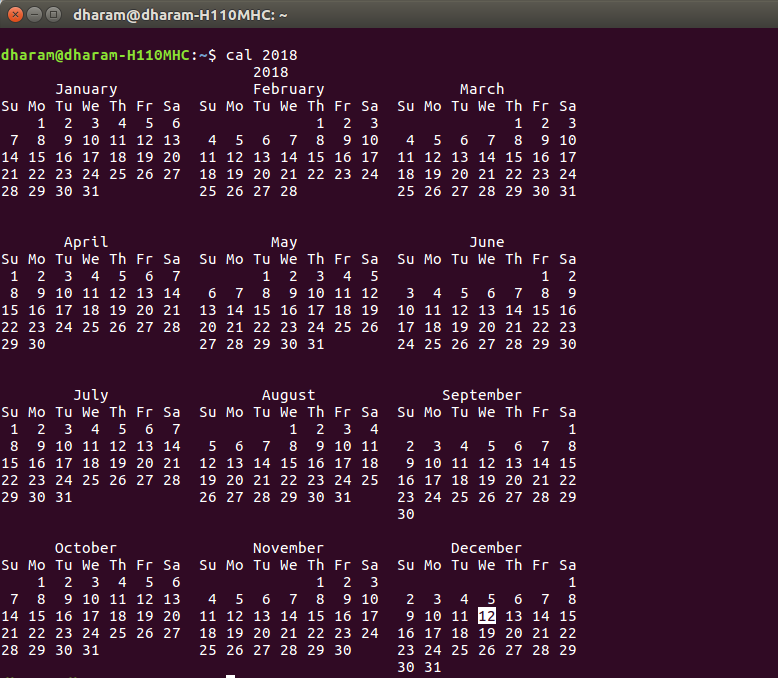
****'cal [year]| more':** When year is not be visible in the same screen use '**more' with '**cal' use spacebar to scroll down.

****'cal -3':** Shows calendar of previous, current and next month

****'cal -j':** Shows the calendar of the current month in the **Julian calendar format not in the default **Gregorian calendar format. In Julian calendarformat, the date does not reset to 1 after every month's end i.e. after 31st Jan, Feb will start as 32nd Feb, not as 1st Feb. But in the Gregorian calendar format, the date is reset to 1 after every month's end i.e after 31st Jan, Feb will start as of 1st Feb.

Conclusion
In conclusion, mastering the '**cal' command in Linux provides users with a powerful tool for calendar management directly from the command line. The '**cal' command is invaluable for system administrators, developers, and anyone who needs quick access to a calendar without leaving the terminal environment. It integrates seamlessly into scripts and commands for automated tasks and scheduling.