Compiling Programs Using the cc Command (original) (raw)
Last Updated : 28 Jan, 2026
The cc command in Linux is used to compile C programs and generate executable files. On most Linux systems, it acts as an alias to popular compilers like gcc or clang.
- Helps compile C source code into executable programs
- Supports debugging, optimization, and warning control
- Can generate object files and final executables
- Widely used in programming, academic learning, and software development
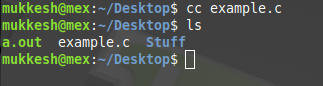
**Example: The cc command takes the example.c source code, compiles it, and creates the default executable file a.out that can be run directly on the system.
cc example.c
Syntax
cc [options] files
where,
- **[options]: Various compiler options that modify how the source code is compiled.
- **files: The C source code files that need to be compiled.
Examples of cc Command Using Options
Below are some useful examples that show how different cc options are used while compiling C programs in Linux.
1. -o (Specify Output File Name)
Takes the 'source_file.c' file, compiles the code, and produces an executable file with the chosen name for execution.
**Command:
cc example.c -o examp_out
- ****'-o'**: Specifies output file name
**Output:

2. -Wall (Enable All Common Compiler Warnings)
Compiles the 'source_file.c' source code while identifying and reporting all errors and warnings in the program.
**Command:
cc example.c -Wall -o examp_out
**Output:

3. -w (Suppress All Compiler Warnings)
Takes the 'source_file.c' file, compiles the code, and suppresses all compiler warnings.
**Command:
cc example.c -w
**Output:

4. -g (Generate Debugging Information)
Compiles the 'source_file.c' file and generates a debugging version of the executable output, which can be used with a debugger and is typically larger than the standard executable.
**Command:
cc example.c -g -o examp_out_debug
**Output:

5. -c (Compile Without Linking)
Compiles the 'source_file.c' file and generates an object file 'source_file.o', which can later be linked to produce an executable.
**Command:
cc example.c -c
**Output:

6. -L (Specify Library Search Directory)
Processes the 'source_file.c' source code and searches the given directory for required header files during compilation.
**Command:
cc example.c -L /home/mukkesh/Desktop
**Output:

7. -ansi (Compile Code Following Strict ANSI C Standards)
This command will compile the 'source_file.c' file, and makes sure that the code follows strict ANSI standards. This will make sure that the code is portable to be compiled on any other system.
**Command:
cc -ansi example.c
**Output:

8. -dump (Display Internal Compiler Information)
The -dumpversion option prints the version of the cc compiler. This is useful for verifying the installed compiler version.
**Command:
cc -dumpversion
- ****'-dumpversion'**: Displays compiler version
**Output:

**Command:
cc -dumpmachine
- ****'-dumpmachine'** : Displays target system type
**Output:

**Command:
cc -dumpspecs
- ****'-dumpspecs'** : Displays internal compiler specifications
**Output:

9. -v (Compile with Verbose Output)
The -v option compiles 'source_file.c' while providing detailed, step-by-step information about the compilation process. This helps in understanding what the compiler is doing internally.
**Command:
cc example.c -v
**Output:

Real-World Scenarios of cc Command
Below are a few practical scenarios where the cc command is commonly used in learning, development, and real-time programming tasks.
1. Compiling Student Programs
Students frequently use the cc command to compile their C assignments, lab programs, and practice codes.
cc program.c -o program
2. Debugging C Programs
Developers compile programs with debugging support to analyze errors and crashes using tools like gdb.
cc program.c -g -o debug_program
3. Building Large Projects With Multiple Files
In real applications, projects contain multiple .c files. These files are compiled into object files and then linked together.
cc -c file1.c
cc -c file2.c
cc file1.o file2.o -o final_app
4. Ensuring Code Safety and Quality
Programmers enable warnings to detect coding mistakes and improve program quality.
cc code.c -Wall -o safe_app