cksum Command in Linux (original) (raw)
Last Updated : 28 Jan, 2026
The cksum command in Linux is used to verify file integrity by calculating a CRC (Cyclic Redundancy Check) value along with the file size. It is mainly used to detect accidental corruption during file transfer or storage.
- Displays CRC checksum, file size (in bytes), and file name
- Helps verify whether a file changed unintentionally
- Commonly used after copying or transferring files
- Suitable for error detection, not for security or authentication
Example 1: Check CRC of a Single File
This example shows how to calculate the checksum of a file.
cksum file.txt
**Output :

CRC value and file size of file.txt displayed using cksum.
**Explanation:
- **2029622798: CRC value
- **39: File size in bytes
- **file.txt: File name
Example 2: Check CRC of Multiple Files
You can calculate CRC values for multiple files in one command.
cksum file1.txt file2.txt file3.txt

CRC values for multiple files calculated in a single command.
**Note: Each file is processed separately, and the output is displayed line by line for each file.
Example 3: Calculate CRC Using Standard Input
If no file name is provided, cksum reads data from standard input.
echo "Hello Linux" | cksum

CRC value of piped data displayed using cksum.
**Note: Useful for verifying the integrity of piped data or command output.
Example 4: Save Checksum Output to a File
You can redirect the output of cksum to a file for later comparison.
cksum file.txt > file_checksum.txt

Checksum and file size saved to file_checksum.txt for later verification.
**Note: Stores the CRC value and file size, which can be reused to check file consistency later.
Example 5: Compare Current CRC with Stored CRC
This example compares the current checksum with a previously saved one.
cksum file.txt | diff - file_checksum.txt
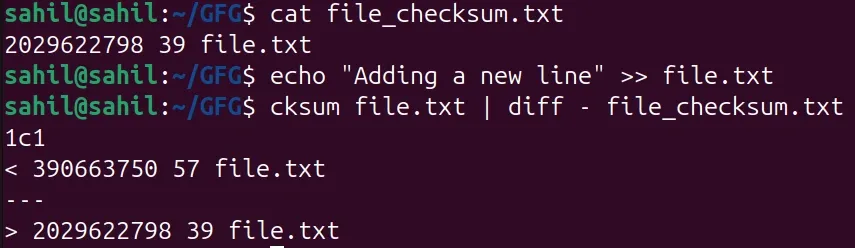
Current CRC compared with stored checksum to detect changes.
**Note: If no output is produced, the file has not changed. If output is shown, the file content has changed.
**Syntax of `cksum` command in Linux
cksum [OPTION]... [FILE]...
- **FILE: Name of the file to calculate CRC
- **OPTION: Optional flags to modify command behavior
**Options Available in `cksum` command in Linux
The cksum command provides very limited options compared to other checksum utilities.
Option 1. --help
Displays help information and usage details.
cksum --help

**Note: Helpful when you want a quick reference for command usage.
Option 2. --version
Displays the version information of the cksum utility.
cksum --version

**Note: Useful for debugging or checking compatibility across systems.
Real-World Use Cases of cksum
1. Verify File Transfer Integrity
After transferring large files over a network, compare CRC values to ensure no accidental corruption occurred.
cksum backup.tar
**Note: Run this command before and after transferring the file, If both CRC values match, the file was transferred successfully.
2. Backup Validation
Helps confirm that backup files remain unchanged after creation.
cksum backup_2024.tar
**Note: This command can be stored in logs or scripts and rechecked later to validate backups.
3. Data Consistency Checks
Used to monitor important files and detect unintended changes over time.
cksum config.cfg
**Note: If the CRC value changes unexpectedly, it indicates accidental modification.