Conditional Statements | Shell Script (original) (raw)
Last Updated : 17 Nov, 2025
Conditional statements, or if-then blocks, are the most important part of any script. They are the "decision-makers" that allow your script to run, skip, or change code based on a specific condition.
You will use conditional logic for all sorts of common tasks:
- Checking if a file or directory exists before trying to read or write to it.
- Validating user input to see if it's a valid number or string.
- Running a command only if a previous command was successful.
- Checking if a user has "root" permissions.
A Simple 'if' Script
This script asks for a number and tells you if it's greater than 10.
**Command:
#!/bin/bash
read -p "Enter a number: " NUMBER
The [ ... ] is a test.
-gt means "greater than".
if [ "$NUMBER" -gt 10 ]; then
echo "Your number ($NUMBER) is greater than 10."
fi
echo "Script finished."
**Output:
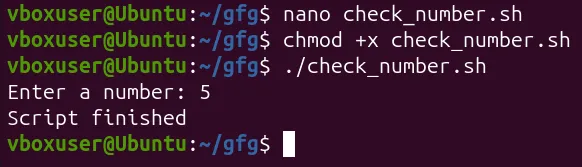
"if" Checks for Exit Status 0
This is the most important concept to understand: if does not test for "true" or "false".
- Instead, the if statement runs a command.
- If the command succeeds (returns an exit status of 0), the then block is executed.
- If the command fails (returns a non-zero exit status), the then block is skipped.
if grep -q "ERROR" /var/log/syslog; then echo "An error was found in the log!" # send an email, restart a service, etc.fi
Here, the if statement runs the grep -q "ERROR" ... command. If grep finds the string "ERROR" (success, exit code 0), the then block runs.
How to Build Logic
You can stack if statements to build complex logic.
1. The if
- What it does: Runs code only if the condition is true.
**Syntax:
if [ condition ]; then
code to run...
fi
2. The if...else...fi
- What it does: Provides an alternative block of code to run if the condition is false.
**Syntax:
if [ condition ]; then
# code to run if true...
else
# code to run if false...
fi
**Example (File check):
if [ -f "/etc/hosts" ]; then
echo "The /etc/hosts file exists."
else
echo "Error: /etc/hosts file not found."
fi
3. The if...elif...else...fi
- **What it does: Lets you chain multiple "else if" conditions. This is the cleanest way to check for multiple, mutually exclusive options.
**Syntax:
if [ condition1 ]; then
# code for condition1...
elif [ condition2 ]; then
# code for condition2...
elif [ condition3 ]; then
# code for condition3...
else
# code to run if nothing matches...
fi
**Example :
#!/bin/bash
Get the current hour (00-23)
HOUR=$(date +%H)
if [ "$HOUR" -lt 12 ]; then
echo "Good morning!"
elif [ "$HOUR" -lt 18 ]; then
echo "Good afternoon!"
else
echo "Good evening!"
fi
The if Statement Sheet
You must use the correct operator for what you are testing (files, strings, or numbers).
1. File Test Operators (Use with [[ -f $file ]])
| Operator | What It Checks |
|---|---|
| -e $file | True if file exists (file or directory). |
| -f $file | True if file is a regular file. |
| -d $dir | True if dir is a directory. |
| -r $file | True if file is readable. |
| -w $file | True if file is writable. |
| -x $file | True if file is executable. |
| -s $file | True if file is not empty (has a size > 0). |
2. String Test Operators (Use with [[ "$str1" == "$str2" ]])
| Operator | What It Checks |
|---|---|
| [[ "$str1" == "$str2" ]] | True if strings are equal. (Note: == is an alias for = in [[...]]) |
| [[ "$str1" != "$str2" ]] | True if strings are not equal. |
| [[ -z "$str" ]] | True if string is empty (has zero length). |
| [[ -n "$str" ]] | True if string is not empty (has non-zero length). |
3. Integer Test Operators (Use with [ "$num" -eq 10 ])
| Operator | What It Checks |
|---|---|
| -eq | Equal |
| -ne | Not Equal |
| -gt | Greater Than |
| -ge | Greater than or Equal |
| -lt | Less Than |
| -le | Less than or Equal |
Example:
if [[ "$USER" == "root" && "$num" -gt 10 ]]; then echo "You are root and the number is greater than 10."fi