curl Command in Linux with Examples (original) (raw)
Last Updated : 20 Dec, 2025
The **curl command in Linux is a command-line tool used to transfer data between a system and a server using different network protocols. It is widely used for fetching web content, testing APIs, and sending or receiving data over the network.
- Supports multiple protocols such as HTTP, HTTPS, FTP, and SCP
- Used to download, upload, and send data from the terminal
- Helpful for testing REST APIs and web services
- Works with headers, authentication, and data formats like JSON
Example 1: Fetching Data Using curl Command
The simplest use of curl is to fetch a URL. By default, curl prints the content of the URL directly to your terminal (stdout).
curl https://example.com
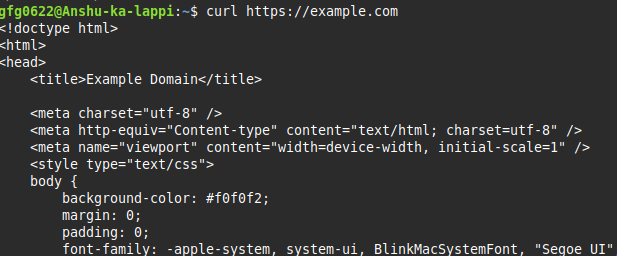
- This command will retrieve the HTML content of the specified URL and display it in the terminal.
Example 2:
curl https://www.geeksforgeeks.org//%3C/span>
This should display the content of the URL on the terminal. The URL syntax is protocol dependent and multiple URLs can be written as sets like:
curl http://site.{one, two, three}.com
URLs with numeric sequence series can be written as:
curl ftp://ftp.example.com/file[1-20].jpeg
![ftp://ftp.example.com/file[1-20].jpeg](ftp://ftp.example.com/file[1-20].jpeg)
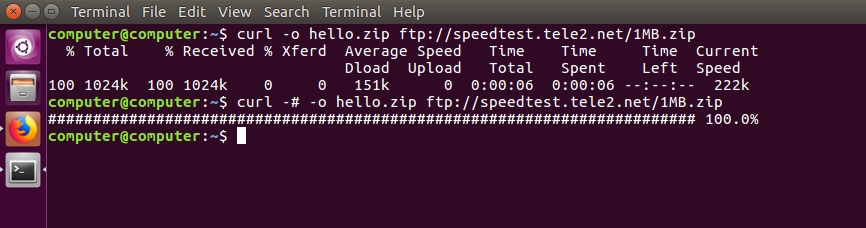
**Progress Meter: curl displays a progress meter during use to indicate the transfer rate, amount of data transferred, time left, etc.
curl -# -O ftp://ftp.example.com/file.zip curl --silent ftp://ftp.example.com/file.zip
If you like a progress bar instead of a meter, you can use the **-# option as in the example above, or **--silent if you want to disable it completely.
**Output:
Examples of Curl with Options Reference
Given below are some examples demonstrating the use of the curl command in Linux along with their options.
| **Option | **What It Does |
|---|---|
| **[URL] | (No option) Prints URL content to stdout. |
| **-o filename | Saves output to a **one, custom filename. |
| **-O | Saves output using the **Original filename from the URL. |
| **-C - | **Continues/Resumes an interrupted download. |
| **-X METHOD | Specifies the HTTP method (e.g., -X POST, -X DELETE). |
| **-d "data" | Sends **data in a POST or PUT request. |
| **-H "Header" | Adds a custom HTTP **Header (e.g., for JSON or auth tokens). |
| **-L | Follows any server redirects (e.g., 301, 302). |
| **-u user:pass | Provides **user authentication credentials. |
| **-T file.txt | **Transfers (uploads) a local file to a destination. |
| **-I | Fetches headers only (HTTP HEAD request). |
| **-i | **Includes the HTTP response headers in the output. |
| **-s | **Silent mode (hides progress meter). |
| **-# | Shows a simple progress bar. |
Syntax of curl Command
curl [options] [URL]
Here,
[options]:Can be various command-line flags that modify the behavior ofcurl[URL]:Specifies the location from which to fetch or send data.
**1. -O Option
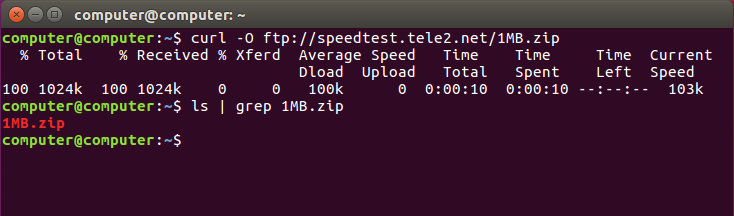
This option downloads the file and saves it with the same name as in the URL.
**Syntax:
curl -O [URL...]
**Example:
curl -O ftp://speedtest.tele2.net/1MB.zip
**Output:
**2. -C - Option:
This option resumes download which has been stopped due to some reason. This is useful when downloading large files and was interrupted.
**Syntax:
curl -C - [URL...]
**Example:
curl -C - -O ftp://speedtest.tele2.net/1MB.zip
**Output:

**3. --limit-rate Option:
This option limits the upper bound of the rate of data transfer and keeps it around the given value in bytes.
**Syntax:
curl --limit-rate [value] [URL]
**Example:
curl --limit-rate 1000K -O ftp://speedtest.tele2.net/1MB.zip
**Output:

The command limits the download to 1000K bytes.
**4. -u Option:
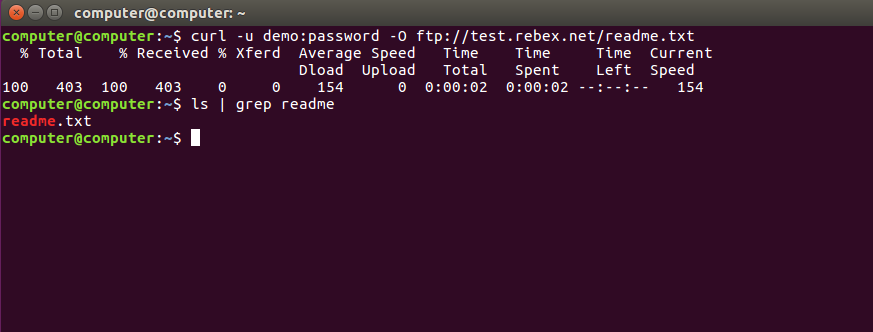
curl also provides options to download files from user authenticated FTP servers.
**Syntax:
curl -u {username}:{password} [FTP_URL]
**Example:
curl -u demo:password -O ftp://test.rebex.net/readme.txt
**Output:
**5. -T Option:
This option helps to upload a file to the FTP server.
**Syntax:
curl -u {username}:{password} -T {filename} {FTP_Location}
If you want to append an already existing FTP file you can use the **-a or --append option.
**6. --libcurl Option:
This option is appended to any curl command, it outputs the C source code that uses libcurl for the specified option.
**Syntax:
curl [URL...] --libcurl [filename]
**Example:
curl https://www.geeksforgeeks.org// > log.html --libcurl code.c
**Output:

The above example downloads the HTML and saves it into log.html and the code in code.c file. The next command shows the first 30 lines of the code.
Some Other uses of curl Command
The curl command supports multiple protocols, allowing it to perform tasks like sending emails and fetching dictionary meanings directly from the terminal.
**1. Sending mail:
If we can transfer data over different protocols, including SMTP, we can use curl to send mails.
**Syntax:
curl --url [SMTP URL] --mail-from [sender_mail] --mail-rcpt [receiver_mail] -n --ssl-reqd -u {email}:{password} -T [Mail text file]
**2. DICT protocol:
DICT protocol which can be used to easily get the definition or meaning of any word directly from the command line.
**Syntax:
curl [protocol:[dictionary_URL]:[word]
**Example:
curl dict://dict.org/d:overclock
**Output:

3. Handling HTTP Requests Using curl Command
'curl' is the perfect tool for interacting with REST APIs. The `curl` command allows you to send custom HTTP requests with various methods such as GET, POST, PUT, DELETE, etc. For example, to send a GET request:
curl -X GET https://api.sampleapis.com/coffee/hot%3C/span>

In the same way, to send a POST request with data:
curl -X POST -d "key1=value1&key2=value2" https://api.sampleapis.com/coffee/hot%3C/span>
In this case, the `-d` flag is used to send data to be sent with the request.
4. Downloading Files Using curl Command
curl is also generally used to download a file from the web. To download a file, you simply provide the URL of the file as the argument:
-o: saves the downloaded file to the local host with the specified name in parameters.
**Syntax:
curl -o [file_name] [URL...]
**Example:
curl -o hello.zip ftp://speedtest.tele2.net/1MB.zip
**Output:
The above example downloads the file from the FTP server and saves it with the name _hello.zip.
5. Uploading Files
If you want to upload a file to a server, for example using FTP (File Transfer Protocol), curl can do that in just one line:
curl -T uploadfile.txt ftp://example.com/upload/
-T uploadfile.txt: This tells curl which file to upload (in this case, a file calleduploadfile.txt).ftp://example.com/upload/: This is the destination FTP URL where the file will be uploaded.
6. Handling Authentication
Sometimes the API or site you're trying to access is protected with a username and password. In those cases, you can put your credentials in the command itself using the -u flag.
curl -u username:password https://example.com//api%3C/span>
-u username:password: This sends your login details securely with the request.https://example.com//api%3C/strong>: The protected API or resource you want to access.