Environment Variables in Linux/Unix (original) (raw)
Last Updated : 22 Jan, 2026
Environment Variables (ENVs) are named key–value pairs used by the Linux/Unix operating system to control how the shell and applications behave. They store technical configuration data such as executable paths, user information, locale settings, and default tools. These variables are inherited by child processes, ensuring programs run with the correct environment settings.
- Store technical configuration values for the shell and programs
- Help the system locate executables, libraries, and files
- Define user-level defaults like editor, shell, and language
- Pass configuration data from parent to child processes
- Modify program behaviour without changing source code
Basic Examples – Environment Variables in Linux/Unix
Below are simple and commonly used examples to understand how environment variables are accessed and viewed in Linux. These examples start from the basics and build familiarity with real commands.
Example 1: Display the Value of an Environment Variable
To display the current shell type by retrieving the value stored in the SHELL environment variable.
**Command:
echo $SHELL
- echo prints output to the terminal.
- $SHELL tells the shell to replace the variable with its stored value.
- The $ symbol is required to access the value of a variable.
**Output:

Displaying the current shell type
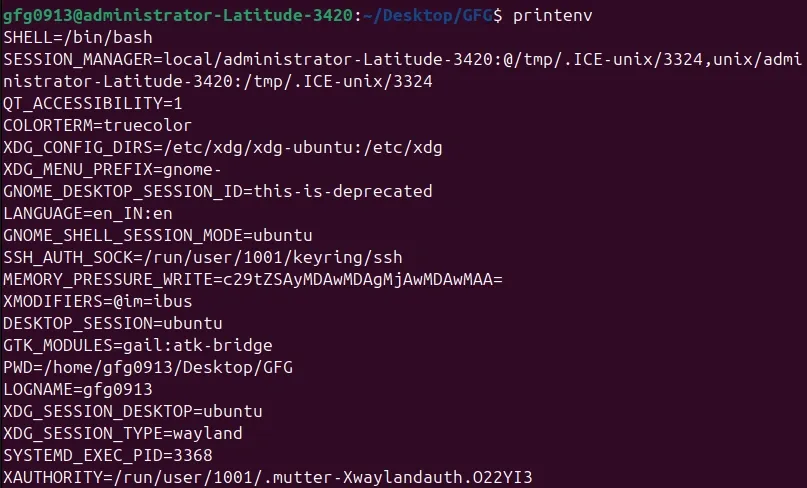
Example 2: View All Global Environment Variables Using printenv
To list all exported environment variables currently available to the shell and child processes.
**Command:
printenv
- printenv shows only global environment variables.
- Useful for checking system and user-level configurations.
**Output:
Example 3: View Environment Variables Using env
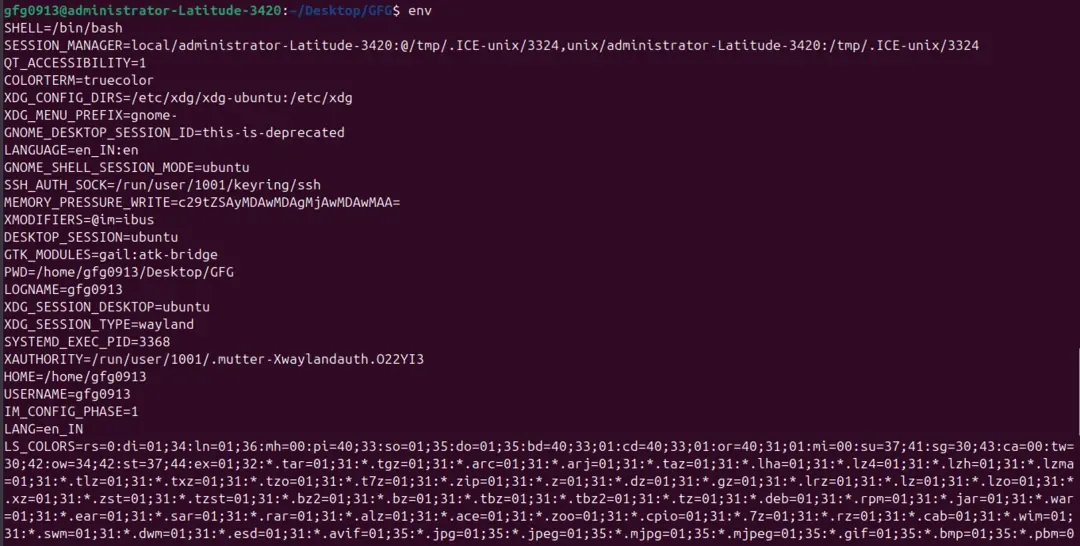
To display all global environment variables or prepare a temporary environment for running a command.
**Command:
env
- env prints global environment variables.
- Commonly used in shell scripts and command testing.
**Output:
Example 4: View All Variables Using set
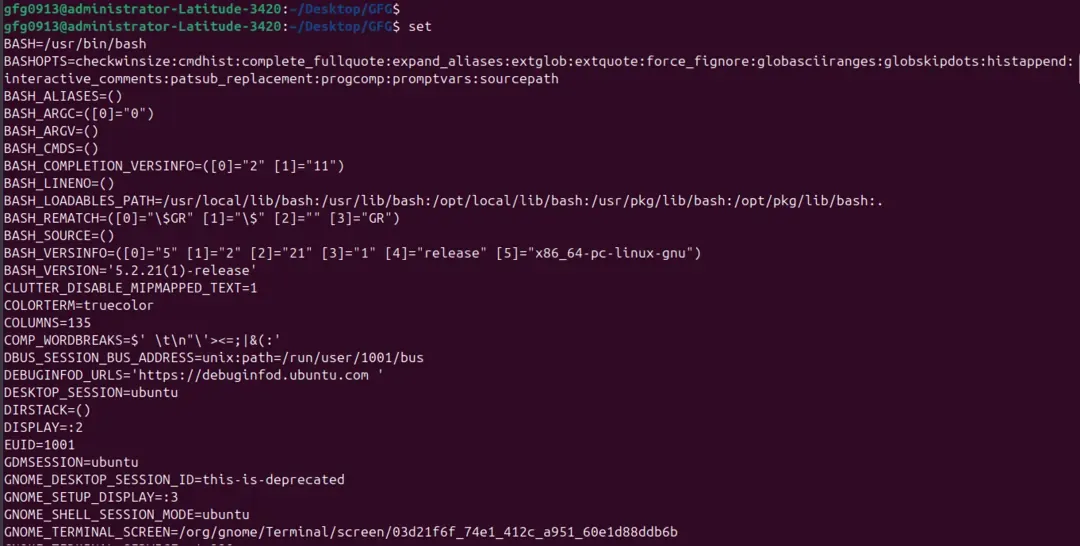
To display all shell variables, functions, and environment variables for debugging or inspection purposes.
**Command:
set
- set lists both local and global variables.
- Output is usually long and detailed.
**Expected Output (partial):
Syntax – Accessing Environment Variables in Linux/Unix
Environment variables are accessed using a simple and consistent syntax in the Linux shell. This syntax applies to both local shell variables and global environment variables.
$VARIABLE_NAME
- $ indicates variable expansion, telling the shell to substitute the variable with its stored value.
- VARIABLE_NAME is the name of the environment or shell variable.
- Variable names are case-sensitive (PATH and path are different).
- If the $ symbol is omitted, the shell treats the name as plain text.
Local vs. Environment (Global) Variables in Linux/Unix
In Linux/Unix, variables store data for the shell and programs. There are two main types: shell (local) variables and environment (global) variables. Shell variables exist only in the current session, while environment variables are exported to child processes and can be used by programs and scripts.
Understanding the difference helps manage configurations and control program behaviour effectively.
Shell Variables (Local):
Shell variables are created for temporary use within the current shell session. They help store values that are needed only while the shell is running.
- Exist only in the current shell session and disappear when the shell closes
- Not inherited by child processes or programs
- Used for temporary or session-specific values
- Created simply as $NAME=value without using export
Environment Variables (Global/Exported):
Environment variables are shared with all programs and child processes started from the shell. They provide system-wide or session-wide configuration that persists across processes.
- Created in the shell and available to child processes
- Used by scripts, programs, and system commands
- Persist in the session if exported using export
- Can store system-wide or user-specific settings
**Example of Local vs Global:
Local variable
NAME="Rahul"
Global variable
export CITY="Delhi"
Check variables
echo $NAME # Output: Rahul
echo $CITY # Output: Delhi
- NAME is available only in this shell session
- CITY is available in this shell and any child processes started from it
Setting Environment Variables in Linux/Unix
Environment variables in Linux can be set at different levels depending on their scope: local (shell session only), user-wide, or system-wide. The method used determines how long the variable persists and which programs can access it.
1. Setting Local Environment Variables
Local variables exist only in the current shell session and are not inherited by child processes. They are useful for temporary configurations.
**Syntax:
NAME=value
**Example:
Set a local variable
GREETING="Hello World"
Display its value
echo $GREETING
**Output:

- Local variables disappear when the shell session ends
- Do not require the export keyword
2. Setting Global (Exported) Environment Variables
Global variables are exported to child processes and can be accessed by programs and scripts. They persist for the current shell session.
**Syntax:
export NAME=value
**Example:
Set a global variable
export CITY="Delhi"
Display its value
echo $CITY
**Output:

- Global variables are inherited by all child processes
- Required when programs or scripts need access to the variable
3. Setting User-Wide Environment Variables
User-wide environment variables are stored in user-specific configuration files such as ~/.bashrc, ~/.bash_profile, or ~/.profile. They persist across shell sessions and system restarts.
**Follow these steps to set user-wide environment variables:
**Step 1: Open the terminal
**Step 2: Edit the file, for example:
nano ~/.bashrc
**Step 3: Add the variable using export:
export EDITOR=nano
**Step 4: Save the file and apply changes:
source ~/.bashrc
**Example:
echo $EDITOR
**Output:
4. Setting System-Wide Environment Variables
System-wide variables are available to all users and persist across reboots. They are defined in files like /etc/environment, /etc/profile, or /etc/profile.d/*.sh.
**Follow these steps to set system-wide environment variables:
**Step 1: Open the file with root privileges:
sudo nano /etc/environment
**Step 2: Add the variable:
LANGUAGE=en_US
**Step 3: Save the file and log out and log back in to apply changes
**Example:
echo $LANGUAGE
**Output:
- Use system-wide variables carefully; overwriting important variables can break the system
- Typically used for global paths, locale, or system-wide tools
The $PATH Variable – A Special Case
The $PATH environment variable is one of the most important variables in Linux/Unix. It stores a colon-separated list of directories where the system looks for executable programs when you type a command.
If a program is not in one of these directories, the shell will return “command not found.” Modifying $PATH allows you to run custom scripts or tools without typing the full path.
- Contains directories separated by :
- Used by the shell to locate executable commands
- Changes to $PATH can be temporary (current session) or permanent (user/system-wide)
Appending a Directory to $PATH (Recommended):
Never overwrite the existing $PATH, as it can break system commands. Instead, append your directory:
export PATH=$PATH:/opt/my_custom_tool/bin
- $PATH – references the current path value
- : – separates directories
- /opt/my_custom_tool/bin – the new directory to add
**Example:
echo $PATH
**Expected Output (after appending):

- This change lasts only for the current session
- To make it permanent, add the export line to ~/.bashrc (user-wide) or /etc/profile (system-wide)
Un-setting Environment Variables in Linux/Unix
Sometimes you may need to remove an environment variable, either temporarily or permanently. Linux provides simple ways to unset or clear variables.
1. Un-setting a Variable Temporarily
Sometimes you only need to remove a variable for the current shell session without affecting other sessions or system-wide settings. The unset command achieves this.
**Syntax:
unset VARIABLE_NAME
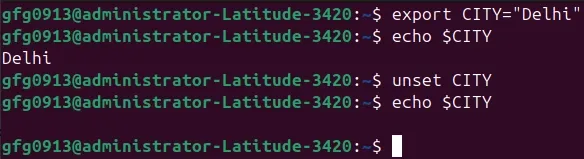
**Example:
Set a variable
export CITY="Delhi"
Remove the variable
unset CITY
Check if it exists
echo $CITY
**Output:
(empty line)
- The variable is removed only for the current shell session
- Child processes started after unsetting will not inherit the variable
2. Clearing a Variable by Assigning an Empty Value
Sometimes you want to keep the variable name but remove its value for the current session. Assigning an empty string effectively clears it.
**Syntax:
VARIABLE_NAME=''
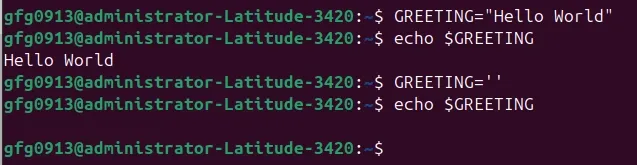
**Example:
Set a variable
GREETING="Hello World"
Clear its value
GREETING=''
Display value
echo $GREETING
**Output:
Commonly Used Environment Variables in Linux/Unix
Linux provides several built-in environment variables that store important information about the system, user, and shell. Knowing these variables helps you navigate, configure, and troubleshoot your system efficiently.
- These variables are predefined by the system and commonly used by scripts and programs.
- They can be read, modified, or extended depending on user requirements.
- Useful for navigation, scripting, and system configuration.
**Example:
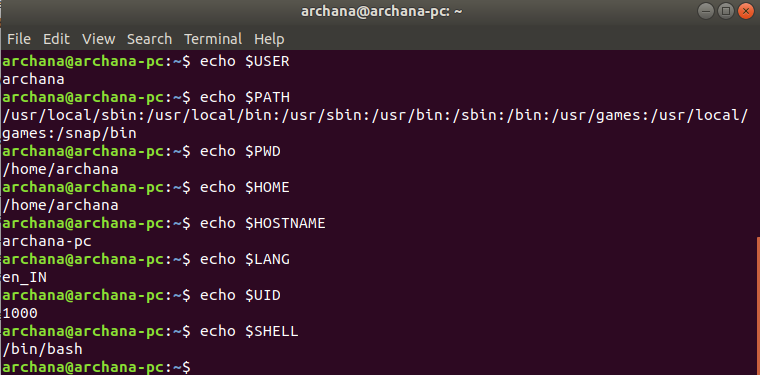
| **Variable | **Description | **Example Output |
|---|---|---|
| ****$USER** | The username of the current user. | rahul |
| ****$HOME** | The path to the user's home directory. | /home/rahul |
| ****$PWD** | Present Working Directory.(Current working directory changes depending on where the user is in terminal.) | /var/www/html |
| ****$SHELL** | The path to the current shell interpreter. | /bin/bash |
| ****$PATH** | Directories searched for executable commands. | /usr/bin:/bin |
| ****$EDITOR** | The default text editor used by tools like nano. | nano |
| ****$HOSTNAME** | The network name of the machine. | web-server-01 |