fc Command in Linux with Examples (original) (raw)
Last Updated : 22 Mar, 2024
As we all know that LINUX is command friendly and while working on LINUX, you may deal with very long commands that may include long paths or really difficult syntax, and imagine what if working with such commands you do a minor mistake which will require re-writing of the entire command synopsis and its arguments in order to execute it again successfully. Now, there are two solutions to this - either re-write the entire syntax or simply use
**fc
command that allows you to
**edit
and
**re-execute
the commands previously entered to a shell without re-writing them again. This command line utility really comes to help while editing long commands. So, the
**fc
command is used to list, edit or re-execute the commands previously entered into an interactive shell. Here's the syntax of fc command :
//syntax of fc command
**fc [-e ename] [-lnr] [first] [last]
or
**fc -s [pat=rep] [command]
where the
**-lnr
refers to the options available for
**fc
and
**-e ename
refers to the editor you want to use for editing.
**first
and
**last
here is for specifying the range .
Using fc command
To easily understand the use of fc command and how does it work let's take a simple example where you want to change your working directory to
**kt/kartik/thakral
and by mistake while changing your directory you write
**karik
instead of
**kartik
, in this case you can simply use
**fc command
to edit the previously entered path. After you enter the incorrect directory path you'll see something like this :
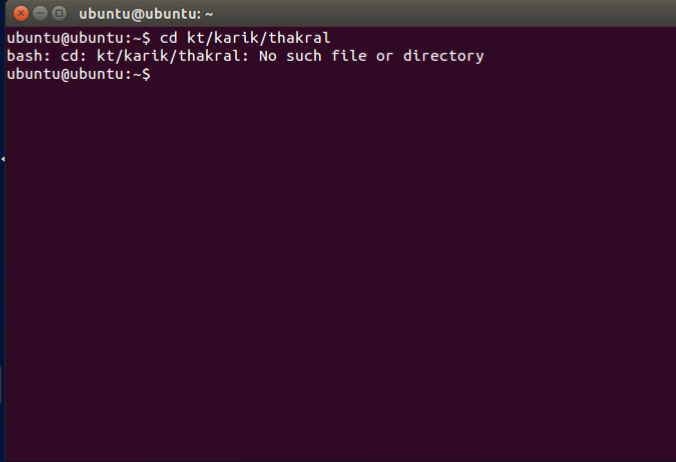
then you can just simply type
**fc
command and after writing fc command your editor will open up so that you can now edit the previously entered command like shown below :

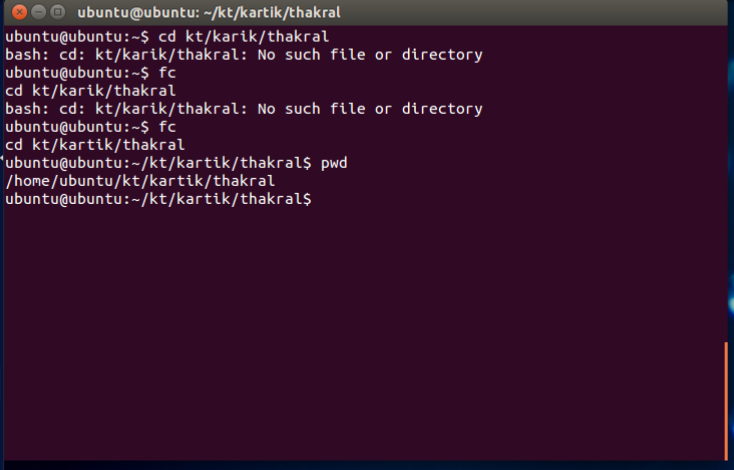
after editing your path you can exit your editor and after exiting
**fc
command will
**re-execute
the
**cd kt/kartik/thakral
like shown below :
Using fc command with options
Applications of fc command
- **fc command is the best way to edit the previously entered commands in the case of a minor mistake without re-writing the entire command syntax and argument again.
- It can also be used to list the previously entered commands in the terminal which can be helpful in case you are working with some new commands.
- **fc command in a way lets you know the command history.