fg command in Linux (original) (raw)
Last Updated : 2 May, 2026
The fg command in Linux is used to bring a background job to the foreground. It allows you to interact with the process directly through the terminal.
- Resumes a background or stopped job in the foreground.
- Useful for switching back to a process that was sent to the background with bg or &.
Example:
**Command:
sleep 60 &
fg %3
**Output:
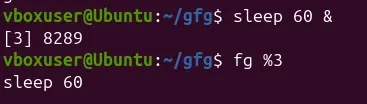
Output
- **sleep 60 &: starts the process in the background with job ID [3]
- **fg %3: brings job 3 to the foreground and continues its execution
Syntax
fg [job_spec]
The job_spec is a way to refer to the background jobs that are currently running or suspended.
- ****%n:** Refers to job number n.
- ****%str:** Refers to a job that was started by a command beginning with str.
- ****%?str:** Refers to a job that was started by a command containing str.
- ****%% or %+:** Refers to the current job (this is the default job operated on by fg if no job_spec is provided).
- ****%-:** Refers to the previous job.
Key Options for the fg command
1. fg [JOB_SPEC]:
This is the primary use of the fg command, bringing a specified job running in the background back to the foreground. For example, if you create a dummy job using sleep 500, you can bring it back to the foreground by referencing its job number:
**Command:
jobs
sleep 500
Press: Ctrl + Z
jobs
bg %1
jobs
fg %1
**Output:
![fg [JOB_SPEC]](https://media.geeksforgeeks.org/wp-content/uploads/fgcommand-crop.png) "sleep 500" is a command which is used to create a dummy job which runs for 500 seconds.
"sleep 500" is a command which is used to create a dummy job which runs for 500 seconds.
2. fg --help:
This option displays help information for the fg command, explaining usage and available options.
**Command:
fg --help
**Output:
