groupdel Command in Linux (original) (raw)
Last Updated : 11 May, 2026
The groupdel command in Linux is used to delete an existing group from the system. It removes the group entry from system group files, but does not delete users belonging to that group. This command is commonly used during cleanup, project removal, or restructuring of user permissions.
- Deletes an existing group from the system.
- Removes the group entry from /etc/group.
- Does not delete users associated with the group.
Example 1: Delete an Existing Group
**Syntax:
sudo groupdel group_name
**Command:
sudo groupdel testgrp1
**Output:
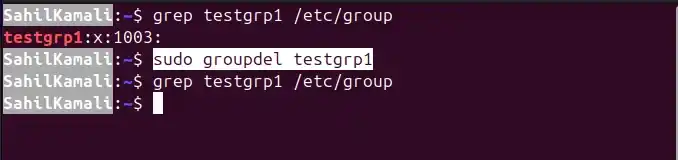
- (No output if successful)
**Verify Deletion:
grep testgrp1 /etc/group
**Output:
- (No output)
Example 2: Attempt to Delete Non-Existing Group
**Command:
sudo groupdel nonexistinggroup
**Output:

**Notes: Helps identify incorrect group names.
Example 3: Delete Group Used as Primary Group
If a group is set as the primary group of a user:
**Command:
sudo groupdel primarygrp
**Check exit code:
echo $?
**Output:
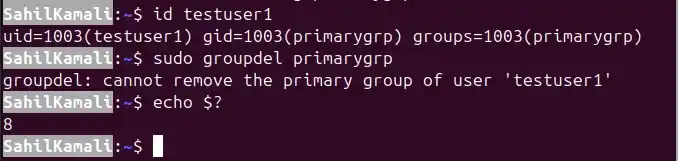
**Notes:
- You must first change the user's primary group.
- Use usermod -g newgroup username.
**Syntax of `groupdel` Command
groupdel [options] group_name
**Files Used:
- ****/etc/group:** Stores group account information.
- ****/etc/gshadow** : Stores secure group account information (passwords and administrators).
**Exit values:
groupdel command exits with the following status codes:
- **0: Success
- **2: Invalid Command Syntax.
- **6: Specified group doesn't exist.
- **8: Can't remove users primary group.
- **10: Can't update group file.
Options of groupdel Command
1. -h, --help
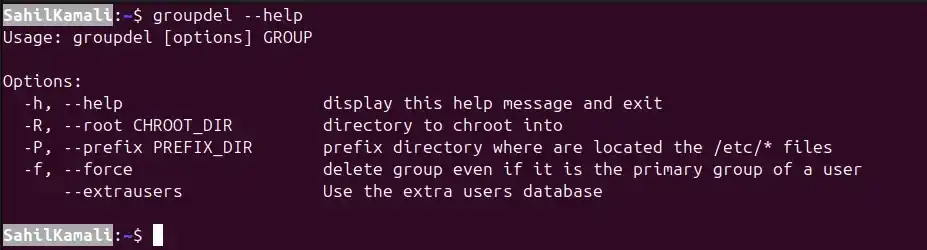
Displays the help message for the groupdel command and exits. It provides usage syntax and a list of available options. This option does not modify the system.
**Syntax:
groupdel --help
**Output:
2. -R, --root CHROOT_DIR
Deletes a group inside a specified chroot environment. Instead of modifying the current system’s /etc/group, it operates inside the provided directory. This is commonly used when repairing or managing another Linux installation mounted inside a directory.
**Syntax:
sudo groupdel -R CHROOT_DIR group_name
- **-R: Specifies alternate root directory.
- **CHROOT_DIR: Directory to act as root.
- **group_name: Name of the group to delete.
**Example: Deleting a Group Inside a Chroot Environment
Deletes a group named developers from a mounted Linux system located at /mnt/chroot.
**Command:
sudo groupdel -R /mnt/chroot developers
**Output:
- (No output if successful)
**Verification:
grep developers /mnt/chroot/etc/group
- (No output if deletion was successful)
3. -P, --prefix PREFIX_DIR
Specifies a directory prefix where /etc/* files are located. Unlike -R, this does not perform a full chroot, but simply works relative to the given directory. Useful when managing system images or container filesystems.
**Syntax:
sudo groupdel -P PREFIX_DIR group_name
- **-P: Defines alternate path to configuration files.
- **PREFIX_DIR: Directory containing /etc/group.
- **group_name: Group to delete.
**Example: Deleting a Group Using Custom Prefix Directory
Deletes the group developers from a system image stored in /mnt/customroot.
**Command:
sudo groupdel -P /mnt/customroot developers
**Output:
- (No output if successful)
**Verification:
grep developers /mnt/customroot/etc/group
- (No output if deleted)
4. -f, --force
Forces deletion of a group even if it is the primary group of an existing user. Normally, groupdel prevents deleting such groups to protect user configuration. This option overrides that protection.
**Syntax:
sudo groupdel -f group_name
**Example: Force Deleting a Primary Group
Deletes a group named alice even if it is set as the primary group of a user.
- Assume developers is primary group of user alice.
sudo groupdel -f alice
**Output:
- (No output if successful)
**Without -f, You Would be:
groupdel: cannot remove the primary group of user 'alice'
**Notes: May cause user account inconsistencies. Recommended only in controlled environments.
Deletes a group from the extra users database instead of /etc/group. Used in systems configured with libnss-extrausers.
**Group data is stored in:
/var/lib/extrausers/group
- This option ensures groupdel operates on that database.
**Syntax:
sudo groupdel --extrausers group_name
**Example: Deleting a Group from Extra Users Database
Deletes the group tempgroup from the extra users database.
sudo groupdel --extrausers tempgroup
**Output:
- (No output if successful)
**Verification:
grep tempgroup /var/lib/extrausers/group
- (No output if deleted)
**Notes:
- Used mainly in embedded systems.
- Common in containerized or minimal installations.
- Has no effect if extrausers is not configured.