if command in linux with examples (original) (raw)
Last Updated : 6 Oct, 2024
**if command in Linux is used for conditional execution in shell scripts.The if command is essential for writing scripts that perform different actions based on different conditions.
*if COMMANDSlist is executed, if its status is true, then the *then COMMANDSlist is executed. Otherwise, each *elif COMMANDSlist is executed in turn, and if its exit status is true, the corresponding then**COMMANDS*list is executed, and the if command completes. Otherwise, the **else COMMANDS list is executed, if present. The exit status of the entire construct is the exit status of the last command executed, or false if no condition tested true.
**Syntax
if: if COMMANDS; then COMMANDS; [ elif COMMANDS; then COMMANDS; ]... [ else COMMANDS; ] fi
Commonly used options with if command
Here are some of the most commonly used conditions with the if command:
| Condition | Description |
|---|---|
| [ -f FILE ] | return TRUE if FILE exists and is a regular file |
| [ -d DIR ] | return TRUE if DIR exists and is a directory |
| [ -z STRING ] | return TRUE if the length of string is zero(empty string) |
| [ -n STRING ] | return TRUE if the length of string is non-zero. |
| [ STRING1 = STRING2 ] | return TRUE if STRING1 and STRING2 are identical |
| [ NUM1 -eq NUM2 ] | return TRUE if NUM1 is equal to NUM2 |
| [ NUM1 -gt NUM2 ] | return TRUE if NUM1 is greater than NUM2 |
Examples of Using the if Command in Shell Scripts
1. -f FILE: Check if a file exists
This example checks if a file named testfile.txt exists.
if [ -f "testfile.txt" ] then echo "The file exists." else echo "The file does not exist." fi

2. -d DIR: Checks if a directory exists
This example checks if a directory /home/user exists.
if [ -d "/home/user" ] then echo "Directory exists." else echo "Directory does not exist." fi

3. -z STRING: Tests if a string is empty
This example prompts the user to enter a string and checks if it is empty.
#!/bin/bash echo "Enter a string: " read string if [ -z "$string" ] then echo "The string is empty." else echo "The string is not empty." fi

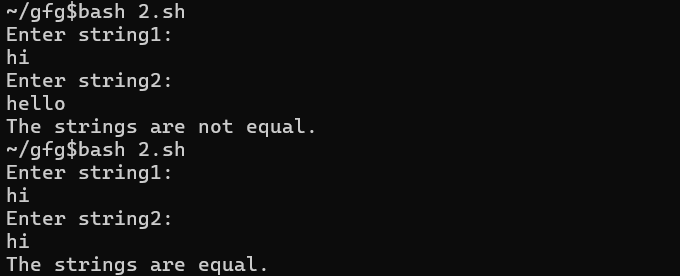
4. STRING1=STRING2: Tests if two strings are equal
This example checks if two user-provided strings are identical
echo "Enter string1:" read string1 echo "Enter string2:" read string2 if [ "$string1" = "$string2" ] then echo "The strings are equal." else echo "The strings are not equal." fi
5. NUM1 -eq NUM2: Tests if two numbers are equal or not
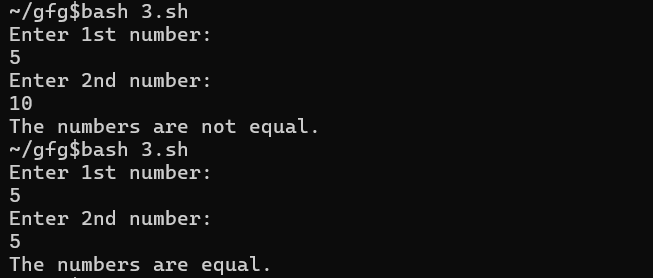
This example checks if two user-provided numbers are equal.
echo "Enter 1st number:" read num1 echo "Enter 2nd number:" read num2 if [ "$num1" -eq "$num2" ] then echo "The numbers are equal." else echo "The numbers are not equal." fi
6. NUM1 -gt NUM2: Tests if the first number greater than second
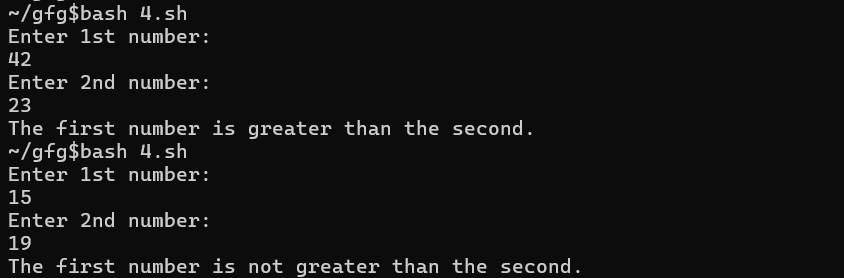
This example compares two user-provided numbers.
echo "Enter 1st number:" read num1 echo "Enter 2nd number:" read num2 if [ "$num1" -gt "$num2" ] then echo "The first number is greater than the second." else echo "The first number is not greater than the second." fi
**Example:

**Common if Command Option
**1. help if:
It displays help information.
help if

Conclusion
The **if command is one of the most commonly used and versatile tools in Linux shell scripting. It allows you to control the flow of your scripts based on conditional testing. By combining **if, **elif, and **else blocks, you can create powerful scripts that handle multiple scenarios based on file existence, string comparison, numerical comparison, and more.