Linux sftp command with Example (original) (raw)
Last Updated : 21 Oct, 2024
In this article, we are going discuss about sftp. It is a protocol for securely transferring files from a remote server to a local machine. before SFTP, FTP was used to transfer files but it was unsecured. An attacker can read the communication between a remote server and a local machine.
What is SFTP?
SFTP stands for Secure File Transfer Protocol. It is a secure and efficient method for transferring files in the Linux environment. It is a command-line tool used in mostly Linux, UNIX-based operating systems. It is an extension of SSH(Secure Shell) and encrypts the command and data during transmission.
Advantages of SFTP
- SFTP ensures that it encrypts the data and commands.
- SFTP checks the data integrity, and whether any data is tampered with or lost during transmission.
- SFTP checks the user authentication with a valid username and password.
- SFTP supports most of the operating systems, which makes them portable to use.
- SFTP is user-friendly, it is easy to use either in command line or graphical mode.
- SFTP allows their command for scripting and automation.
- SFTP allows multiple users to access and transfer the file securely.
The syntax for `SFTP` command in Linux
sftp username@ip_address/hostname
Here,
**sftp: It is a utility used for connecting ftp servers securely.
**username: Mention the username for connecting to ftp server.
**ip_address/hostname: Mention the IP address of the remote server or machine name.
Options available for SFTP
| Option | Description |
|---|---|
| -b batchfile | Gives the name of a batch file that contains SFTP commands. |
| -B buffer_size | Determines the size of the file transmission buffer. |
| -P port | Specifies the remote host's port to use for the connection. |
| -v | For verbose mode, it generate the detailed report |
| -h | It displays the helps information for particular command |
| pwd | Prints the current working directory |
| cd directory_name | Change the directory |
| get remote_file [local_path] | It is used to download the file from remote server |
| put local_file [remote_path] | It is used to upload the file in remote server |
| rm filename | It removes a file from the distant server |
| mkdir directory_name | It create a directory in remote server |
| rmdir directory_name | It remove the directory from remote server |
| chmod permisssions filename | It sets the permissions on files and directories |
Examples of SFTP
**For connecting to remote server, we need to provide the username and ip address
**username: testuser1
**ip address: 192.168.28.232
-(1).png)
To view the current working directory in remote server
pwd

Create a directory in remote server
mkdir directory1

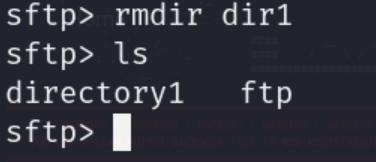
Remove the directory from remote server
rmdir dir1
To download the file from remote server to local machine
get geek.txt /home/kali
.png)
To delete/remove the file from remote server
rm ftp/test/demo.txt

To upload the file from local machine to remote server
put /home/kali/abc.txt /home/testuser1/ftp
.png)
Specify the buffer size that uses sftp when transferring the files
sftp -B 4096 testuser1@192.168.29.232
.png)
Table of Differences between FTP vs SFTP
| Basic | File Transfer Protocol(FTP) | Secure File Transfer Protocol(SFTP) |
|---|---|---|
| Security | No encryption is applied during transmission. | Proper encryption is applied during transmission. |
| Port | Uses two port 20 & 21 for data transmission | Uses single port 22 for data transmission |
| Encryption | No built-in encryption | SSH implies for data encryption. |
| Authentication | It uses username and password in a plain text for authentication. | It uses various authentication method like SSH key. |
| Integrity checks | It doesn't check if any data is tampered or lost | It checks the data if any data is tampered or lost. |
| Supported Platforms | It supports many operating system like Linux, UNIX or Windows. | It supports only Linux and UNIX operating system. |
| Firewall Friendly | It requires additional ports to be allowed in firewall rules. | It requires only single port to be allowed in firewall rules. |
| Popular Clients | FileZilla, WinSCP | OpenSSH, PuTTY |
Conclusion
In a conclusion, SFTP command is a faster and secure tool for transferring the files between server and client. It also provides the security which helps in preventing the cyber attacks. As we have already discuss about sftp features and its usability.