Systemd and its Components in Linux (original) (raw)
Last Updated : 11 May, 2026
Systemd is a system and service manager for modern Linux operating systems. It initializes the system, manages services, and controls system resources during startup and runtime. Systemd replaces the traditional SysV init system and runs as the first process with Process ID (PID) 1.
- Initialize the system during boot
- Manage and control system services
- Replace the traditional SysV init system
- Improve boot speed and performance
- Provide centralized system management tools
Managing Services with systemd
Systemd provides a unified framework to manage services, system resources, and configurations efficiently. Services are organized into units, and systemctl is the main utility to control them.
Primary Utilities:
- **systemctl: Controls services and units (start, stop, enable, disable, status). Central for service management.
- **journalctl: Accesses system logs maintained by systemd. Supports filtering by service, time, or priority.
- **hostnamectl: Configures system hostname dynamically.
- **localectl: Sets system locale and keyboard layout.
- **timedatectl: Manages system time, date, and timezone settings.
- **systemd-cgls: Displays the hierarchy of cgroups for running processes.
- **systemadm: Provides a graphical or simplified interface to manage services using systemctl commands.
Service Management Commands:
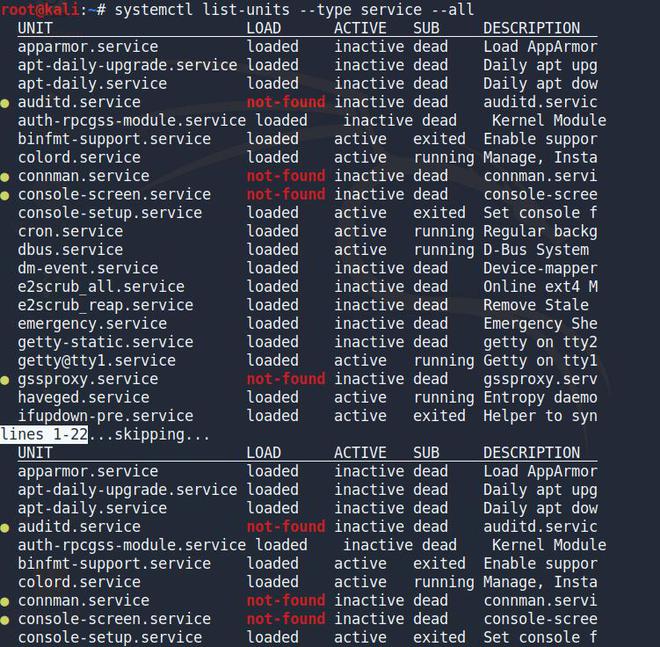
**1. List all services (active and inactive):
Displays all services, including their current state, description, and whether they are loaded.
**Command:
systemctl list-units --type service --all
**2. Start a service:
Launches the service immediately but does not enable it on boot.
**Command:
systemctl start [service-name]

**3. Stop a service:
Stops the service immediately.
**Command:
systemctl stop [service-name]

**4. Restart a service:
Stops and starts the service in one step. Useful after configuration changes.
**Command:
systemctl restart [service-name]

- **Service status codes: 0 indicates running, 1 indicates inactive.
System Power Management Commands:
systemd also provides commands for managing system power operations.
**Halt the system:
systemctl halt
**Power off the system:
systemctl poweroff
**Reboot the system:
systemctl reboot
**Note:
- Combining systemctl with journalctl -u [service-name] allows troubleshooting without leaving the terminal.
- systemd-cgls is useful for monitoring resources used by services and processes.