locate command in Linux with Examples (original) (raw)
Last Updated : 3 Nov, 2025
The locate command in Linux is a fast and efficient tool used to find files by their name. Unlike the find command, it searches through a pre-built database of file paths instead of scanning the entire filesystem, making searches much quicker.
- Used to search and locate files or directories by name.
- Works faster than the find command because it uses a pre-indexed database.
- The database is updated using the updatedb command.
- Newly created files do not appear until the database is refresh
Example 1: Search a File with Specific Name Using locate Command
locate sample.txt
It will search for sample.txt in a particular directory.

**Syntax of `locate` command
locate [OPTION]... PATTERN...
**Exit Status: This command will exit with status 0 if any specified match is found. If no match is found or a fatal error is encountered, then it will exit with status 1.
Options in locate Command
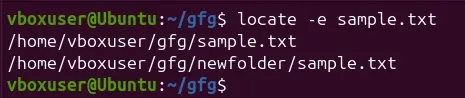
1. Print Only Existing Files
Shows only the files that currently exist on the system.
locate -e sample.txt
2. Follow Symbolic Links
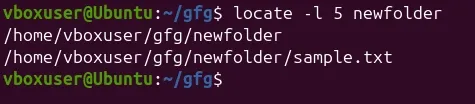
Includes files that are symbolic links (default behavior).
locate -l 5 newfolder
3. Display The Number of Matching Entries Using locate Command
locate -c [.txt]*
It will count files ending with _.txt.

4. Ignore Case Sensitive Locate Outputs Using locate Command
This command is configured to process queries in a case sensitive manner. It means SAMPLE.TXT will show a different result than _sample.txt.
$ locate -i SAMPLE.txt

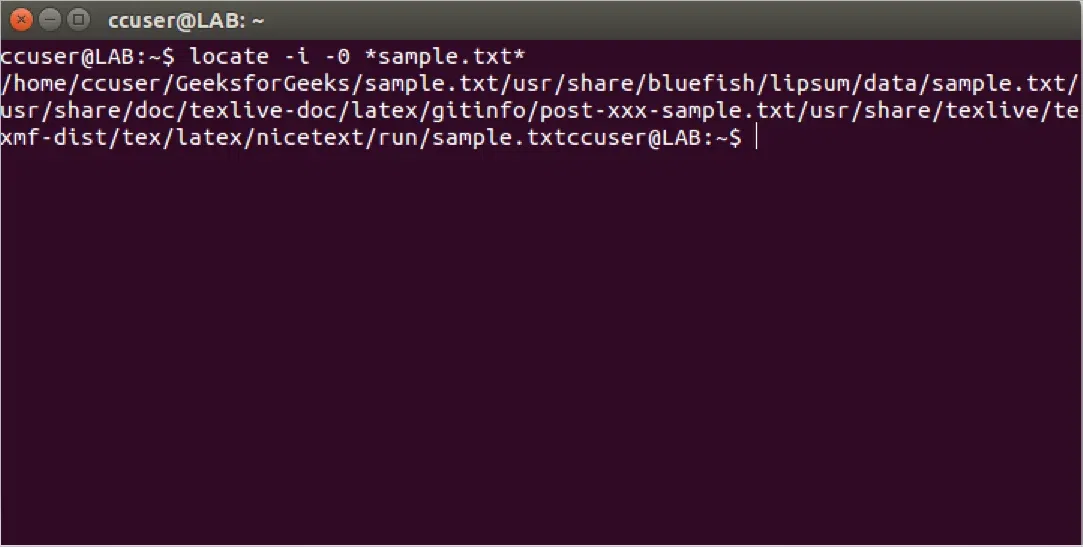
5. Separate Output Entries Without New Line Using locate Command
locate -i -0 sample.txt
Default separator for locate command is the newline (\\n) character. But if someone wants to use a different separator like the ASCII NULL, then he/she can do so using the _-0 command line option.
6. Limit the Number of Results
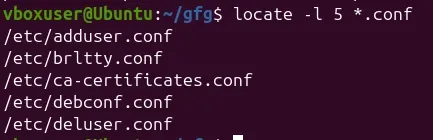
Displays only the first five matching .conf files.
locate -l 5 *.conf
7. Show Database Statistics
Displays information about the locate database, such as file count and storage size.
locate -S
**Output:
Database /var/lib/mlocate/mlocate.db:
12345 directories
67890 files
2,345,678 bytes in file names
8. Limit Search Queries to a Specific Number Using locate Command
locate "*.html" -n 20
It will show 20 results for the searching of file ending with _.html.
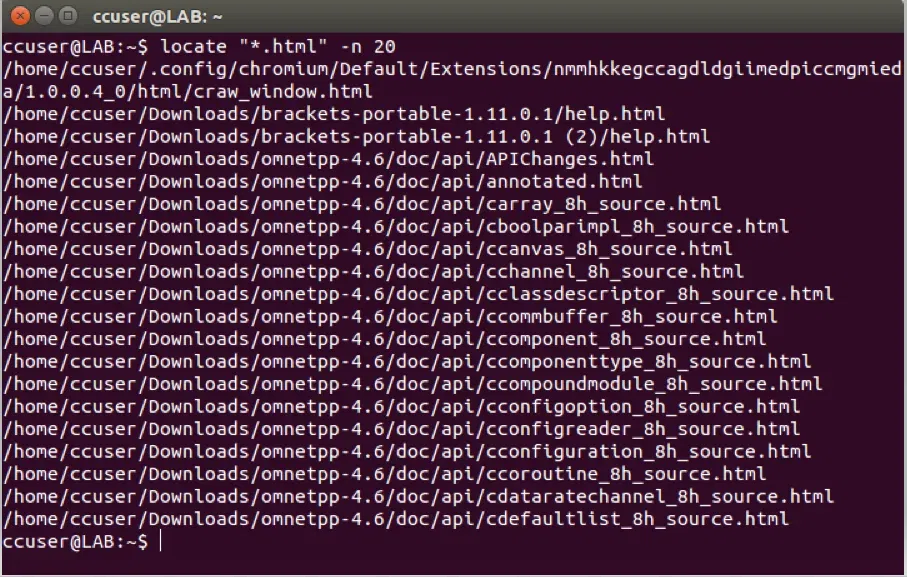
**Options Available in 'locate' command in Linux
| OPTIONS | DESCRIPTION |
|---|---|
| -b, --basename | Match only the base name against the specified patterns, which is the opposite of --wholename. |
| -c, --count | Instead of writing file names on standard output, write the number of matching entries only. |
| -d, --database DBPAT | Replace the default database with DBPATH. DBPATH is a : (colon) separated list of database file names. If more than one _--database option is specified, the resulting path is a concatenation of the separate paths. An empty database file name is replaced by the default database. A database file name - refers to the standard input. Note that a database can be read from the standard input only once. |
| -e, --existing | Print only entries that refer to files existing at the time locate is run. |
| -L, --follow | When checking whether files exist (if the --existing option is specified), follow trailing symbolic links. This causes bro ken symbolic links to be omitted from the output. This option is the default behavior. The opposite can be specified using --nofollow. |
| -h, --help | Write a summary of the available options to standard output and exit successfully. |
| -i, --ignore-case | Ignore case distinctions when matching patterns. |
| -l, --limit, -n LIMIT | Exit successfully after finding LIMIT entries. If the _--count option is specified, the resulting count is also limited to LIMIT. |
| -m, --mmap | Ignored, but included for compatibility with BSD and GNU locate. |
| -P, --nofollow, -H | When checking whether files exist (if the **--existing option is specified), do not follow trailing symbolic links. This causes broken symbolic links to be reported like other files. This option is the opposite of **--follow. |
| -0, --null | Separate the entries on output using the ASCII NULL character instead of writing each entry on a separate line. This option is designed for interoperability with the **--null option of GNU xargs. |
| -S, --statistics | Write statistics about each read database to standard output instead of searching for files and exit successfully. |
| q, --quiet | Write no messages about errors encountered while reading and processing databases. |
| -r, --regexp REGEXP | Search for a basic regexp REGEXP. No PATTERNs are allowed if this option is used, but this option can be specified multiple times. |
| --regex | Interpret all PATTERNs as extended regexps. |
| -s, --stdio | Ignored, for compatibility with BSD and GNU locate. |
| -V, --version | Write information about the version and license of locate on standard output and exit successfully. |
| -w, --wholename | Match only the whole path name against the specified patterns. This option is the default behavior. The opposite can be specified using _--basename. |