Looping Statements | Shell Script (original) (raw)
Last Updated : 28 Apr, 2026
Loops are a fundamental part of programming, and shell scripting is no exception. They allow you to automate repetitive tasks by running a block of code multiple times.
- **for loop: Iterating over a list of items (e.g., files, servers, usernames).
- **while loop: Running code as long as a condition is true (e.g., reading a file line by line).
- **until loop: Running code until a condition becomes true (e.g., waiting for a file to appear).
while statement in Shell Script in Linux
The while loop is used when you don't know how many times to loop, but you know the condition to stay in the loop.
**How it works:
It checks the condition. If it's TRUE, it runs the code, then checks again. It repeats until the condition is FALSE.
#/bin/bash
while
do
<command 1>
<command 2>
done
Statement: Implementation of While Loop in Shell Script.
First, we create a file using a text editor in Linux. In this case, we are using `vim`editor.
vim looping.sh
- You can replace "looping.sh" with the desired name.
- Then we make our script executable using the `chmod` command in Linux.
chmod +x looping.sh
#/bin/bash
a=0
lt is less than operator
#Iterate the loop until a less than 10
while [ $a -lt 10 ]
do
# Print the values
echo $a
# increment the value
a=expr $a + 1
done
**Output:

While Loop in Linux
for statement in Shell Script in Linux
The for loop operates on lists of items. It repeats a set of commands for every item in a list.
**Syntax:
#/bin/bash
for in <value1 value2 ... valuen>
do
<command 1>
<command 2>
done
- Here var is the name of a variable and word1 to wordN are sequences of characters separated by spaces (words). Each time the for loop executes, the value of the variable var is set to the next word in the list of words, word1 to wordN.
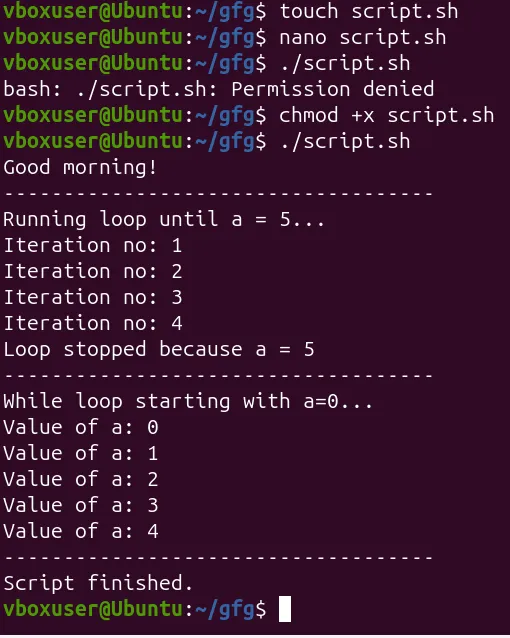
Statement 1: Implementation of `for` Loop with `break` statement in Shell Script.
First, we create a file using a text editor in Linux. In this case, we are using `vim`editor.
vim for.sh
- You can replace "for.sh" with the desired name.
- Then we make our script executable using the `chmod` command in Linux.
chmod +x for.sh
#/bin/bash
#Start of for loop
for a in 1 2 3 4 5 6 7 8 9 10
do
# if a is equal to 5 break the loop
if [ $a == 5 ]
then
break
fi
# Print the value
echo "Iteration no $a"
done
**Output:
Statement 2: Implementation of `for` Loop with `continue` statement in Shell Script.
First, we create a file using a text editor in Linux. In this case, we are using `vim`editor.
vim for_continue.sh
- You can replace "for_continue.sh" with the desired name.
- Then we make our script executable using the `chmod` command in Linux.
chmod +x for_continue.sh
#/bin/bash
for a in 1 2 3 4 5 6 7 8 9 10
do
# if a = 5 then continue the loop and
# don't move to line 8
if [ $a == 5 ]
then
continue
fi
echo "Iteration no $a"
done
**Output:

continue statement in for loop in Linux
until statement in Shell Script in Linux
The until loop is executed as many times as the condition/command evaluates to false. The loop terminates when the condition/command becomes true.
**Syntax:
#/bin/bash
until
do
<command 1>
<command 2>
done
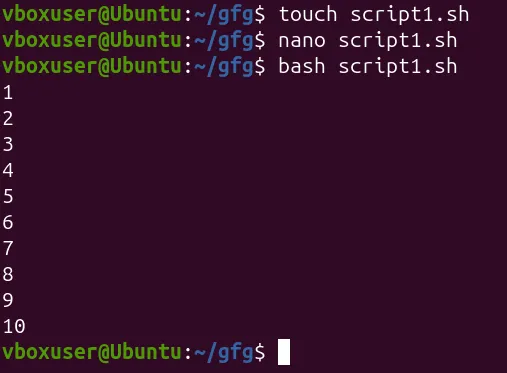
Statement: Implementing until Loop in Shell Script
First, we create a file using a text editor in Linux. In this case, we are using `vim`editor.
vim until.sh
- You can replace "until. sh" with the desired name.
- Then we make our script executable using the `chmod` command in Linux.
chmod +x until.sh
#/bin/bash
a=0
-gt is greater than operator
#Iterate the loop until a is greater than 10
until [ $a -gt 10 ]
do
# Print the values
echo $a
# increment the value
a=expr $a + 1
done
**Output:
**Note: Shell scripting is a case-sensitive language, which means proper syntax has to be followed while writing the scripts.
Examples of Looping Statements
Below are some commonly used looping statements along with their basic structure and examples.
1. Iterating Over Colors Using a For Loop
First, we create a file using a text editor in Linux. In this case, we are using `vim`editor.
vim color.sh
- You can replace "color.sh" with the desired name.
- Then we make our script executable using `chmod` command in Linux.
chmod +x color.sh
#/bin/bash
COLORS="red green blue"
the for loop continues until it reads all the values from the COLORS
for COLOR in $COLORS
do
echo "COLOR: $COLOR"
done
**Output:

For until in Linux
**Explanation:
**1. Initialization of Colors:
- COLORS="red green blue": Initializes a variable named COLORS with a space-separated list of color values ("red", "green", and "blue").
**2. For Loop Iteration:
- for COLOR in $COLORS: Initiates a for loop that iterates over each value in the COLORS variable.
**3. Loop Body:
- echo "COLOR: $COLOR": Prints a message for each color, displaying the current color value.
- The loop continues until it processes all the values present in the COLORS variable.
3. Interactive Name Confirmation Loop
First we create a file using a text editor in Linux. In this case we are using `vim`editor.
vim name.sh
- You can replace "name.sh" with desired name.
- Then we make our script executable using `chmod` command in Linux.
chmod +x name.sh
#/bin/bash
CORRECT=n
while [ "$CORRECT" == "n" ]
do
loop discontinues when you enter y i.e., when your name is correct
-p stands for prompt asking for the input
read -p "Enter your name:" NAME
read -p "Is ${NAME} correct? " CORRECT
done
**Output:

Interactive script in Linux
Explanation:
**1. Initialization:
- CORRECT=n: Initializes a variable named CORRECT with the value "n". This variable is used to control the loop.
**2. Interactive Loop:
- while [ "$CORRECT" == "n" ]: Initiates a while loop that continues as long as the value of CORRECT is equal to "n".
**3. Loop Body:
- read -p "Enter your name:" NAME: Prompts the user to enter their name and stores the input in the NAME variable.
- read -p "Is ${NAME} correct? " CORRECT: Asks the user to confirm if the entered name is correct and updates the CORRECT variable accordingly.
- The loop continues until the user enters "y" (indicating the correct name).