lsmod command in Linux with Examples (original) (raw)
Last Updated : 23 May, 2019
lsmod command is used to display the status of modules in the Linux kernel. It results in a list of loaded modules. lsmod is a trivial program which nicely formats the contents of the /proc/modules, showing what kernel modules are currently loaded.Syntax:
lsmod
Example: Run lsmod at the command line to list all active kernel modules.
lsmod
Output: 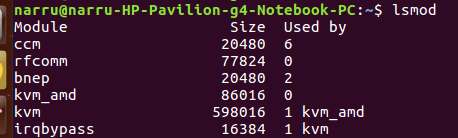 Output Format: There are three columns in output.
- First, column is used for 'Name' of the module file. Or you can say
Name = Module file name - Module file extension(eg .o or .ko) - Second, column is used for 'size' of the module in Bytes.
- The third column in output is for 'used by'. It is basically used to display the number of instances of the module which are used.